
Table of contents
HIPAA Compliance Software Development Checklist | 2026

Written by
Blaze Team

Reviewed by
Bruno Denuit
Expert Verified
Some teams don't find out their software has a HIPAA problem until it's already built, and then the unthinkable happens: An unauthorized user views sensitive information or nefarious actors hack into your system.
To help you with HIPAA compliance software development, I created a checklist that helps you safeguard your app, software, or integrations with HIPAA-enabling features like BAAs (Business Associate Agreements) and access controls.
By the end, you'll know how to protect sensitive patient data, which safeguards to build in before development starts, and when you need to enter into BAAs with vendors.
HIPAA Compliance Software Development Checklist
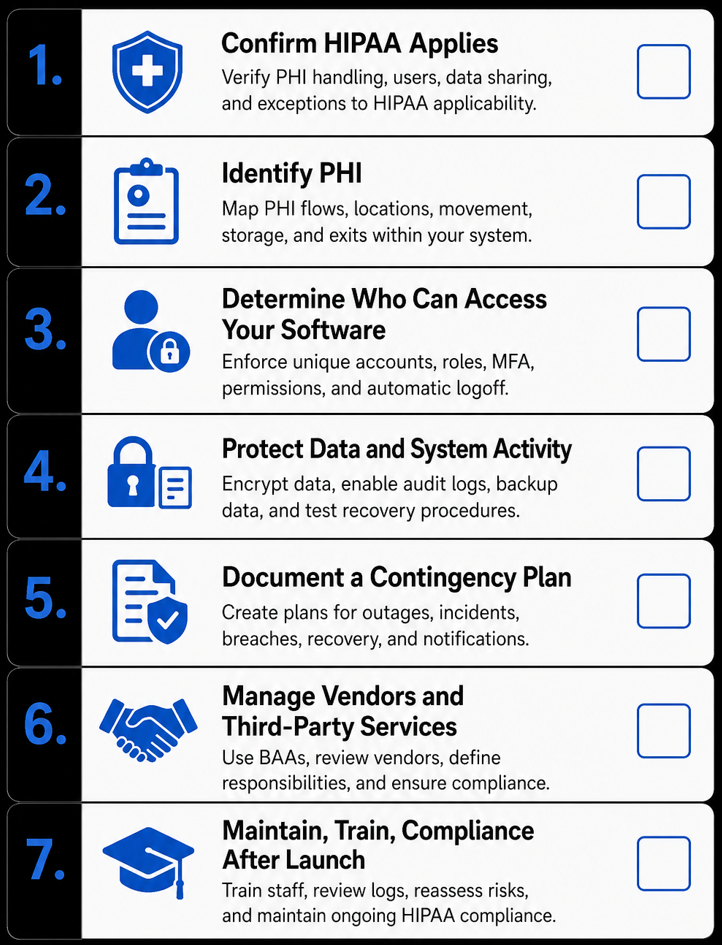
My checklist covers the technical and operational steps required for HIPAA-compliant software development. If you follow each item, you can reduce compliance mistakes and expensive rework later during deployment.
1. Confirm HIPAA Applies
This decision framework helps you identify whether you need to build HIPAA-enabling features into your software and take the steps to make your organization meet HIPAA Rules.
Does your software handle PHI?
PHI (Protected Health Information) is individually identifiable health information related to a person’s health, healthcare, or payment for healthcare. Software that creates, receives, stores, or transmits PHI for a covered entity or business associate must support applicable HIPAA requirements.
Who will use the software?
HIPAA Rules generally apply to patient engagement tools operated by or on behalf of covered healthcare providers when those tools create, receive, store, or transmit PHI.
For example, software that lets patients access medical records, complete intake forms, or join telehealth visits typically falls under HIPAA.
Does the software share patient data with vendors?
Third-party data sharing happens when your software sends patient data to cloud hosting providers, APIs, analytics tools, or any company that handles PHI.
If you built or purchased your healthcare software from a vendor, the vendor must enter into a Business Associate Agreement (BAA) on behalf of a covered entity or business associate before processing, storing, or transmitting PHI.
When HIPAA usually doesn't apply
HIPAA usually doesn't apply when software never creates, receives, stores, or transmits PHI for a covered entity or business associate. After confirming your app doesn’t touch PHI, your team can focus on standard data protection instead of HIPAA requirements.
For instance, a provider’s public website may fall outside HIPAA when it doesn’t collect, receive, or disclose PHI through forms, tracking technologies, patient portals, or other tools.
2. Identify PHI
Your team must identify which data qualifies as PHI and map where it enters your system, where it is stored, how it moves through your system, and when it leaves. Without a data map, it's difficult to protect patient information and control who accesses your software.
Identify PHI by mapping sample data instead of real patient information. For instance, work from generated names and fake birthdates, never a production export pulled straight from your clinic's database.
3. Determine Who Can Access Your Software
Access control comes after you’ve determined how your PHI flows through your software. You set rules that determine which users, based on their roles, can view or edit specific patient data.
Here’s how to apply secure access:
- Give every user a unique account: Every person should have their own login so you can trace activity to a specific user. A nurse's updates appear in their own account instead of a shared clinic login.
- Apply role-based permissions: Limit each user to the patient data and features they need for their job. Admin staff can schedule appointments, but only doctors can view clinical notes.
- Use strong authentication and multi-factor authentication (MFA): Require secure logins and an additional verification step before users access PHI. All users need to enter a password and approve a sign-in using an authentication app.
- Configure automatic logoff and emergency access: Sign users out after inactivity while allowing authorized emergency access when necessary. Make sure your workstations automatically lock, but providers can still get emergency access even during a system shutdown.
4. Protect Data and System Activity
Protect data and system activity by securing patient information and tracking how your system is used. Here’s how to do it:
- Encrypt data in transit and at rest: Encryption protects patient information while it moves between systems and while it is stored. Only authorized users and systems can read the data after it is decrypted.
- Enable audit logs: Audit logs record who accessed patient information, what they viewed or changed, and when it happened. These records show which clinician updated a patient's medication and the exact time of the change.
- Back up data and test recovery procedures: Keep recoverable copies of critical data and test that they can be restored. For instance, your team can restore a recent backup after ransomware disrupts the production database.
5. Document a Contingency Plan
When you document a contingency plan, you create an official guide that outlines how your organization will respond to outages or security incidents. The plan should include backup and recovery procedures. It also needs to have related incident response and breach notification procedures documented as part of your organization's broader security program.
For instance, if you fall victim to a ransomware attack that locks patient records, your system should trigger recovery using a tested backup according to the organization's contingency plan.
Designated personnel must determine whether a reportable breach occurred. If notification is required, affected individuals must be notified without unreasonable delay and no later than 60 days after the breach is discovered.
6. Manage Vendors and Third-Party Services
Every vendor that creates, receives, maintains, or transmits PHI on your behalf becomes part of your compliance program. Whether you buy software, hire a healthcare app developer, or connect a third-party service, each vendor that handles PHI on your behalf should sign a BAA before patient data is shared.
Most organizations maintain multiple BAAs with different vendors. These may include cloud providers, APIs, analytics platforms, AI services, and other business associates. Review each vendor's security and compliance practices before connecting it to your application.
Define which security and compliance responsibilities belong to each vendor. These responsibilities may include protecting PHI, managing backups, responding to security incidents, and controlling user access.
7. Maintain Compliance After Launch
HIPAA compliance is an ongoing responsibility. Once your system is in place, HIPAA requires that you train your employees periodically so they use your system safely. Designate responsible individuals to oversee privacy and security activities and regularly review access logs. Reassess risks whenever you update your systems or integrations.
Ultimately, your organization's BAAs, system configuration, and documented processes are what determine HIPAA compliance, not your software on its own.
Why Some Software Fails HIPAA Compliance Reviews
Some organizations fail HIPAA compliance reviews if they don’t have BAAs or their software is missing security controls. Let’s look at why some organizations fail:
- Lack of BAAs: Using vendors that handle PHI without signed BAAs is a major compliance violation. Organizations often need more than one BAA, as any app or software that handles PHI must maintain a BAA with each vendor.
- Weak access controls: Some systems give staff broader access than their roles require, such as a front-desk team member being able to access patient disease history. Periodically review which team members can access PHI.
- Missing audit logs: The software can't reliably record who accessed, changed, or viewed patient information during an audit or investigation. Always keep your audit logging enabled, and confirm that it’s working with periodic reviews.
- Using real PHI during development: Don’t make live patient data available when building new features. Use test data instead, and only plug in PHI when the system is ready to ship.
- Treating compliance as a one-time project: Compliance is an ongoing process that involves security updates, risk assessments, workforce training, and vendor reviews. Keep a schedule and always set deadlines for reviews and training.
Develop HIPAA-Compliant Software With Blaze.tech
Once you’ve determined how your organization will approach HIPAA compliance software development, you’ll need to choose a way to create your software. Blaze.tech provides an option with HIPAA-enabling infrastructure already in place, so your team can focus more on optimizing your software.
Here’s why hundreds of healthcare organizations choose Blaze:
- Healthcare software built for you: Get production-ready applications like custom patient portals and clinical databases built by an expert-led 3-person team, delivered to your exact specifications.
- Build without code: Prefer to build internally? Use Blaze's no-code app builder to create and modify clinical workflows without technical expertise.
- Replace repetitive administrative work: Automate patient intake, document routing, approvals, reminders, and other manual tasks, all without ripping out your existing EHR.
- Faster implementation than traditional builds: Go live in weeks, not the months a custom build usually demands.
- AI integrations built for real clinical workflows: Supports use cases like automated intake, document extraction, and OpenAI integration, alongside secure EHR and EMR connections built around how your team actually operates.
- Built on compliance-ready infrastructure: Blaze is a HIPAA-enabling, HITRUST e1-certified, SOC 2 Type II healthcare app development platform.
Schedule a free build consultation call today and stop losing months to compliance rework. Blaze builds those safeguards in before development starts, not after an audit fails.
Frequently Asked Questions
1. What Should a HIPAA Compliance Software Development Checklist Include?
You should include PHI identification, access controls, encryption, audit logs, contingency planning, and vendor BAAs on a HIPAA compliance software development checklist. These items help reduce compliance mistakes and avoid costly rework after deployment.
2. How Do You Prepare for a HIPAA Compliance Review?
To prepare for a HIPAA compliance review, confirm signed BAAs with vendors, verify access controls match roles, and test audit logs. Addressing these areas before the review reduces the risk of compliance findings and unexpected remediation costs.
3. Does HIPAA Require a Business Associate Agreement (BAA)?
Yes, HIPAA requires a signed BAA with any vendor that creates, receives, maintains, or transmits PHI on your behalf. A signed BAA helps define each party's responsibilities for protecting PHI and supports compliance with HIPAA requirements.
Sources
1. U.S. Department of Health & Human Services. “Summary of the HIPAA Security Rule.” HHS.gov. https://www.hhs.gov/hipaa/for-professionals/security/laws-regulations/index.html
2. U.S. Department of Health & Human Services. “Security Rule Guidance Material.” HHS.gov. https://www.hhs.gov/hipaa/for-professionals/security/guidance/index.html
3. National Institutes of Health: StatPearls. “Health Insurance Portability and Accountability Act (HIPAA) Compliance.” NCBI. https://www.ncbi.nlm.nih.gov/books/NBK500019/
The Secure No-Code & AI Platform
Supercharge your team's operations and performance with better apps and tools.
Create custom apps fast
Secure & HIPAA compliant
Streamline complex workflows

The Secure No-Code Platform
Build apps with best-in-class security.
Related Articles
Discover related guides on healthcare no-code development, HIPAA compliance, security, integrations, and launching apps faster.
10 Best HIPAA-Compliant Telehealth Platforms and Features | 2026
HIPAA-compliant telehealth platforms provide secure medical visits. Top platforms are Doxy.me and Zoom for Healthcare. Compare tools and learn your best fit.
.png)
10 Best Replit Alternatives: Tested for Developer Tasks (2026)
After comparing 10 Replit alternatives, I found differences in compliance features and needed coding skills. Discover platforms and prices to find the best fit.
%20(1).png)
Healthcare Claims Automation: How It Works (2026)
Healthcare claims automation connects systems to reduce repetitive work. Explore the 9 workflow stages that show how eligibility, validation, and payments move.