
Table of contents
Is Zapier HIPAA-Compliant in 2026? (No, Learn Why)

Written by
Blaze Team

Reviewed by
Bruno Denuit
Expert Verified
No, Zapier isn’t HIPAA-compliant, so you can’t use it to handle protected health information (PHI). HIPAA is the US data privacy law that protects patients’ medical information.
Over the years, I’ve helped many providers determine if they need a HIPAA-compliant platform. I’ll explain why Zapier isn’t HIPAA compliant, what the HIPAA rules require, and the security safeguards involved.
Why Zapier Isn’t HIPAA Compliant
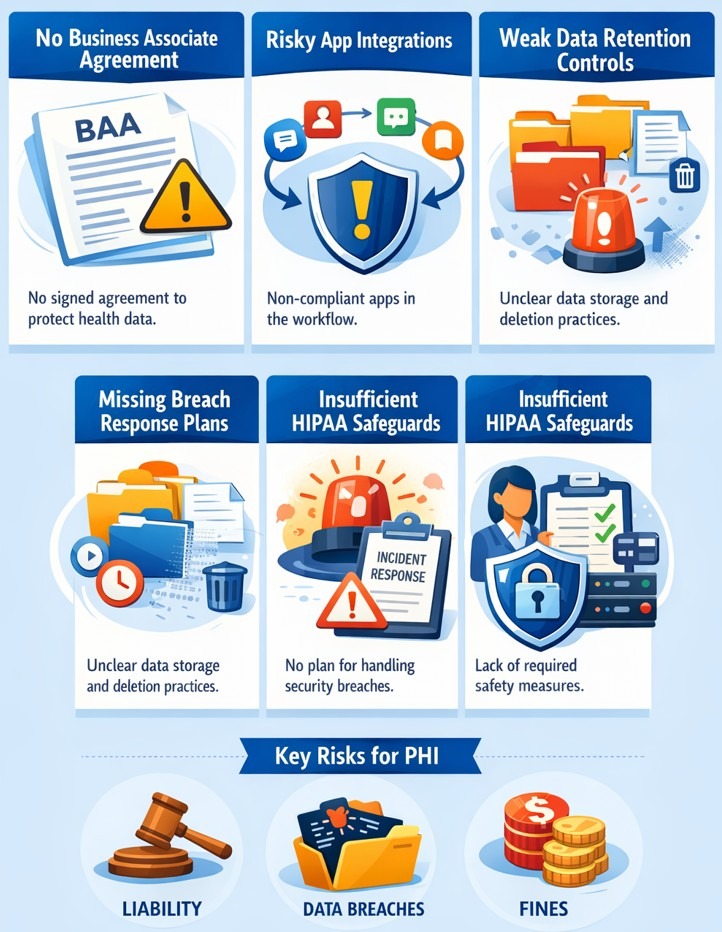
Zapier isn’t HIPAA compliant because it doesn’t provide features that support HIPAA standards. For example, the company also doesn’t sign a Business Associate Agreement (BAA) or provide healthcare data breach response procedures.
The platform offers security features like two-factor authentication, encryption, and audit logs. But, Zapier even explicitly states that it’s not HIPAA-compliant.
Where Zapier Falls Short
Zapier falls short because it doesn’t meet the core HIPAA standards. Don’t use Zapier for healthcare workflows that store, send, or handle PHI. Here are the main areas that keep Zapier non-compliant:
Connects with non-HIPAA-Compliant Apps
Many Zapier‑connected apps, like Calendly and Wave, don’t support PHI. Since Zapier works by automating tasks between different apps, these limitations create a big problem for handling PHI.
Missing BAAs
When automation involves PHI, Zapier would need a BAA with you and any PHI‑handling subcontractors. BAAs define the responsibilities that both the vendor and the software user must follow.
Uncertain Data Retention and Disposal
HIPAA also requires organizations to keep certain HIPAA records for six years. Federal and state laws may also require keeping PHI for specific periods. When organizations no longer need the data, they must delete it in a way that makes it unreadable and impossible to recover.
Zapier isn’t built for sending, receiving, or holding PHI. The platform doesn’t sign a Business Associate Agreement (BAA). It also keeps automation history for a limited time, usually around 29 to 69 days, depending on your plan.
Reduced Functionality for HIPAA Compliance
If Zapier tried to become HIPAA compliant, it would likely lose some of its flexibility. The platform would need to remove apps that do not meet HIPAA rules and sign BAAs with vendors that handle PHI.
This would reduce the number of apps users could connect to through Zapier. The platform would also need stricter data controls and more internal oversight, which could slow down new features and updates.
HIPAA Compliance Requirements: At a Glance
| Requirement | Description |
|---|---|
| PHI handling | Protect identifiable health, care, payment information |
| BAA requirements | Signed vendor contract required before handling PHI |
| Administrative safeguards | Define PHI access, staff training, procedures |
| Technical safeguards | Encryption, role-based access, activity audit logs |
| System breach procedures | Notify patients, regulators within sixty days |
| Physical safeguards | Control facility entry, device access verification |
| Data backup and disaster recovery | Maintain backups, recovery plans, regular restoration testing |
For a software platform to be HIPAA compliant, it must be able to safely handle PHI and provide a signed Business Associate Agreement (BAA). Here’s an in-depth look at what software platforms must have to meet HIPAA requirements:
- PHI handling: Includes any health information about a specific person, their care, or payments. A platform must clearly explain how it protects PHI before you even create or store one record.
- BAA requirements: This is a contract between the provider who uses the software (you) and the vendor who sells you the software. Without a signed BAA, the vendor relationship violates HIPAA regardless of security measures.
- Administrative safeguards: These internal policies explain who decides PHI access, how staff receive training, and what steps teams follow if procedures fail.
- Technical safeguards: Technical safeguards are tools and settings that help protect electronic health information (ePHI). These include encryption that protects data when it is stored or sent, role-based user access controls, and logs that track who views or changes the data.
- System breach procedures: You need a plan that explains how your team will respond to and contain a system hack or data breach. HIPAA requires organizations to notify patients and government regulators within 60 days after discovering a breach of unsecured PHI.
- Physical safeguards: Physical safeguards require controlling who can enter areas and use devices that handle PHI. Examples include locks, keycards, passwords, or biometrics to restrict and verify access. If you use a HIPAA-compliant cloud platform, your infrastructure provider must document these physical safeguards on your behalf.
- Data backup and disaster recovery: Your system must allow you to access PHI even after failures, cyberattacks, or data loss. HIPAA expects reliable backups, disaster recovery plans, and regular testing so organizations can restore necessary information.
Even if your organization misses just one of these requirements, you're in violation of HIPAA. This violation puts you at legal risk. Staying HIPAA-compliant means auditing every platform in your stack against these requirements. HIPAA-compliance is actively meeting these standards. It’s not checking off a long list of boxes.
Can You Still Use Zapier in Healthcare Apps Without PHI?
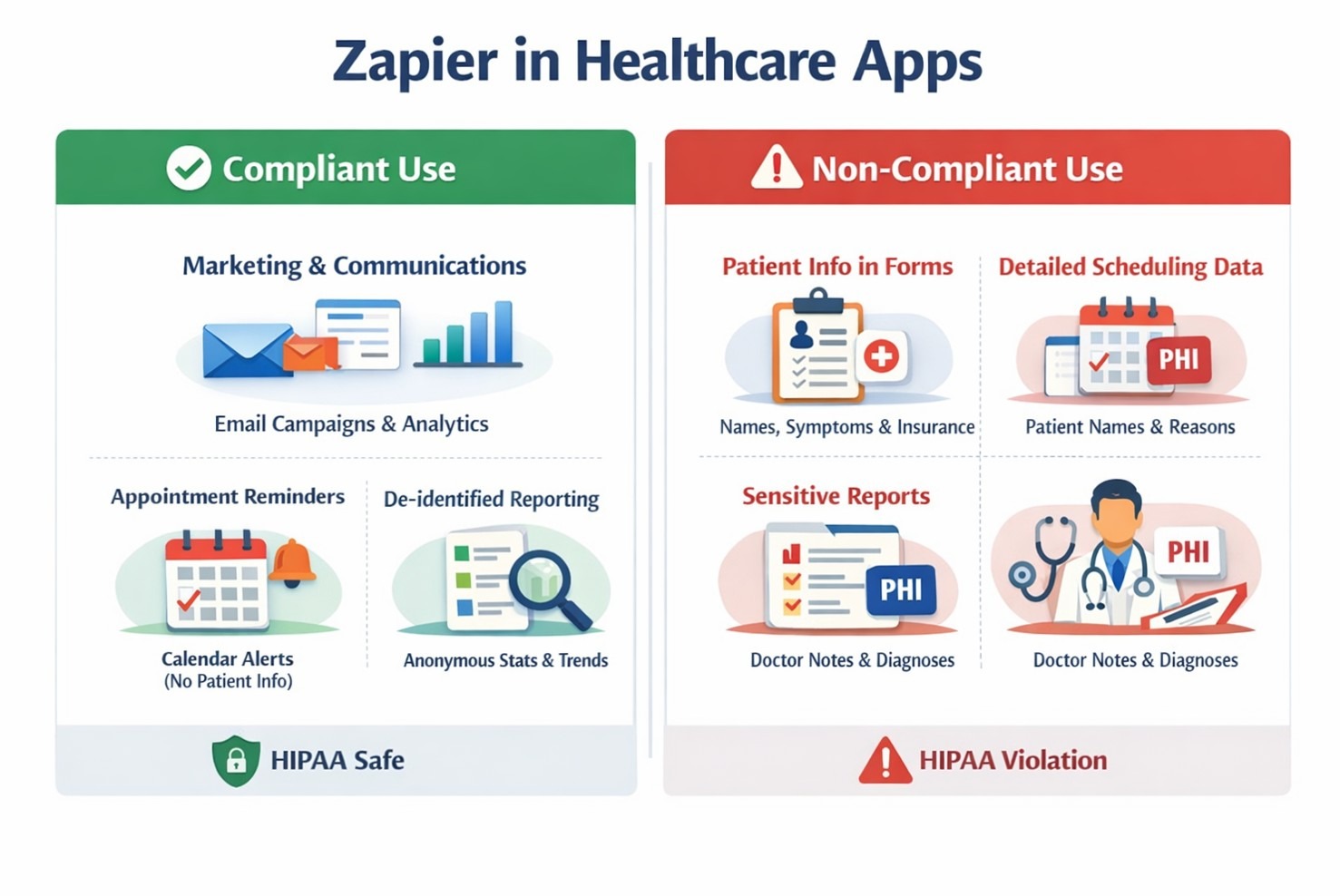
Yes, you can still use Zapier for internal business automation as long as the workflow doesn’t process PHI. Here’s a breakdown of some healthcare workflows that can use Zapier, and when risks start appearing:
Marketing and Communications Automation
Connecting a form submission to a marketing email sequence, syncing campaign analytics to a spreadsheet, or triggering internal Slack alerts based on ad performance don’t touch PHI. None of these workflows references a specific patient, their condition, or their care.
Risks appear when…
A form collects symptoms, diagnostic history, or insurance details alongside a name. This information is PHI. Automating this workflow through Zapier would violate HIPAA.
Appointment Scheduling Automations
Some clinics automate scheduling notifications or calendar updates using tools like Zapier. For example, a workflow might send appointment confirmations to staff calendars or notify a team when a booking request is submitted. This workflow doesn’t contain a patient name or reason. It only reminds providers of an upcoming appointment at a specific time.
Risks appear when…
Identifiable patient information moves through the automation. If the workflow sends a patient’s name together with appointment details, symptoms, or treatment requests into scheduling tools, that data becomes PHI, which Zapier can’t support.
Analytics and Reporting Pipelines
Teams can use Zapier to automate reports on performance, weekly appointment trends with personal identifiers removed, and staff productivity. The key is de-identification. A report that shows how many appointments were booked in a week doesn’t count as PHI if it does not include information that can identify a person.
Risks appear when…
The system gives in-depth reports about who booked each doctor, why, and what was discussed. All of this information is PHI. You can’t build analytics reports from it with Zapier.
HIPAA-Compliant Alternatives to Zapier
When PHI is in the workflow, the automation platform is a business associate, not a utility. These platforms offer signed BAAs and the compliance infrastructure that makes PHI automation legally defensible.
- Blaze.tech: A no-code app and workflow builder for mid-sized and enterprise organizations. Blaze offers BAA availability and features that can meet ongoing compliance requirements when correctly configured. You can create HIPAA-compliant workflows, telehealth and scheduling apps, EHRs, and healthcare databases.
- Workato: An enterprise integration platform that signs BAAs, Workato supports the access controls that regulated industries require. Workato helps teams design workflows that protect health data from the beginning.
- Tray.ai: Built for growing mid-size organizations, Tray provides signed BAAs. The platform lets providers create unique patient workflows with AI agents.
The platform you choose must be HIPAA compliant and support your workflow and automation needs. If you need more information about HIPAA-compliant Zapier alternatives, read our article that breaks them down.
Build HIPAA-Compliant Apps and Workflows with Blaze
Zapier isn’t built for HIPAA compliance, but you have several alternatives to choose from. If you’re looking for a HIPAA-compliant Zapier competitor that lets you build automations and apps, try Blaze. Using a drag-and-drop interface and premade components, Blaze lets you build and scale workflows without hiring developers.
Here's why healthcare teams choose Blaze:
- PHI-ready architecture: Blaze provides a signed BAA and handles PHI to support HIPAA and SOC 2 compliance requirements, though actual compliance depends on how each organization configures and uses the platform.
- No-code ease: Blaze's drag-and-drop builder lets non-technical teams create scheduling tools, patient intake workflows, and internal dashboards in days instead of weeks.
- Customizable healthcare workflows: Every practice operates differently. Blaze lets you design custom workflows for referrals, care coordination, and data management that match how your team actually works.
- Dedicated support: If you choose the HIPAA-compliant enterprise plan, Blaze provides hands-on onboarding and implementation support so your team launches, tests, and scales apps with ease.
Schedule a free demo today and learn how you can build HIPAA-compliant apps and automations without writing a single line of code.
FAQ
Can Zapier Sign a Business Associate Agreement (BAA)?
No, Zapier can’t sign a Business Associate Agreement (BAA). Because of this limitation, you can’t use Zapier to build HIPAA-covered workflows. Without a signed BAA, using Zapier with PHI exposes your organization to regulatory liability and audit risk.
Can Healthcare Organizations Use Zapier for Non-PHI Workflows?
Yes, healthcare organizations can use Zapier for non-PHI workflows. Healthcare organizations can use Zapier to build workflows for staff scheduling, marketing automation, and internal notifications. These workflows just can’t hold, touch, or handle any patient information.
What Happens If You Send PHI Through Zapier?
If you send PHI (Protected Health Information) through Zapier, you violate HIPAA standards and expose yourself to legal liabilities. Sending PHI through Zapier violates HIPAA's Security Rule (45 CFR §164.312) and the Privacy Rule (45 CFR §164.502). Penalties range from $100 to $50,000 per violation.
What Tools Are HIPAA-Compliant Alternatives to Zapier?
Blaze, Workato, and Tray are HIPAA-compliant alternatives to Zapier. Each tool offers signed BAAs and encrypts sensitive data handling. Switching to one of these platforms lets healthcare teams automate PHI-adjacent workflows confidently, reducing compliance risk without sacrificing automation power.
Sources
i. U.S. Department of Health & Human Services. "Summary of the HIPAA Security Rule." HHS.gov. https://www.hhs.gov/hipaa/for-professionals/security/laws-regulations/index.html
ii. U.S. Department of Health & Human Services. "Security Rule Guidance Material." HHS.gov. https://www.hhs.gov/hipaa/for-professionals/security/guidance/index.html
iii. National Institutes of Health — StatPearls. "Health Insurance Portability and Accountability Act (HIPAA) Compliance." NCBI. https://www.ncbi.nlm.nih.gov/books/NBK500019/
The Secure No-Code & AI Platform
Supercharge your team's operations and performance with better apps and tools.
Create custom apps fast
Secure & HIPAA compliant
Streamline complex workflows

The Secure No-Code Platform
Build apps with best-in-class security.
Related Articles
Discover related guides on healthcare no-code development, HIPAA compliance, security, integrations, and launching apps faster.
10 Database Applications: Types, Examples & Use Cases
What do database applications do and how do they help your business? Read on for an overview and 10 real-world examples that could help.
.png)
17 Top Customer Service Platform: 2026 (Tested & Compared)
Shopping for a customer support platform portal and need some inspiration? I reviewed the top 17, shared features, pricing details, and my verdict.
%20(1).png)
8 Healthcare Dashboard Examples (2026)
Explore healthcare dashboard examples for hospital operations, revenue, and compliance. Discover what each dashboard tracks and how to build one.