
Platform Features
Build with AI.
Perfect with Drag & Drop.
Blaze's AI app builder and visual drag-and-drop platform lets anyone on your team design, build, and launch custom web applications — without writing a single line of code.
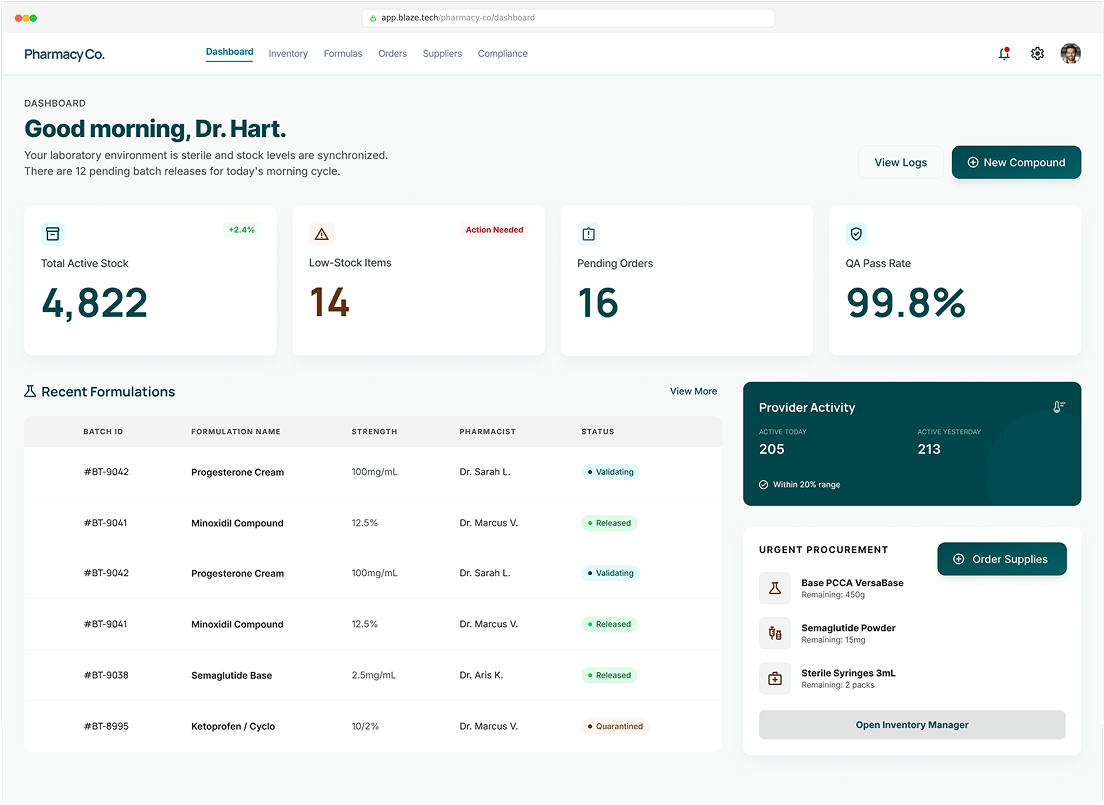
Visual Builder
Design control made easy — just drag and drop.
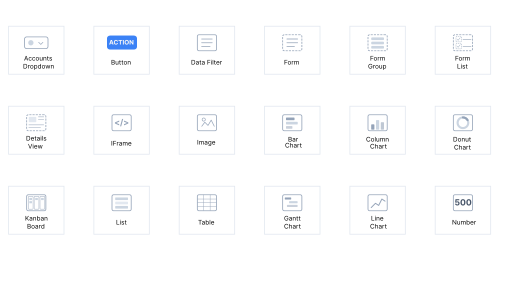
Blaze's visual app builder works the way you already think. Select from a library of pre-built components — forms, data tables, charts, buttons, text fields, image uploads, and more. Drag them onto your canvas and arrange them however you want. You have control over the styling of each component and the ability to create color themes and styling that apply throughout the app.
01
Pre-built component library
Drop in forms, tables, charts, navigation menus, file uploaders, and rich-text editors without configuring anything from scratch.
02
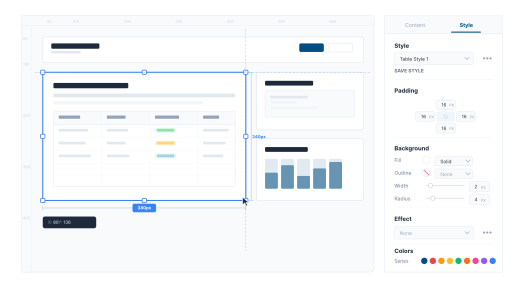
Pixel-level layout control
Position and resize elements freely on a flexible canvas. Build multi-page apps with consistent, professional layouts.
03
Real-time preview
See exactly how your app will look and behave as you build it, so there are no surprises at launch.
04
Templates to jump-start your build
Start from curated templates for patient portals, CRMs, inventory trackers, onboarding flows, and more — then customize everything to fit your workflow.
AI-Powered
Describe what you want.
Blaze AI builds it.
Blaze AI, powered by OpenAI, accelerates every part of the app-building process. Describe a workflow in plain English and Blaze generates the logic. You stay in control of the result — AI just gets you there faster.

Natural language workflow creation
Type a description like "when a new order comes in, check inventory levels, update the stock count, and log the change" and Blaze AI sets up the workflow.

AI-assisted formulas and filters
Generate complex calculations, conditional filters, and data transformations by describing what you need in plain language.

UI generation assistance
Get help configuring frontend components, layouts, and page structures so you spend less time on setup and more time refining.
No-Code Database
Your data, organized and connected — in minutes.
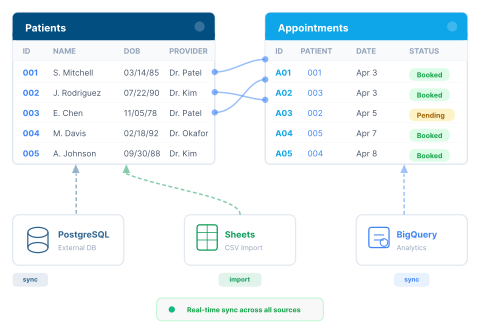
Every Blaze app is backed by a built-in relational database, Blaze Tables, that works like a spreadsheet but scales like enterprise software. Set up tables, define relationships, and start capturing data immediately. Already have data somewhere else? Import CSVs or connect directly to PostgreSQL, MongoDB, Google BigQuery, and any popular database.
Blaze’s no-code relational database
Link tables together so information stays connected across your entire application. Reference a customer record in an order, tie an appointment to a patient profile, or associate tasks with projects.
Learn more about Blaze Tables
→
CSV import and external database connections
Bring in existing data instantly or connect to PostgreSQL, MongoDB, Google BigQuery, and other sources.
Real-time sync
Data updates across all users and all connected apps the moment it changes. No refresh buttons, no stale records.
Custom views and filters
Display the right data to the right people with filtered views, sorted lists, and role- based visibility.
Workflow Automation
Automate the work that slows your team down.
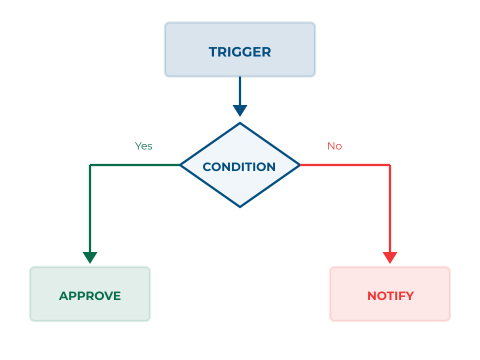
Blaze lets you build custom workflows that handle the repetitive, manual tasks eating up your team's time. Set up approval chains, trigger automated notifications, route data between systems, and enforce business logic — all configured visually, without code.
Conditional logic and triggers
Automatically execute actions when specific conditions are met: a form is
submitted, a status changes, a deadline passes, or a value crosses a threshold.
Approval workflows
Route requests through multi-step approval chains with configurable rules, so the right people sign-off at the right time.
Automated notifications
Send emails, in-app alerts, and SMS based on events in your application. Keep everyone informed without anyone having to remember.
Task status tracking
Create custom statuses and move records through defined stages so your team always knows where things stand.
Integrations
Connect Blaze to everything your business already uses.
Blaze apps don't live in isolation. Connect to the tools and systems your
team depends on — CRMs, ERPs, EHRs, payment processors, communication platforms, and more. Use pre-built integrations or connect any service with a REST API.
Salesforce
Surescripts
Stripe
DocuSign
AthenaHealth
Auth0
Zoom
PostgreSQL
Epic
BigQuery
Salesforce
Surescripts
Stripe
DocuSign
AthenaHealth
Auth0
Zoom
PostgreSQL
Epic
BigQuery
Salesforce
Google Sheets
Stripe
DocuSign
Airtable
Auth0
OpenID
PostgreSQL
MongoDB
BigQuery
Pre-built integrations
Connect to Airtable, Google Sheets, DocuSign, Salesforce, Stripe, and dozens of other platforms out of the
box.
REST API & webhooks
Exchange data with any external system. Trigger actions from external events, or push data from Blaze to other tools.box.
EMR & EHR connectivity
For healthcare organizations, integrate with electronic medical record systems to pull patient data into Blaze applications.
SSO & identity providers
Connect with Auth0, OpenID, and enterprise identity providers for seamless, secure authentication.
Security & Compliance
Built secure from the ground up — not bolted on after.
Blaze was engineered for organizations that handle sensitive data. SOC 2 Type II certification and HIPAA compliance are built into the platform from day one — not sold as add-ons. Every app you build on Blaze inherits enterprise-grade security controls automatically.
HITRUST e1 Certified
SOC 2 Type II Certified
Single Sign-On (SSO)
Role-Based Access Controls
Automated Audit Logs
Data Encryption at Rest & In Transit
Implementation Support
You're never building alone.
Blaze isn't just a platform — it comes with a team. Our expert implementation specialists will support you from kickoff to launch, helping you architect your application, configure complex workflows, and get to production faster.
Step 01

Onboarding & architecture guidance
Our team helps you plan your application structure, data model, and user flows before you start building.

Step 02

Hands-on implementation
Need help with a complex integration or workflow? Blaze's team configures it with you — or for you.
Step 03

Ongoing support
After launch, our team stays available to help you add features, troubleshoot issues, and scale your application as your needs grow.
Stop waiting on developers.
Start building what your team needs today.
Blaze gives you the power to create custom, secure, scalable web applications — on your timeline, not a dev team's backlog. See it in action.