
Table of contents
HIPAA-Compliant App Development: The Complete Guide (2026)

Written by
Blaze Team

Reviewed by
Nanxi Liu
Expert Verified
HIPAA compliance extends beyond the app itself. Audit logs, role-based permissions, and encryption help protect PHI (Protected Health Information), but these features alone don’t make an organization HIPAA-compliant.
HIPAA requirements affect your organization and the vendors you buy your software or apps from. These requirements also affect how your team collects, stores, accesses, transmits, and manages PHI throughout the software lifecycle.
Here, I’ll explain when HIPAA applies, which safeguards you need to consider, how the development options compare, and what steps to take before, during, and after the build.
What Is HIPAA-Compliant App Development?
HIPAA-compliant app development means building healthcare software around HIPAA’s administrative, physical, and technical safeguards. It helps keep PHI (protected health information), which is patients’ private medical data, safe.
Apps aren’t “HIPAA certified.” Compliance with the HIPAA Security Rule depends on how you build, configure, and operate your systems. You also must obtain a BAA (Business Associate Agreement) from the vendor providing app-building services or tools. A BAA explains how a vendor must protect patient health information and follow HIPAA when handling that data.
For HIPAA-compliant app development, responsibility spans developers, vendors, and healthcare organizations. When you’ve deployed your app, you’ll also need to implement safety protocols, regular audits, and training.
Does Your App Need HIPAA-Enabling Features?
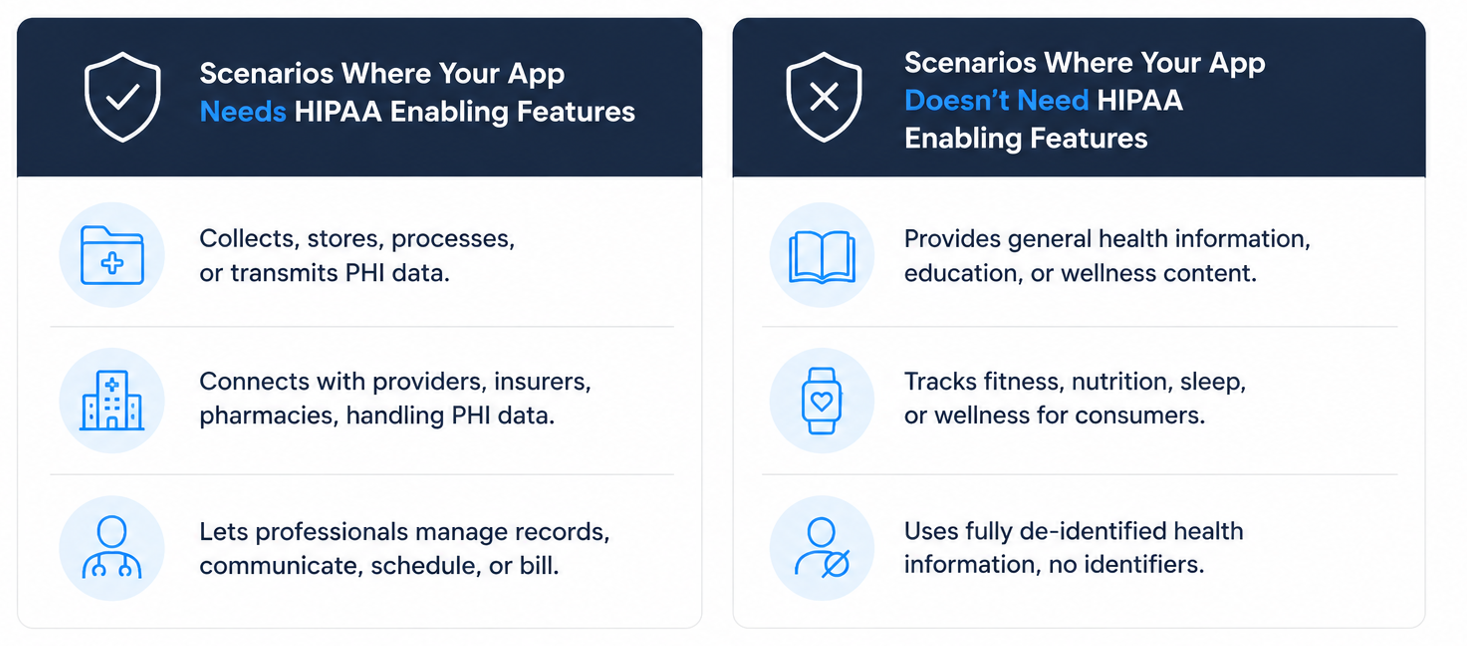
Your healthcare app usually only needs HIPAA-enabling features under certain scenarios. Other times, you don’t need these features. Let’s look at instances when you need an app with technical safeguards, and when you don’t need to implement them:
Scenarios Where Your App Needs HIPAA-Enabling Features:
- Your app collects, stores, processes, or transmits PHI, such as patient names, diagnoses, medical histories, prescriptions, or treatment information.
- Your app connects with healthcare providers, insurers, pharmacies, or other HIPAA-covered organizations, and handles PHI on their behalf as a business associate.
- Your app lets healthcare professionals manage patient records, communicate with patients, schedule care, process billing information, or perform other workflows involving identifiable patient health data.
Scenarios Where Your App Doesn’t Need HIPAA-Enabling Features:
- Your app provides general health information, educational resources, or wellness content. It doesn’t collect, store, transmit, or process identifiable patient health information or medical records.
- Your app tracks fitness, nutrition, sleep, or other wellness information for individual consumers without handling PHI on behalf of a HIPAA-covered organization.
- Your app uses fully de-identified health information that meets HIPAA requirements and contains no data that can reasonably identify an individual patient.
Core Features Every HIPAA-Compliant App Needs
HIPAA-compliant app development requires controls that protect PHI by addressing security, accountability, communication, and privacy requirements. Here are the main features:
User Authentication and Access Control
Only certain users can access, view, change, or download specific parts of your app. For instance, providers can access patient records, while admin staff can access billing records.
Each user must authenticate their identity before logging in. Tools like multi-factor authentication (MFA), single sign-on (SSO), and role-based access help protect patient data and meet HIPAA requirements.
Audit Logging
Activity records track who accessed a system, what they viewed or changed, and when they did it. HIPAA requires you to periodically review your audit logs and track activity in systems that handle electronic patient data.
These records help teams investigate issues and find problems without relying on emails or staff memory. Admins can review login history and changes to spot suspicious activity.
For example, a compliance manager can investigate a changed patient record by checking who made the change, when they made it, and what they changed.
Encryption And Secure Data Storage
Data encryption turns sensitive information into unreadable data that only approved users and systems can access. Healthcare organizations encrypt PHI when they send and store it to help prevent unauthorized access.
Encryption protects PHI stored in databases, cloud systems, and devices. It also protects data as it moves between systems. For example, when a patient uploads an insurance document, encryption protects the file during the upload and while the app stores it in the cloud.
Secure PHI Management
To handle PHI securely, your app needs to control how patient information enters, moves through, stays in, and leaves an app. Healthcare organizations should only collect the patient information they need, since more data means more information to protect.
This control feature helps keep PHI out of personal emails, non-secure spreadsheets, and other unapproved storage. Backups help keep patient records available if a system goes down.
For example, a patient intake app collects insurance and medical information, then securely transmits and stores it. The organization then retains or disposes of the data according to its documented retention policy and applicable legal requirements.
Patient Communication Tools
Secure communication tools like chat and video conferencing features found in tools for patient engagement let healthcare teams securely share PHI. These tools also protect PHI from people who should not see it. Teams use secure messaging because non-HIPAA-enabled email and text messages can send PHI to the wrong person or device.
Staff should send patient messages through approved systems instead of personal phones or messaging apps. They should also avoid putting sensitive medical details in basic text or email reminders.
For example, a clinic can text a patient an appointment reminder. The patient then signs into a secure portal to view the details.
Healthcare Integrations
Healthcare system integrations connect your app to EHRs and other healthcare software. Teams can use FHIR APIs, HL7 messaging, and other supported connections to share data with systems like Epic, athenahealth, Oracle Health, and eClinicalWorks.
These connections give staff access to current patient information. They help staff avoid manually copying it between systems. Integrations also let developers control what information each system can send and receive.
For example, a scheduling app can use a FHIR connection to pull appointment information from Epic and show it to approved staff.
Patient Consent And Privacy Controls
Patient privacy controls track what patients agree to and how the app can use or share health information. Healthcare organizations use these controls to keep a clear record of each patient’s choices.
Your team can check these permissions before sharing PHI. These permissions allow you to avoid searching through paper forms, emails, or separate systems. Patients can also review privacy notices, request records, and update their permissions.
For example, a patient can approve sharing their medical records with a specialist. Your team can check this approval before sending the records.
HIPAA-Compliant App Development Options
I based the price ranges below on our guide to healthcare app development costs. These figures reflect broad market estimates rather than fixed project prices. Actual costs vary based on project scope, compliance requirements, integrations, infrastructure, and scale.
Self-Build Development
Self-build platforms let your team create apps using visual development tools instead of traditional programming. Always check that the platform provides technical safeguards and offers a BAA.
Pros
- This approach is usually the cheapest, providing a good option for small and solo clinics.
- Self-build gives your organization direct control over workflows and future changes.
Cons
- Your team takes on more responsibility for configuring access controls, permissions, data handling, integrations, and other HIPAA-related requirements.
- Some platforms may limit your ability to export code, modify the underlying infrastructure, or deploy the application outside the platform’s ecosystem.
Price and Timeline
Platform costs can range from under $1,000 to $15,000+ per year, depending on the platform, users, infrastructure, and required features. Simple applications can take a few days or weeks, while applications with complex workflows and integrations can take several months.
Vendor-Assisted Development
Vendor-assisted development combines an application development platform with implementation support from the vendor or its development team. Your organization defines its requirements while specialists help build workflows, integrations, permissions, security controls, and deployment configurations.
Pros
- This approach can reduce the internal technical workload while retaining more customization than off-the-shelf healthcare software.
- It’s a good fit for organizations that need a custom HIPAA-compliant application but don't have the engineering resources to build and configure the entire system internally.
Cons
- The tradeoff is greater vendor dependence. Your organization may need the vendor for complex integrations, major application changes, troubleshooting, and ongoing platform support.
- Your team defines the requirements, but the vendor executes them. If you define workflows, permissions, or PHI-handling requirements poorly, you may have costly revisions later.
Price and Timeline
Implementation costs commonly range from $10,000 to $50,000+, depending on scope. Project build timelines can take several weeks to several months.
Traditional Custom Development
Traditional development involves hiring software engineers to build an application using programming languages, frameworks, databases, and cloud infrastructure. Your development team can control the application architecture, data flows, security controls, integrations, and infrastructure.
Pros
That flexibility makes traditional development suitable for complex healthcare applications with specialized technical or integration requirements.
You have complete control over your code and underlying infrastructure.
Cons
- Your organization is responsible for keeping the entire technology stack and operating environment aligned with HIPAA requirements. This includes physical or cloud-based infrastructure and networks through operating systems, applications, and data.
- Traditional development is the most expensive option.
Price and Timeline
Costs can range from roughly $40,000 to $500,000+, with additional expenses for maintenance, infrastructure, security, and compliance work. Development can take several months to more than a year, depending on complexity.
How to Create a HIPAA-Compliant App in 4 Steps
HIPAA-compliant app development starts with defining how PHI will move through your app. Here’s a four-step process to help teams reduce compliance gaps before development, deployment, and ongoing maintenance work begins.
Step 1: Define PHI and App Requirements
This phase determines whether your app will collect, store, receive, or share PHI for a healthcare organization or its business partners. Your team should identify what patient data the app uses and track where that data goes from collection to deletion.
Use this data map to define the app’s HIPAA requirements. Identify who needs access to PHI, which vendors will handle it, where BAAs are required, and which safeguards you need.
Step 2: Choose a HIPAA-Capable Development Approach
Now it’s time to determine which build option you should use. Here’s how to select the right one for your organization:
Choose Self-Build Development If...
- You have a limited budget: Self-build works for organizations that need a custom healthcare application without paying for a dedicated external development team.
- Your team can manage configuration: Choose this route when you have the resources to build your app, configure permissions, integrations, and other HIPAA-related requirements.
- You want direct workflow control: Self-build suits teams that want to create and modify workflows internally instead of relying on developers.
Choose Vendor-Assisted Development If...
- You lack internal engineering resources: Vendor-assisted development fits organizations that need specialists to configure integrations, permissions, and security controls.
- You need more support: Choose this model when building and maintaining an application internally requires too many internal resources.
- You accept greater vendor dependence: This approach works when your organization is comfortable relying on its development vendor for complex integrations, troubleshooting, major changes, and platform support.
Choose Traditional Custom Development If...
- You have complex technical requirements: Traditional development suits healthcare applications with specialized or highly custom workflows, architecture, integrations, or infrastructure requirements.
- You need complete technical control: Traditional development gives your organization direct ownership and control over application code, architecture, and deployment decisions.
- You have substantial development resources: If you’re prepared for higher upfront costs, longer development timelines, and continuing expenses for maintenance, traditional development might be the best fit.
Step 3: Build and Test HIPAA Safeguards
Build your app one feature at a time. For example, when building a patient portal, define the data model, authentication, permissions, and audit events before building the interface. Test with synthetic or properly de-identified data instead of live PHI.
Testing should follow PHI as it moves through the entire app, including connected systems and support tools. For example, testers confirm that clinical staff can only access the patient information they need to do their jobs.
Step 4: Deploy and Maintain Compliance
After launch, you’ll need to keep your app and patient data protected by reviewing security risks, monitoring user access, and checking for security problems. HIPAA compliance requires ongoing work and training.
Summing Up: HIPAA-Compliant App Development Checklist
These requirements provide a general HIPAA compliance framework. Your specific obligations depend on your app, PHI data flows, vendors, and risk analysis:
Vendor and Infrastructure Requirements
Be aware of these requirements when shopping for a vendor and throughout development and deployment:
- Vet vendors: Identify every vendor, subcontractor, cloud provider, API, and integration that creates, receives, maintains, or transmits PHI on your organization’s behalf.
- Classify business associates: Determine whether each applicable vendor is a HIPAA business associate.
- Execute BAAs: Execute HIPAA-compliant business associate agreements (BAAs) before a business associate handles PHI on your behalf.
- Map PHI flows: Document how PHI flows through your application, infrastructure, vendors, integrations, backups, and support processes.
- Assess infrastructure risks: Evaluate hosting and infrastructure through a documented risk analysis, including physical security, access management, encryption capabilities, logging, backups, and incident response.
- Review third-party integrations: Review third-party APIs and integrations for authorized data access, secure transmission, appropriate authentication, audit logging, retention practices, and contractual obligations.
- Set AI usage rules: Establish written rules for AI tools, including whether PHI may be used, whether the provider is a business associate, whether a BAA is required, and how data is retained, accessed, or de-identified.
Technical Safeguards
You’ll implement technical safeguards and controls throughout development and maintenance. Here’s what you need to do:
- Control user access: Configure unique user identification, authentication, and access controls.
- Enforce role-based access: Apply role-based access controls so users can access only the PHI necessary for their job functions.
- Manage access changes: Establish procedures to authorize, modify, review, and terminate user access.
- Enable audit controls: Implement audit controls that record and enable review of activity in systems containing PHI.
- Protect PHI: Protect PHI in transit and at rest using encryption or another documented, appropriate safeguard based on your risk analysis.
- Safeguard data integrity: Implement integrity controls to protect PHI from improper alteration or destruction.
- Back up PHI: Establish a data-backup plan that creates and maintains retrievable, exact copies of PHI.
- Prepare for disruptions: Maintain disaster-recovery and emergency-mode operations procedures.
- Test PHI integrations: Test integrations that create, receive, maintain, or transmit PHI for secure authentication, authorization, transmission, logging, error handling, and data handling.
Ongoing Compliance Responsibilities
Once you’ve deployed your app, here’s how you maintain compliance throughout your app’s lifecycle:
- Conduct risk analyses: Conduct and document an accurate, thorough risk analysis of risks and vulnerabilities to PHI.
- Evaluate compliance controls: Perform periodic technical and nontechnical evaluations, including after material changes to the application, infrastructure, vendors, workflows, or operating environment.
- Train your workforce: Provide role-appropriate HIPAA privacy, security, and security awareness training to workforce members whose work involves PHI/PHI or affects its protection.
- Review access controls: Review user access, permissions, privileged accounts, and offboarding controls regularly.
- Reassess vendor relationships: Review BAAs and vendor relationships when services, PHI data flows, subcontractors, or responsibilities change.
- Monitor security activity: Monitor audit logs, security events, and suspected incidents.
- Maintain compliance documentation: Maintain written HIPAA policies, procedures, and required compliance documentation.
- Update safeguards: Update safeguards when changes in technology, operations, threats, or the application could affect the confidentiality, integrity, or availability of PHI.
Build a HIPAA-Compliant App With Blaze.tech
HIPAA-compliant app development requires more than building the right workflows. Blaze.tech gives healthcare organizations a faster path to custom applications with security and compliance-enabling capabilities built into the platform.
- Healthcare software built for your requirements: Get production-ready applications, including custom patient portals and clinical databases, built to your specifications by an expert-led three-person team.
- Choose self-build: Prefer to build internally? Use Blaze’s no-code app builder to create custom healthcare applications without traditional programming or a dedicated engineering team.
- Replace repetitive healthcare administration: Automate patient intake, document routing, approvals, reminders, and other manual processes while keeping your existing EHR at the center of clinical operations.
- Launch faster than traditional development: Move from requirements to a working healthcare application in weeks instead of spending months managing a conventional software development project.
- Add AI to real clinical workflows: Support automated patient intake, document extraction, and OpenAI integrations alongside secure EHR and EMR connections that fit existing healthcare operations.
- Build on compliance-ready infrastructure: Blaze is a HIPAA-enabling, HITRUST e1-certified, SOC 2 Type II healthcare app development platform designed to support applications that handle sensitive healthcare data.
Schedule a free build consultation call today and turn your HIPAA requirements into a working application without assembling and managing a traditional development team.
Frequently Asked Questions
Can a No-Code Platform Build a HIPAA-Compliant App?
Yes, a no-code platform can build a HIPAA-compliant app if it offers a BAA and supports encryption, access controls, and audit logging. Choosing a platform that offers HIPAA-enabling features makes it easier for your organization to meet HIPAA standards.
Who Is Responsible for HIPAA Compliance When Developing a Healthcare App?
Healthcare organizations and business associates share responsibility for HIPAA compliance when developing a healthcare app. Covered entities must meet HIPAA requirements. Developers, hosting providers, and other vendors that handle PHI must follow requirements that apply to business associates. A BAA is required when a vendor qualifies as a business associate, but not every vendor needs one.
What Happens If an Organization Fails To Meet HIPAA Requirements?
If an organization fails to meet HIPAA requirements, non-compliance can trigger federal penalties, data breaches, and loss of patient trust. Building safeguards in from the start avoids costly fines and prevents disruptive post-launch remediation work.
Sources
1. U.S. Department of Health & Human Services. “Summary of the HIPAA Security Rule.” HHS.gov. https://www.hhs.gov/hipaa/for-professionals/security/laws-regulations/index.html
2. U.S. Department of Health & Human Services. “Security Rule Guidance Material.” HHS.gov. https://www.hhs.gov/hipaa/for-professionals/security/guidance/index.html
3. National Institutes of Health: StatPearls. “Health Insurance Portability and Accountability Act (HIPAA) Compliance.” NCBI. https://www.ncbi.nlm.nih.gov/books/NBK500019/
Build a HIPAA-Compliant App Today
Request the app you want. Blaze AI assembles it for you and your healthcare team.
Trusted by Fortune 500s and startups
HIPAA compliant, SOC 2 and HITRUST certified
Zero coding required

Ready to Build Your Custom Healthcare App?
Launch your own healthcare app today that's fully HIPAA compliant.
Related Articles
Discover related guides on healthcare no-code development, HIPAA compliance, security, integrations, and launching apps faster.
%20(1).png)
Hospital App Development: Features, Steps, and Costs in 2026
Hospital app development costs range from $1,000 to over $1 million. Compare needed features, EHR integrations, development steps, and the 3 build approaches.
%20(1).png)
EHR Implementation Cost Breakdown
This EHR implementation cost breakdown reveals upfront, ongoing, and hidden expenses. Compare costs from client projects and research to help you budget.
%20(1).png)
7 Top White Label Telehealth Platforms + How to Pick (2026)
I reviewed seven white-label telehealth platforms to see how they compare. Explore pricing, branding, integrations, and the best fits available.