
Workflow automation
Your hardest processes, automated.
Build complex, multi-step workflows visually and deploy them instantly. Blaze works at the data layer, so your automations keep running through upgrades, redesigns, and everything in between.
Real-World Workflows
See what teams are automating with Blaze workflows.
From healthcare compliance to pharmacy operations, Blaze workflows power mission-critical automations that get launched in days, not months.
01
Compounding Pharmacy
Automated batch release workflow
When a pharmacist marks a formulation as complete, the workflow validates QA data, generates a Certificate of Analysis PDF, emails it to the prescribing provider, and updates the batch status — all in seconds.
02
Health SYstems
EHR-triggered lab result triage
When a screening lab result posts in the EHR, the workflow checks eligibility rules against the visit and patient history via FHIR, automatically messages patients whose results are normal, and pends draft orders with a note routed for physician review on borderline ones. Automation prepares the work; clinicians review and sign.
03
Patient Onboarding
Webhook-driven intake processing
When a new patient submits intake forms via an external portal, a webhook triggers a Blaze workflow that creates the patient record, assigns a care coordinator, calls an insurance verification API, and sends a welcome SMS.
Visual Builder
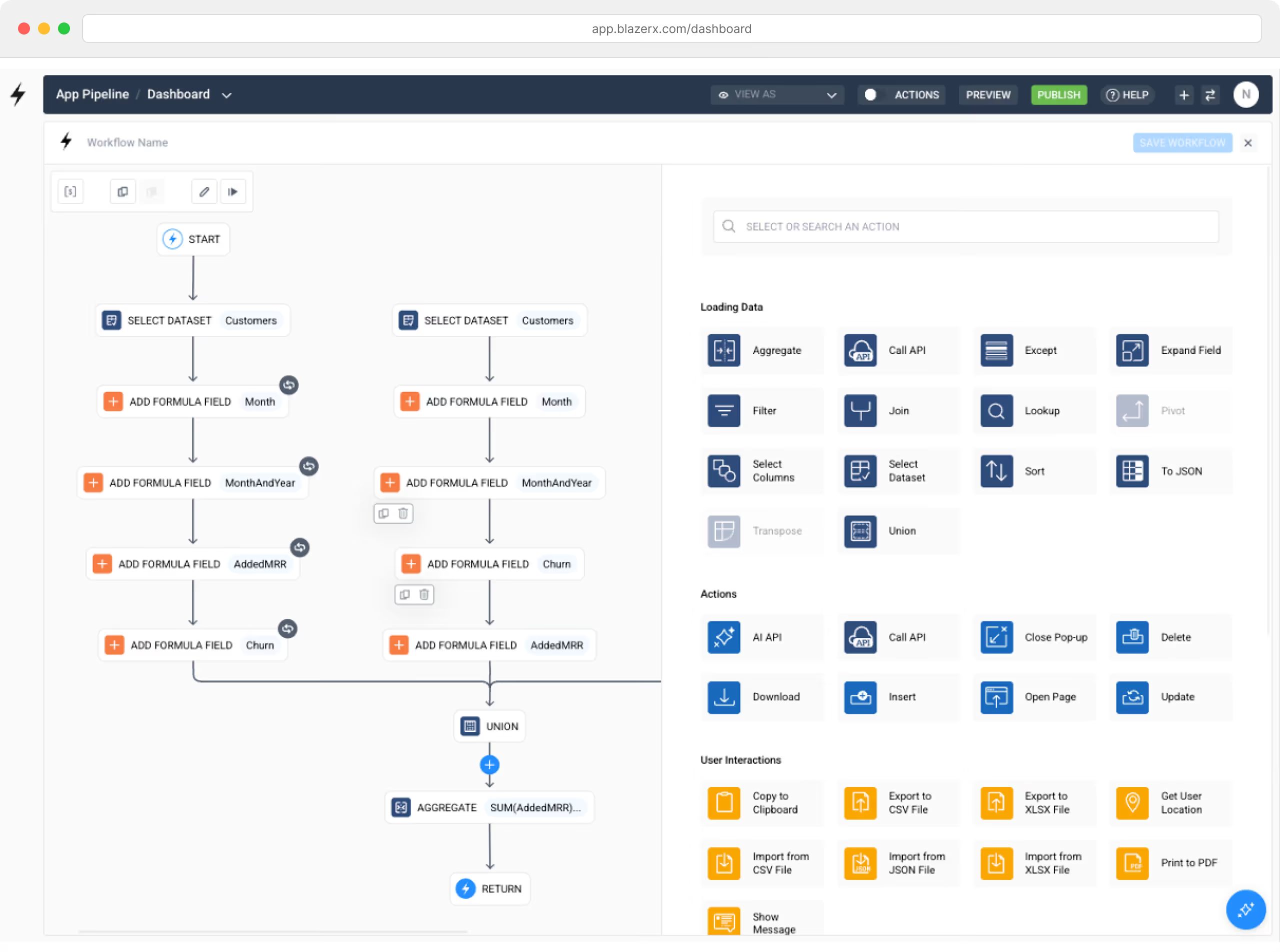
Build complex logic with a visual, step-by-step editor.
Blaze's workflow builder lets you chain together actions in a visual canvas. Each step flows into the next — with full control over conditional branching, loops, data transformations, and error handling. No code required.
Drag-and-drop action steps
Add steps between any two nodes. Choose from dozens of built-in actions — data queries, API calls, emails, PDF generation, conditional logic, and more — then configure each in a side panel.
Incoming and outgoing data flow
Every action produces outgoing data that flows into the next step. Blaze shows you exactly what fields are available at each point, so you always know what your workflow is working with.
Test workflows before deploying
Run any workflow on demand with the "Run Now" option to verify behavior before it goes live. For scheduled workflows, test ahead of the scheduled time to ensure everything works as expected.
Name, save, and reuse
Give every workflow a descriptive name. Duplicate existing workflows to quickly create variations. Save your work at any point and come back to refine later.
Workflow Types
Four ways to trigger automation — pick the one that fits.
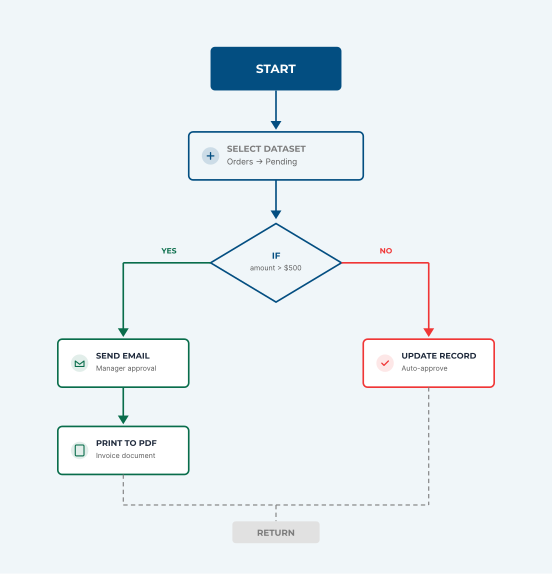
Blaze supports multiple workflow types so you can automate any scenario: react to user actions in the UI, run background jobs on a schedule, respond to external events via webhooks, or execute logic when your data changes.

User Triggered
Component Workflows
Attach workflows to buttons, tables, forms, and other UI components. When a user clicks, submits, or interacts, the workflow runs — updating records, sending emails, navigating pages, or calling APIs.

Time Based
Scheduled Workflows
Run workflows automatically at defined intervals — every minute, every day at 8AM, every Monday, or the first of each month. Perfect for recurring reports, data syncs, and compliance checks.

External events
API & Webhook Workflows
Trigger workflows from webhooks or third-party APIs — a form submission from another platform, a payment completing in Stripe, or an EHR event (a lab result posting, an order being placed, or a patient being admitted) in Epic.

Data Driven
Table Workflows
Automatically trigger workflows
when records are created, updated,
or deleted in your database tables.
Enforce data integrity rules and
cascade changes across your
application.
Workflow Actions
Full library of building blocks for your automation
Blaze gives you a library of workflow actions across data, logic, integrations, and output so you can assemble the exact automation your operations require. Data queries, conditional branching, API calls, PDF generation, email and SMS notifications, file exports, scheduling, loops — all available in the Blaze visual builder.
Loading Data
14 nodes
Query, filter, join, sort, aggregate, and transform data from your tables or external sources before passing it downstream.

Select Dataset

Aggregate
Filter

Join

Sort

Lookup

Pivot

Select Columns
To JSON

Transpose

Union

Except

Expand Field

Call API
Actions
8 nodes
Write data, navigate users, trigger external services, and execute operations that change state in your application.

Insert

Update

Delete
Call API

AI API

Open Page
Close Pop-up

Download
User Interactions
9 nodes
File exports, imports, clipboard operations, user location lookups, PDF generation, and in-app messages.

Print to PDF

Export to XLSX

Export to CSV

Import from CSV
Import from JSON
Import from XLSX

Copy to Clipboard

Get User Location

Show Message
Logic & Computations
7 nodes
Conditional branches, loops, formulas, and variable assignments that add intelligence to your workflows.

If

For Each

While

Add Formula Field

Assign

Break
Terminate
Advanced
6 nodes
Custom JavaScript, timed delays, file imports, data merging, modal dialogs, and stored variables for power users.
Delay

Execute JavaScript
Import File
Merge

Open Dialog

Store Variable
Scheduling Engine
Run workflows on autopilot — down to the minute.
Blaze's scheduling engine lets you configure workflows to run at precise intervals. Send daily reports, sync data every 15 minutes, generate weekly compliance summaries, or trigger monthly billing cycles. Each environment (Development, Production) can have its own independent schedule.

Every N minutes
As frequent as every 60 seconds
Daily at a specific time
e.g. Every day at 8:00 AM EST

Weekly on selected days
e.g. Mon, Wed, Fri at 9:00 AM

Monthly on specific dates
e.g. 1st of every month, or 2nd Tuesday
Built-in Debugger
Debug workflows like a developer, without the code.
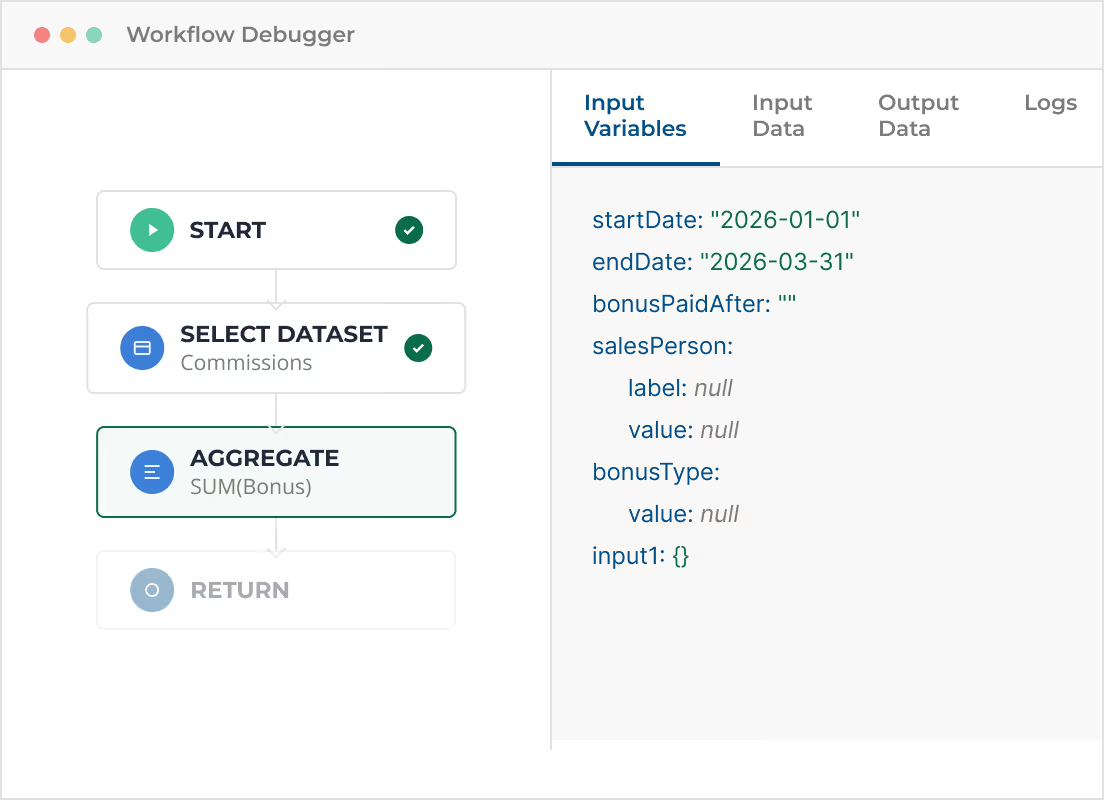
Blaze includes a powerful visual debugger that lets you step through every node in a workflow, inspect input and output data at each stage, and trace exactly what happened. No guesswork — just clear visibility into every execution.
Step-through execution
Run your workflow one node at a time. Watch data flow from Start through each Select Dataset, Aggregate, If, and Return step. Pause at any point to inspect what's happening.
Input & output data inspection
Every node shows its incoming data (the fields it receives) and outgoing data (the fields it produces). Toggle between Input Variables, Input Data, and Output Data tabs to see exactly what each step is working with.
Execution logs
View a complete log of every action taken during a workflow run — including timestamps, record counts, API response codes, and error messages. Diagnose issues in seconds, not hours.
Test with real data
The debugger runs against your actual database, so you see real results — not simulated outputs. Use "Run Now" on any scheduled workflow to test behavior ahead of time.
Formulas & Calculations
Add advanced logic and math in your workflows.
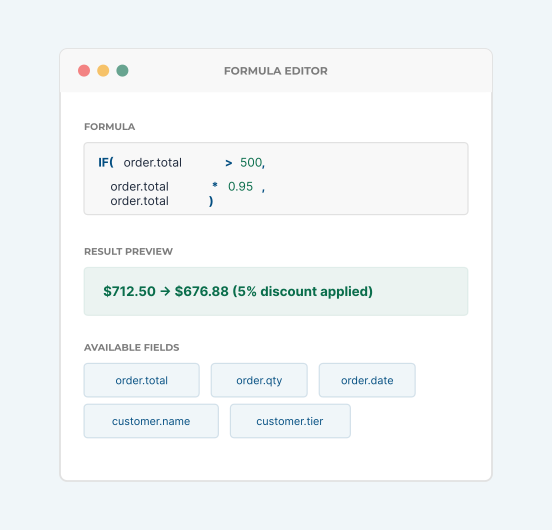
Blaze's formula engine lets you perform calculations, transform data, and create conditional expressions directly within workflow steps. From simple arithmetic to complex multi-field expressions, formulas give you full control over how data is processed.
Advanced calculations
Compute totals, averages, margins, tax rates, and compound values using formulas within any workflow step. Reference fields from incoming data and combine them in any way you need.
String and date manipulation
Format names, parse addresses, calculate date differences, or generate reference numbers — all with built-in formula functions available inside the workflow builder.
Conditional expressions
Use IF/THEN logic within formulas to compute different values based on conditions. Combine with the If Node for powerful, multi-path decision trees.
AI-assisted formula creation
Describe what you want in plain English and Blaze AI generates the formula for you. No need to memorize syntax — just tell Blaze what to calculate.
AI-Powered
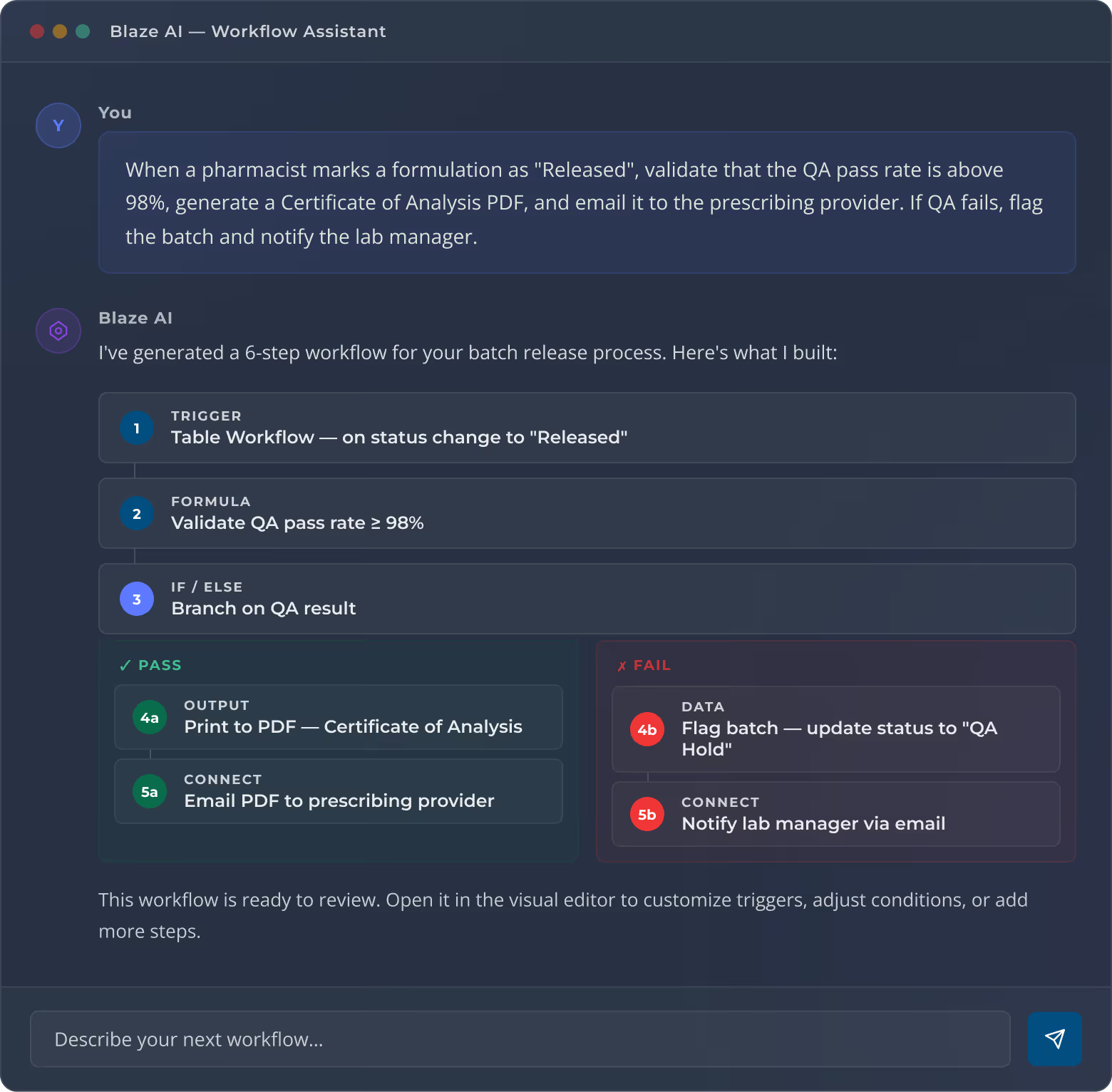
Describe a workflow. Blaze AI builds it.
Type what you need in plain English. Blaze AI generates the workflow logic, formulas, and data connections — then you refine the output visually.
How It Works
From idea to live automation in three steps.
Building workflows in Blaze follows a simple, repeatable process — whether you're automating a single email or orchestrating a multi- system data pipeline.
Step 01

Choose your trigger
Select when the workflow should run: on a user action (button click, form submit), on a schedule, on a webhook event, or when a table record changes.

Step 02

Build your logic
Add action steps — queries, conditions, API calls, emails, PDF exports, formulas — and chain them together in the visual workflow canvas. Configure each step's inputs and outputs.
Step 03

Test and deploy
Test your workflow with real data using "Run Now," verify the results, then enable it for production. Blaze handles the rest — reliably executing your workflow every time the trigger fires.
Build it this week. Not next quarter.
Blaze gives you the power to automate any business process — from simple notifications to complex multi-system orchestrations — without writing a single line of code.