
Table of contents
Epic Integration: Use Cases, Limitations + My Evaluation (2026)

Written by
Blaze Team

Reviewed by
Nanxi Liu
Expert Verified
Epic integrations connect other health systems to Epic, so data like appointments or billing info can sync in and out of the EHR. Over the years, I’ve helped providers connect scheduling apps and other software directly to their Epic EHRs. Learn the tools that you can integrate with Epic, what doesn’t work, and the best use cases for connecting apps.
Apps That Integrate With Epic
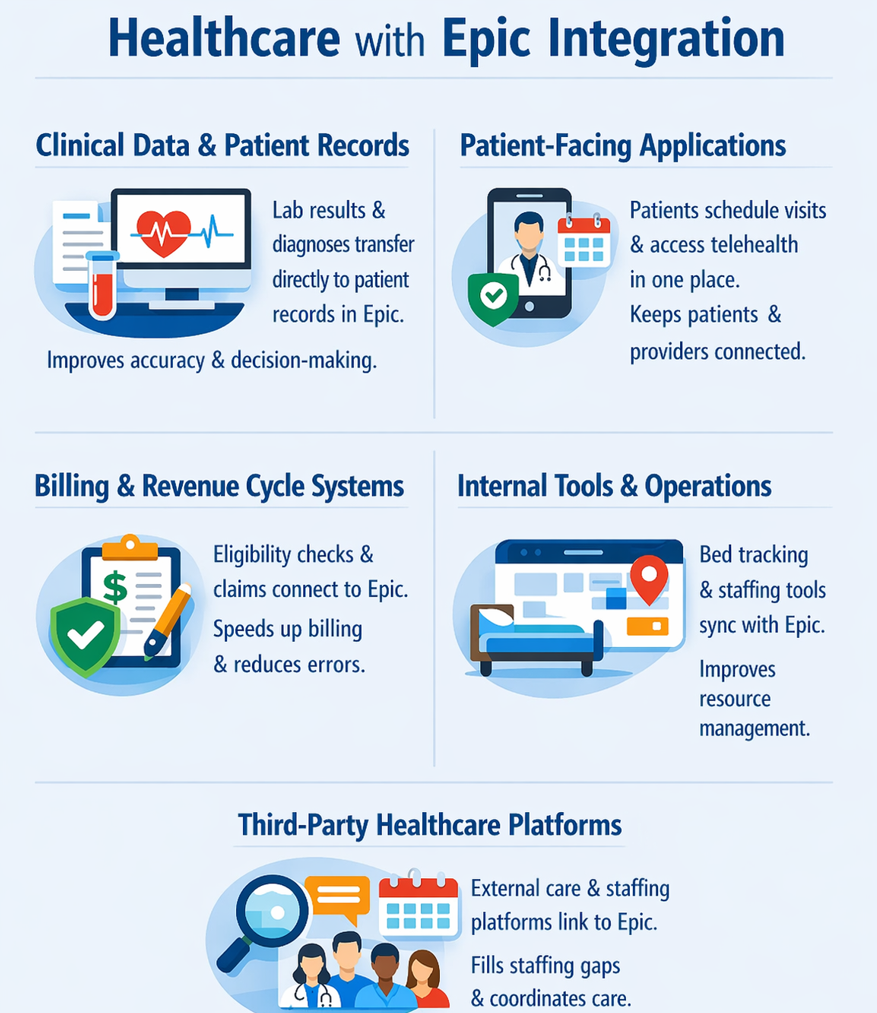
You can integrate Epic with many apps and systems in healthcare, such as patient records and billing systems. Many organizations already integrate the following with Epic:
Clinical Data And Patient Records
Clinical systems transfer patient data, such as lab results, diagnoses, and notes, into Epic from different departments. Without these connections, doctors must switch between systems and fix records with manual workarounds. These methods often lead to errors.
When clinical data systems connect with Epic, a doctor can easily navigate to current patient data, which helps them act at the right time. The integration helps doctors make better decisions.
Patient-Facing Applications
Patient-facing applications let patients engage with providers through secure login. Patients can schedule appointments or meet with providers using a telehealth platform. Providers can transfer health information about their patients directly to their Epic EHR via an Epic integration.
Instead of sending patients messages from different systems, everything stays in one place. Patients use one system, and doctors see one complete record.
Billing And Revenue Cycle Systems
Billing tools like eligibility checks, claims, and payments can connect to Epic, so front desk staff don’t need to enter data by hand. Billing can start as soon as a session ends. These integrations mean fewer claims get denied because they pull the actual visit data. Teams spend less time trying to find missing information.
Internal Tools and Operational Systems
Provider workflow dashboards, bed tracking tools, and staffing systems can connect to Epic. These integrations often update quickly. For example, a nurse can see beds open soon after patients check out. Connections like this help providers allocate resources more evenly.
Third-Party Healthcare Platforms
External care tools and analytics platforms can also connect to Epic. For instance, tools like blood glucose monitors can send patient health data to an Epic EHR. This integration allows clinicians to monitor their patients in near real time.
Where Epic Integrations Fall Short
Epic integrations move data well, but they don’t connect everything. These limits show up often and explain where third-party tools fall short:
- No true real-time sync: Although an Epic integration allows data to travel from a third-party app to the Epic EHR in near real time, it typically doesn’t update instantly.
- Orders stay inside Epic: External tools can read patient data, but they can’t send orders or prescriptions back into Epic. Only a licensed clinician using Epic can do that.
- Workflows don’t transfer: Connected tools can support Epic, but they can’t replace its workflows. Staff still complete key tasks and documentation inside Epic.
- Data access has hard limits: Epic controls what data it shares. Some sensitive data, older records, and certain patient details stay locked. A connected system only sees what Epic allows.
Epic sets clear limits on what outside tools can access and control. A good system should follow those limits.
Best Epic Integration Use Cases: At a Glance
| Use Case | What It Does | Key Benefit |
|---|---|---|
| Cross-team care coordination | Pulls recent visit data | Gives all providers the same patient view |
| Remote patient monitoring | Collects data from home devices | Helps clinicians catch changes early |
| Clinical decision support | Data shows alerts and risk scores | Provides data-backed guidance |
| Operational reporting tools | Connects analytics tools | Replaces manual reports |
Epic's best use cases are those that connect to tools supporting ongoing care. If you’re running apps for these use cases, consider integrating them with Epic:
- Cross-team care coordination: Care coordination apps pull care plan and recent visit data from Epic. This data gives specialists and care managers the same view of the patient, so they don’t need to take extra steps.
- Remote patient monitoring: Home devices send patient data into Epic between visits. Clinicians can act on changes early instead of waiting for the next appointment.
- Clinical decision support: Decision support tools use patient data from Epic to show alerts and risk scores during care. Providers get helpful guidance from inside their workflows.
- Operational reporting tools: Analytics tools connect to Epic and replace manual reports with live dashboards. Teams can track capacity, outcomes, and usage in real time using current data.
The best Epic integrations pull clinical data where a decision is already happening. Tools that connect to Epic for any other reason tend to add steps rather than remove them.
Where an Epic Integration Becomes Complex
Certain issues make data flow between Epic and your apps difficult, but not unachievable. Here are some scenarios that may make connecting your Epic EHR or Epic EMR difficult:
- Epic doesn’t connect with external apps uniformly: Every organization configures Epic’s API to integrate with its unique apps in its own way. Some integrations, like those with customized apps, take longer to connect. You might also run into this problem if you’re scaling different apps that connect with your Epic EHR.
- You’re running legacy apps: Sometimes, data from older systems doesn’t fully transfer to and from your Epic EHR because they don’t have modern API capabilities. Data transfer in this situation requires an update or manual workarounds.
- FHIR (Fast Healthcare Interoperability Resources) versions may not match: Not every Epic system uses the same FHIR version. When versions don’t match, the integration can pull incomplete data. Some users mention this can also slow down data transfer to once a day.
- Approvals can slow everything down: Epic’s App Showroom and each site’s IT approval process can add weeks to the timeline. Teams often have to revise technical decisions after approvals come back.
- PHI rules limit what you can do: Rules around protected health information limit what a third-party system can request, store, and send. Teams must clear the HIPAA compliance review before their integration can go live.
If you’re aware of these complexities before you integrate apps with your Epic system, you can budget the time to deal with them.
Epic Integration Timeline and Costs
Epic integration projects usually take up to 18 months, depending on complexity. The timeline depends on the type of data, app complexity, how many approvals each site needs, and which FHIR version the system uses.
Annual costs vary by the number of integrations connecting to your EHR and the size of your organization. Simple integrations that only take 2–4 months often cost between $50,000–$150,000.
Mid-sized clinics with several connections could pay between $150,000–$400,000. Larger projects that connect multiple health systems can cost $250,000–$1 million+.
My Own Experience With Epic Integrations
I’ve helped many teams connect their systems to Epic over the past 5 years. The biggest variable that impacted integration was scope: what data you move and whether you only read it or also send data back into Epic.
Read-only connections are usually faster. For example, these can pull schedules or basic patient details. They often take less time because they don’t change anything inside Epic.
Write-back connections often take longer. These include billing data or clinical notes, where the app has to post information back into Epic. Projects like these can take months because they need more approvals, testing, and data setup before they go live.
My Final Verdict on Epic Integrations
Epic integrations connect directly to apps to help care teams work in one unified place. But they have drawbacks, and aren’t worth it for every team. Here’s how to determine whether or not you should get an Epic integration:
An Epic Integration Is Worth It When You…
- Have high-volume manual workflows: An Epic integration reduces manual tasks and errors and saves time across systems, creating measurable gains.
- Need to sync apps and tools: If multiple tools store key data, integration keeps data accurate, prevents silos, and enables better decisions across departments without constant manual updates.
- Plan on scaling: As your clinic expands, integrations handle increased data movements. They help reduce hiring needs and support consistent processes.
An Epic Integration Isn’t Worth It When You…
- Use tools with minimal impact: If your team doesn’t rely on software, the integration cost outweighs the benefits.
- Have simple tasks done quickly manually: When workflows take seconds to complete by hand, automation adds unnecessary setup time and costs without meaningful savings.
- Have frequent system changes: If your systems or processes change often, you’ll need to constantly update your Epic integration. Maintenance will be more costly and unreliable compared to flexible manual alternatives.
Your decision to integrate with Epic depends on how your team actually works. When systems fit together well, the integration adds real value. When they don’t, it adds extra work that builds up over time and becomes harder to fix.
Build Health Apps That Integrate With Epic Using Blaze
If you’re considering an Epic integration, the real challenge is building something that actually works within Epic’s constraints. Blaze designs, builds, and launches healthcare apps that integrate with Epic, all while avoiding long development cycles.
Here’s what you get when you choose Blaze:
- Healthcare apps built for Epic workflows: Blaze’s architecture integrates with Epic. Receive production-ready apps like patient portals, intake tools, and databases designed to integrate directly with Epic systems.
- Faster Epic integration timelines: Launch in weeks instead of months with a 3-person team that understands Epic requirements, interfaces, and integration workflows.
- Designed for real Epic data exchange: Support AI-driven intake, data extraction, and secure data exchange with Epic EHRs, aligned with how clinical teams actually operate.
- Compliance-ready from the start: Blaze runs on a HIPAA-enabling infrastructure, HITRUST e1-certified, SOC 2 Type II platform, built for secure Epic-connected healthcare applications.
Schedule a free build consultation call today and avoid long Epic integration delays by working with a team that already knows the process.
Frequently Asked Questions
What Can You Integrate With Epic EHR?
Epic integrates with clinical data systems, billing platforms, patient-facing apps, and third-party healthcare tools. When you integrate with Epic, your app sends data to the Epic EHR or EMR. In some cases, Epic sends data back to your apps. Most integrations focus on accessing and displaying patient data rather than modifying core workflows.
What Are the Limitations of Epic Integrations?
The limitations of Epic integrations are largely centered around data flow. Epic is better at pulling clinical data than sending it back in real time. Actions like placing orders and fully replacing workflows are still limited. If you’re building tools that need to do more than just show patient data or need data in real time, workflows may slow.
How Long Does Epic Integration Take?
Most Epic integration projects take a few months to over a year. The timeline depends on how large your app is, what approvals you need, and how many Epic systems you connect to. The more complex your project, the more time you should plan for.
Sources
1. U.S. Department of Health & Human Services. “Summary of the HIPAA Security Rule.” HHS.gov. https://www.hhs.gov/hipaa/for-professionals/security/laws-regulations/index.html
2. U.S. Department of Health & Human Services. “Security Rule Guidance Material.” HHS.gov. https://www.hhs.gov/hipaa/for-professionals/security/guidance/index.html
3. National Institutes of Health: StatPearls. “Health Insurance Portability and Accountability Act (HIPAA) Compliance.” NCBI. https://www.ncbi.nlm.nih.gov/books/NBK500019/
The Secure No-Code & AI Platform
Supercharge your team's operations and performance with better apps and tools.
Create custom apps fast
Secure & HIPAA compliant
Streamline complex workflows

The Secure No-Code Platform
Build apps with best-in-class security.
Related Articles
Discover related guides on healthcare no-code development, HIPAA compliance, security, integrations, and launching apps faster.
%20(1).png)
Blaze.tech vs. Knack: Healthcare App Comparison | 2026
When choosing between Blaze.tech vs. Knack, you’ll find Blaze is for healthcare, while Knack serves broader business use cases. Learn about integrations and ease of use.
%20(1).png)
Quickbase Review: Features, Pricing & Verdict? (2026)
My Quickbase review comes from using its app builder to create a database automation. Learn about how it manages data and compare pricing plans to find a fit.
%20(1).png)
HIPAA Integration: Requirements & Examples (2026)
HIPAA integration requires more than connecting two HIPAA-capable platforms. Discover different connection types and which one best suits your organization.