
Table of contents
Patient Portal Development Guide: Capabilities and Steps (2026)

Written by
Blaze Team

Reviewed by
Nanxi Liu
Expert Verified
For several years, I’ve helped healthcare providers create their own patient portals. One common problem I see is not starting with a clear development plan, which slows the build process. My guide shows you patient portal development in 6 steps, required integrations, and building options and costs, so you can build the right portal for your organization.
Core Capabilities: What a Patient Portal Needs To Do
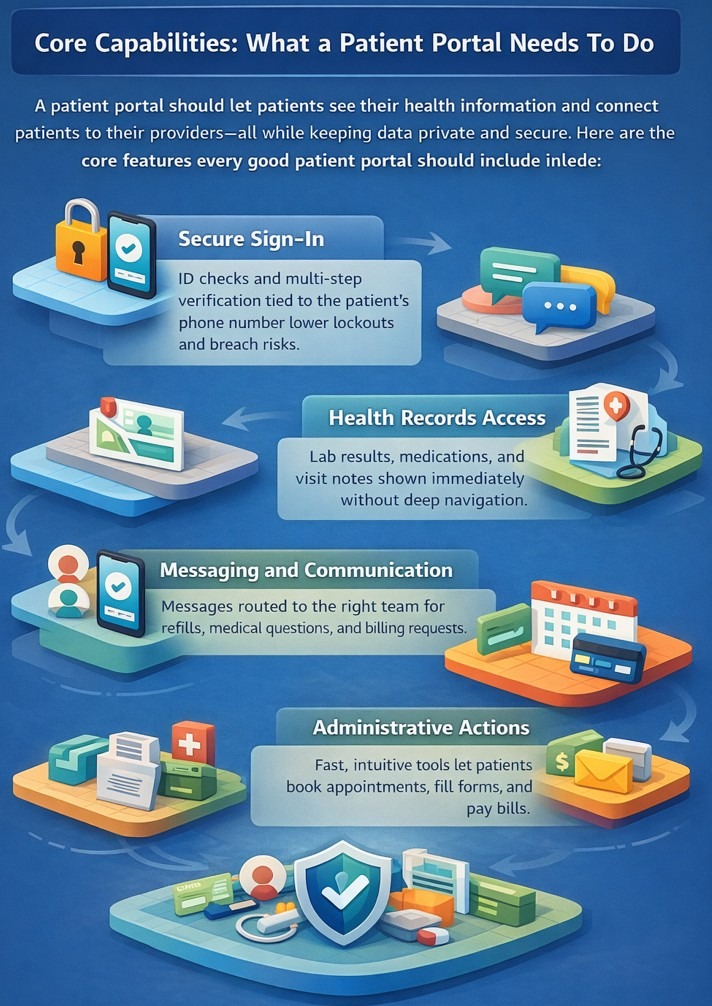
A patient portal should let patients see their health information and talk to their providers in one place. It also needs to keep that information safe and private. These are the core features every good patient portal should include:
Secure Sign-In
Signing in is the first step patients take to access a portal. Strong portals use ID checks and multi-step verification tied to the patient’s phone number. When sign-in works well, fewer patients get locked out, support teams handle fewer issues, and security risks like breaches decrease.
Health Records Access
Patients log in to access health records, such as lab results, medications, or visit notes. If they have to click through too many pages, the portal feels frustrating.
Good portals show key information right away. For instance, they display recent lab results immediately on the patient’s home page. Patients can also find a list of up-to-date medications and find visit notes linked to the doctor who wrote them. When patients can find answers on their own, they make fewer calls to the office.
Messaging and Communication
Messaging works best if a provider responds in a timely way. An effective setup sends messages to the right team. Medical questions go to care teams, while billing or office questions go elsewhere. Clear message types help keep refill requests, medical questions, and simple issues organized.
Administrative Actions
Administrative actions such as appointment scheduling, admission forms, and payment processing are common actions portals offer. But if these tools feel confusing or slow, patients may stop using them and instead use the phone.
Strong portals show real-time appointment slots based on the provider’s schedule. Once patients book an appointment, they should receive an email or text confirmation.
Forms should prefill known patient details so users don’t have to repeat the same information. Bill pay should be easy to find from the main screen, not hidden in menus.
Patient Portal Integrations That Actually Matter
Some integrations, like those with EHRs and billing systems, help transfer data to your portal and result in a faster workflow and better patient experience. If these integrations handle PHI, they most likely need to comply with HIPAA rules.
You should consider connecting the following tools with your patient portal:
EHR And EMR Systems
Patient portals that integrate with EHRs (electronic health records) or EMRs (electronic medical records) like Epic and Cerner can pull in clinical data that providers upload. This includes problem lists, medications, allergies, lab results, and notes. Secure login controls help match the data to the right patient.
When it comes to data update speed, some systems update data in real time, while others refresh every few minutes or even once a day.
Without connections to EHR or EMRs, the portal can only handle basic tasks like scheduling, payments, and patient-entered data.
Billing And Payments
Billing integrations let patients see claims, balances, payment history, and explanations of benefits. This helps patients understand what they owe without calling the office.
More complex issues, like billing errors or insurance questions, still need staff support. The system must check payer details and process billing data correctly to avoid mistakes.
Communication Systems
Patient portals connect with tools that send messages by text or email when something important happens. This might include the release of lab results, appointment reminders, or medication updates.
These messages often have higher open rates than portal notifications. They help bring patients back into the portal, where secure messaging can handle follow-up questions.
Third-Party Health Tools
Some portals connect to devices that track health data, like blood pressure monitors or glucose trackers. This data can flow into the patient’s record and help care teams track trends in real time or near-real time.
Third-party health tools work best when the data helps trigger clear actions or follow-up care.
Patient Portal Development Types, Costs, and Timelines: At a Glance
| Method | Best for | Pros | Cons | Cost |
|---|---|---|---|---|
| Out-of-the-box | Quick-launch clinics | Fast setup, built-in support | Limited control, rigid UX | $50–$500+/month/provider |
| No-code | Simple portals, small teams | No coding, affordable, fast | Limited customization, workflow constraints | $1K–$15K+/year |
| Low-code | Moderate customization needs | More flexibility, API support | Needs technical skills, setup | $10K–$50K/year |
| Traditional coding | Unique workflows, complex portals | Fully custom, highly scalable | Highest cost, ongoing maintenance | $40K–$500K+/year |
You can build a patient portal by selecting an out-of-the-box EHR vendor, choosing a no-code or low-code platform, or hiring an agency or in-house developers. Here’s a breakdown of each option:
Option 1: EHR Vendor Portals
Although pre-made vendor portals are more “plug-and-play” than custom-built solutions, these tools offer a solid option for clinics that want a quick setup. These platforms offer built-in integrations and support. Most can launch in a few weeks.
However, you get limited control over design and user experience.
Examples include Epic MyChart, Oracle Health, and athenahealth’s patient portal. Costs are usually included in your EHR subscription and range from $50/month per provider to $500+/month per provider.
Option 2: No-Code Platforms
No-code platforms that support HIPAA compliance, like Knack Health, allow you to build a portal with drag-and-drop interfaces and premade components. You can create and launch a portal in just a few months with no code.
But customization is limited, so if you need specially configured workflows, no-code platforms might not be a good fit. No-code development platforms typically cost under $1,000 to $15,000+ per year.
Option 3: Low-code Platforms
Low-code tools like Caspio also provide drag-and-drop tools and premade components. These platforms also allow you to further customize your app with code and specialized backend operations like real-time data sharing. Pricing ranges from $10,000 to $50,000 annually, and you can launch in a few weeks to a few months.
However, low-code tools require some technical expertise. So, if you want to select a low-code option, you should have a few folks who understand coding and how APIs work on your team.
Option 4: Traditional development
If you go for traditional development, you’ll hire an app development agency or onboard an engineer. Although this is the most expensive option, ranging from ~$40,000 to $500,000+/year, traditional development lets you create a unique and customized portal that often matches your requirements.
Build timelines depend on your portal’s complexity. A basic portal with scheduling and messaging may take a few months and cost on the lower end. More advanced systems with many integrations or remote monitoring can take much longer and cost significantly more.
You also need to plan for ongoing maintenance each year. This option works best for practices with unique workflows or specialized needs.
Which Portal Development Option Should You Choose?
Each of these 4 patient portal development approaches serves different build complexities and healthcare organizations. Here's how to pick the one for you:
Choose an Out-of-the-Box Option If You:
Are a smaller practice with few other external apps and need a proven solution fast
Choose a No-Code Platform If You:
Want to design and configure your own portal workflows, but don’t want to spend time and money on a developer.
Choose a Low-Code Platform If You:
Need flexibility with your integrations and data controls, and have a team member who has some coding experience.
Choose Traditional Development If You:
Have an enterprise health system and need complete control over scalability and data transfer.
Patient Portal Development Process: 6 Steps
Organizations build the best patient portals by following a process that focuses on their customized workflow, compliance, and integrations. Here are the 6 steps that providers should follow to build a suitable portal:
Step 1: Define the Portal’s Role in Your Workflow
Start by deciding what you want your portal to do. First, determine where the portal will fit into your current workflow, and write down the problems it solves. For instance, will your portal reduce scheduling through phone calls and emails? Or, are you looking to provide telehealth services that patients can access directly from your portal?
Understanding how your portal improves workflows helps you create a clear blueprint, so you stay focused and hit your goals.
Step 2: Identify Required Data and Integrations
Only include the data and integrations you need. Connecting tools that aren’t needed can create a fragmented system and frustrate everyone.
For instance, integrating your EHR with your portal lets patients access health data like visit summaries and test results. Review each data type and remove anything that doesn’t support the goal you’re trying to achieve.
Step 3: Plan Security and Compliance Early
Most patient portals handle Protected Health Information (PHI), so they need HIPAA-enabled features such as encryption for data at rest and in transit. These safeguards help protect PHI from accidental leakage and from bad actors trying to steal patient information.
Before you even start building your patient portal, you’ll need to make sure that your developer or software vendor provides a Business Associate Agreement (BAA). This contract, between providers and vendors, states that the vendor will safeguard Protected Health Information (PHI) and comply with HIPAA regulations.
Most systems that handle your PHI, such as your cloud service provider, will require a BAA. Always check with your compliance department which systems require BAAs.
Step 4: Design User Roles and Access Levels
Role-based permission tools set clear restrictions for patients, clinicians, front desk staff, billing teams, and admins. Give each group access only to what it needs. For instance, front desk staff can view appointments, but they can’t access test results. Use role-based access control to enforce these permissions.
Make sure your system has audit logs that track who makes changes and who logs into the portal. For example, you can identify which doctor uploaded blood tests and see when a patient accessed the results. These logs help you stay compliant and prevent issues later.
Step 5: Test With Real Workflows
Before you launch, run your portal through real scenarios like patient intake, care coordination, and message handling. Have some of your team members book sample appointments, and have other providers upload sample test results.
Then, slowly release your portal in “beta version” for no more than 15 patients. A small number of testers keeps the process simple, which gives your team ample time to spot and correct mistakes. Ask for their feedback often, and make changes where necessary.
Step 6: Launch, Monitor, and Maintain
Once your portal is bug-free and the patients confirm that it offers a smooth and simple user experience, launch it for all your patients. Monitor performance regularly, track issues, and apply updates as needed to keep the system reliable and running smoothly.
Issues that Hurt Patient Portal Adoption
Sometimes, your portal may cause problems that reduce patient usage. Here are the issues that can drive patients away:
- Poor mobile experience: Many patients use their phones to access portals, so if your portal doesn’t work well on mobile, they leave. When designing your portal for mobile, use large buttons, simple layouts, and smooth form entry to make tasks easier.
- Fragmented data sources and integrations: Patient data often comes from different systems, and it doesn’t always match. For example, medication lists may differ between the pharmacy and what the patient reports. Systems need to organize and clean data so it stays consistent across sources and appears professional to patients.
- Incomplete self-service workflows: Some portals only handle basic tasks like scheduling or messaging. When patients can’t refill prescriptions, view test results, or complete forms, they may have to call the office. Portals should support full workflows from start to finish so patients can complete tasks at once.
Patients compare the portal to calling the office. If the portal feels slower or harder to use, they may stop using it. Try to avoid shortcuts during development, because they lead to abandoned accounts and more phone calls, which you’re most likely trying to avoid.
Let Blaze Develop Your Patient Portal
Patient portal development stalls when internal teams get pulled between compliance reviews, integration headaches, and clinical feature requests. Instead of dealing with these hurdles on your own, hire Blaze. They’ll handle the build end-to-end so your staff stays focused on care delivery instead of development.
- Secure patient-facing apps built for you: Get production-ready portals, telehealth tools, intake workflows, and clinical databases delivered ready for patient use.
- Faster rollout than traditional development cycles: Go live in weeks rather than months with a 3-person team, including a project manager, healthcare developer, and integration engineer.
- Modern clinical features and integrations: Powers healthcare AI workflows like automated intake and chart extraction, paired with EHR and EMR integrations engineered for live clinical environments.
- Built on compliance-ready infrastructure: Blaze is a HIPAA-enabling, HITRUST e1-certified, SOC 2 healthcare app development platform.
Schedule a free build consultation call today and tell us what you need in your patient portal. Whether your portal project is stuck because of an EHR integration, HIPAA review cycles, or scoping, Blaze clears the path.
Frequently Asked Questions
What Is the Difference Between a Patient Portal and a Patient App?
A patient portal is a web-based extension of an EHR for records, messaging, and scheduling. A patient app is a standalone tool with broader features like device tracking. Both systems improve patient engagement beyond basic record access.
Do Patient Portals Need to Integrate With EHR Systems?
Yes, EHR integration is essential for portals to pull clinical data like lab results, medications, and visit notes. Without it, portals could handle only basic tasks. EHR integration cuts manual updates and reduces staff phone volume.
What Technologies Are Used to Build a Patient Portal?
Patient portals use frontend frameworks like React and Angular, backend languages such as Node.js, Python, and secure databases built on PostgreSQL. They connect with EHR via FHIR APIs, which are typically hosted on HIPAA-enabling cloud infrastructure. This technology reduces compliance risk through encryption, audit logs, and access controls.
Sources
1. U.S. Department of Health & Human Services. “Summary of the HIPAA Security Rule.” HHS.gov. https://www.hhs.gov/hipaa/for-professionals/security/laws-regulations/index.html
2. U.S. Department of Health & Human Services. “Security Rule Guidance Material.” HHS.gov. https://www.hhs.gov/hipaa/for-professionals/security/guidance/index.html
3. National Institutes of Health: StatPearls. “Health Insurance Portability and Accountability Act (HIPAA) Compliance.” NCBI. https://www.ncbi.nlm.nih.gov/books/NBK500019/
The Secure No-Code & AI Platform
Supercharge your team's operations and performance with better apps and tools.
Create custom apps fast
Secure & HIPAA compliant
Streamline complex workflows

The Secure No-Code Platform
Build apps with best-in-class security.
Related Articles
Discover related guides on healthcare no-code development, HIPAA compliance, security, integrations, and launching apps faster.
.png)
17 Top Customer Service Platform: 2026 (Tested & Compared)
Shopping for a customer support platform portal and need some inspiration? I reviewed the top 17, shared features, pricing details, and my verdict.
%20(1).png)
8 Healthcare Dashboard Examples (2026)
Explore healthcare dashboard examples for hospital operations, revenue, and compliance. Discover what each dashboard tracks and how to build one.
%20(1).png)
Healthcare Claims Automation: How It Works (2026)
Healthcare claims automation connects systems to reduce repetitive work. Explore the 9 workflow stages that show how eligibility, validation, and payments move.