
Table of contents
Mendix Review: Is It Worth It in 2026?

Written by
Blaze Team

Reviewed by
Nanxi Liu
Expert Verified
Mendix’s core offering is delivering an enterprise application development tool to teams with limited technical resources. In practice, though, building production-ready software still requires technical knowledge that many organizations underestimate.
To see how the platform performs, I signed up for the free version and built a healthcare prior-authorization app. I tested Maia AI, which allowed me to build my app quickly, and ran through its integration capabilities. Mendix proved capable of handling complex enterprise applications, but had a technical learning curve.
This Mendix review explains where the platform excels, where it falls short, what users think, and which teams are most likely to benefit. In the end, you’ll be able to decide if it's the right choice or if a healthcare-focused alternative is a better fit.
Mendix Review: Quick Verdict
Mendix is best for enterprises building complex internal business applications with experienced IT teams. It excels at visual development, workflow automation, and integrations, but it’s technical and takes time to learn.
Key Features from Testing Mendix
Some key features Mendix offers are a handy AI assistant and a visual development interface. I signed up for Mendix’s free version and tested the platform by building a sample prior authorization app. My app would simulate one that helps healthcare staff submit, track, and manage authorization requests in one place.
To get started, I downloaded Mendix’s console, Studio Pro, to my computer, which connected directly to my Mendix account.
Here’s what I learned when building my test app:
AI-Assisted Development (Maia)
Maia, Mendix’s AI assistant, lives in a panel on the right corner of Studio Pro. You can ask it to help you develop parts of your app. When I asked it to help launch my database, Maia drew up data types such as patient, provider, and insurance provider. To configure each type, I just had to click on the tab so I could edit in the box.
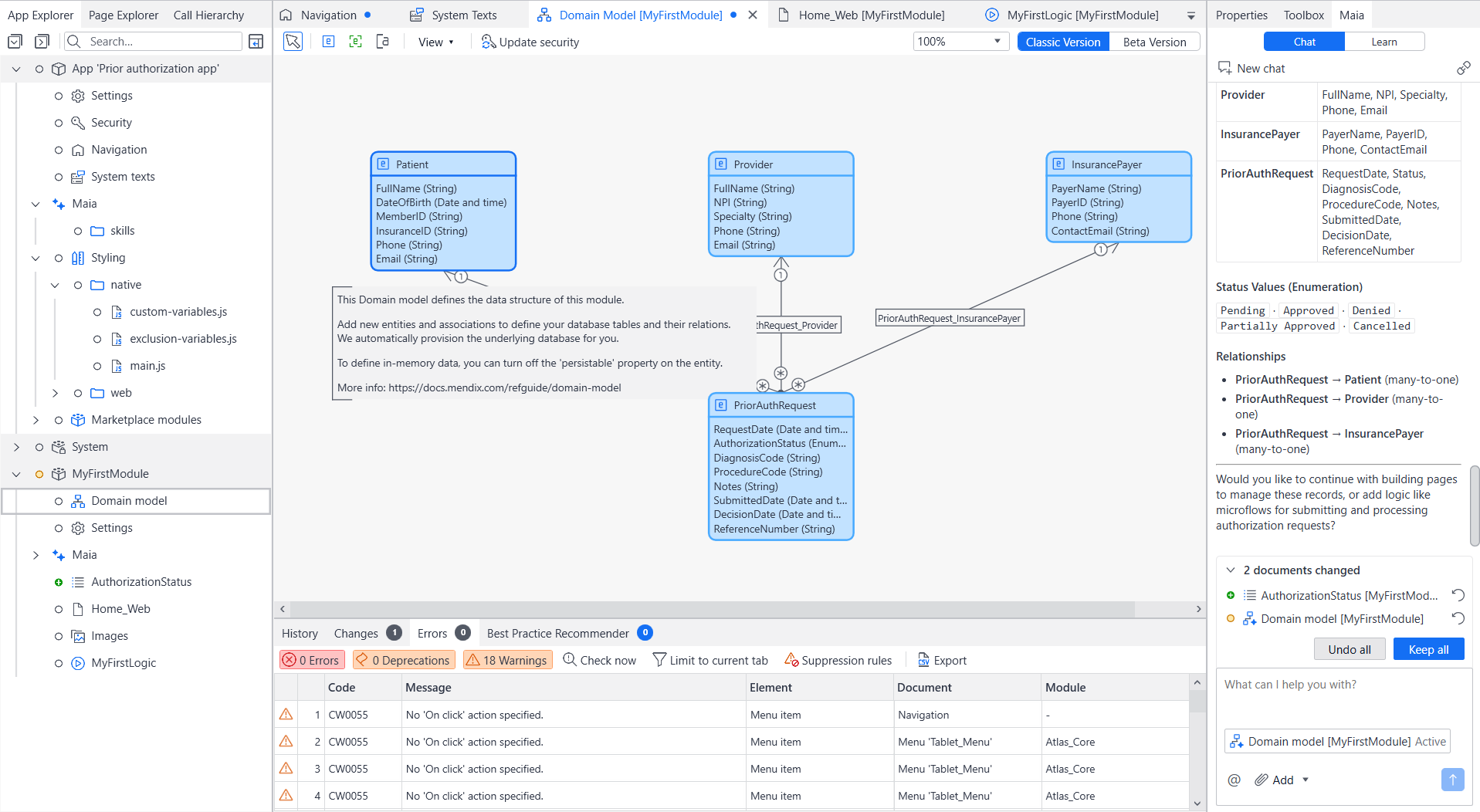
Mendix’s AI is helpful when you run into questions or get stuck during development. It can walk you through problems step by step and suggest solutions. It can also "vibe code" parts of your app, which you can then customize to fit your exact requirements.
Visual Application Development
The platform uses a visual modeling environment called Studio Pro, which is an app that you download to your computer. You can assemble pages, data models, and business logic using the visual interface.
Mendix’s interface helps business applications move from requirements to working prototypes without long development cycles. During my test, I could change layouts or add new entities in just minutes because everything remained connected visually.
This approach was straightforward, making revisions easier after adding new requirements.
Workflow Automation
Mendix uses visual flows that control approvals, notifications, and validations for building workflow automations. My sample application routed authorization requests through review stages without requiring separate tracking spreadsheets or email chains.
For example, when I tested an authorization denial process, Mendix built a path that automatically returned it to staff with the required correction reason before another submission.
Integrations and Connectivity
Mendix includes connectors, APIs, and other integration tools that let your apps exchange information. These are the tools that allow you to connect all other pre-existing software, such as an EHR or telemedicine app, directly to your Mendix-built apps.
However, this is where some users might encounter difficulties. You should understand how APIs work, how to read API documentation, map data fields between systems, troubleshoot connection errors, and work with authentication methods such as OAuth or API keys.
During testing, most of my time went toward validating data and fixing field mapping issues. For example, connecting a clinical data app mainly involved matching patient lab results and visit information between two systems instead of creating a custom integration from the ground up.
Security and Governance
Security and governance are the controls that determine who can access application data, what actions they can perform, and how those permissions are managed across the application. These controls protect sensitive information and support HIPAA security requirements by limiting access to PHI (Protected Health Information).
During testing, I assigned different permissions to user roles such as clinicians, administrators, and front desk staff. This let each person see only the pages and information they needed without creating separate versions of the app.
Setting permissions inside my app's data model also made security easier to manage than writing custom access rules throughout the application. When configured correctly, role-based access control keeps your software HIPAA-ready and helps staff see only the information they need to do their jobs.
Deployment and Application Management
Deployment tools package your app, manage environments (the different setups where your app runs, such as development, test, and production), and move updates into live use. Mendix offers built‑in environment and deployment management. This lets you develop many apps directly from the platform without custom scripts or separate tools.
Although Mendix simplifies deployment, you still need technical skills to manage environments safely. Understanding application lifecycles and version control helps with smooth update rollouts. Those skills become more important as your Mendix applications grow and multiple developers work on the same project.
What Other Users Are Saying about Mendix
I researched what users said about Mendix on websites like G2, Reddit, and Trustpilot. Here’s what I found:
Mendix Pros
- Fast development helped with complex integrations: Mendix accelerated a client’s app development through rapid data integration, flexible customization, and an easy setup that supported steady growth.
- Integrated enterprise systems with rapid setup: The platform simplified a user’s enterprise application development by integrating SAP and Teamcenter while replacing manual Excel workflows with collaborative features.
- Balanced rapid development with flexibility: Mendix delivered fast application development while maintaining the flexibility to support complex business requirements with custom widgets, integrations, and Java actions.
Mendix Cons
- Maintenance becomes harder over time: A user noted that as Mendix-built applications grow, interconnected workflows become more difficult to understand, making changes riskier.
- Limited debugging and version control: Debugging tools and version control flexibility for large applications can be slower than traditional development.
- Integrations require technical expertise: Developers still need a strong understanding of connected systems to avoid implementation issues.
Mendix Pricing
Mendix offers a limited free version, a Standard plan, and a Custom plan. Here’s a look at each one:
Free ($0/month)
The Free plan lets you explore Mendix and build apps with limited resources and functionality. It’s intended for demos, prototypes, or small applications. You get to download the core development tools, which come with Maia for collaborative editing. It includes 2 environments per app: One for local development and one production environment on Mendix Cloud.
Standard (Starting at $1,090/month)
The Standard plan targets department-level business apps with dedicated databases, up to 4 environments, identity provider integration, scaling, operational dashboards, and business-hours support. For Standard, Mendix Cloud and other deployment options are available at additional cost.
This plan suits organizations running production apps with moderate infrastructure requirements.
If you need to build multiple applications, the Unlimited Apps Standard option starts at $2,725.
Premium (Custom pricing)
The Premium plan is designed for systems that require advanced governance and infrastructure control. It offers high availability/fallback, multi‑region failover, and horizontal scalability as additional‑cost options, along with a private marketplace.
You can also receive disaster recovery features and some infrastructure capabilities as paid add-ons. Because it’s intended for enterprise organizations, you’ll need to set up a meeting with their sales team to receive a quote.
Alternative Options to Mendix
If you don’t think Mendix is right for your organization, plenty of alternatives are out there. Here are four Mendix competitors, each with customized pricing and most HIPAA-enabling features for healthcare use:
My Analysis: Is Mendix Right for You?
Mendix is a great platform for creating customized enterprise applications without extensive coding. But it’s not for everyone. Here’s how to determine if Mendix fits your app needs:
Use Mendix If You ...
- Are building enterprise internal apps: Organizations building large internal business applications with custom workflows, multiple user roles, and long-term scalability will get the most value from Mendix.
- Need complex workflows and integrations: Projects that depend on connecting multiple business systems, clinical data integration, and automating approval processes across departments are a strong fit for Mendix.
- Have a technical team with a long-term roadmap: Teams with experienced developers and business analysts who will continuously maintain, expand, and support the application after launch are well suited for Mendix.
Avoid Mendix If You ...
- Need simple apps quickly: Organizations that only need a basic application should look elsewhere because Mendix's capabilities exceed the requirements of straightforward projects.
- Want straightforward pricing: If you need transparent pricing like a monthly subscription, consider other platforms because Mendix requires contacting the sales team for a custom quote.
- Prefer a less technical platform: Teams seeking minimal technical involvement should consider a simpler platform because building, integrating, and maintaining Mendix applications still requires development knowledge.
Blaze.tech: A Self-Serve and Vendor-Assisted Mendix Alternative
If this Mendix review raises flags about the platform being too technical, Blaze offers another path. It combines a healthcare-focused application platform with optional implementation services, so you can build applications yourself or have an experienced team deliver them for you.
Here’s why hundreds of healthcare providers opt for Blaze:
- Choose your development approach: Work with a 3-person implementation team for a production-ready healthcare application, or build it yourself using the platform.
- Designed for healthcare applications: Create patient portals, clinical databases, care coordination tools, and other healthcare software without starting from scratch.
- Faster deployment timelines: Launch production applications in weeks instead of the months commonly associated with traditional custom software projects.
- AI built for clinical operations: Connect OpenAI, automate patient intake, extract information from documents, and integrate with EHR and EMR systems using healthcare-focused workflows.
- Compliance-ready foundation: Blaze is a HIPAA-enabling, HITRUST e1-certified, SOC 2 Type II healthcare application development platform.
Schedule a free build consultation call today and see how Blaze can help you avoid spending months evaluating platforms that exceed your requirements or demand more technical resources than your team has.
Frequently Asked Questions
Is Mendix Easy to Learn?
Mendix is not easy to learn for non-developers, but if you have development experience, the platform is easy to learn. You can ask Mendix’s AI assistant, Maia, to help create features that you can customize. The platform also offers a Mendix Academy. However, learning the platform will take several months of dedicated study.
Is Mendix Really Low-Code?
Yes, Mendix really is low-code. However, Mendix uses visual modeling for pages, data, and logic, which greatly reduces the amount of manual coding. Complex integrations and custom workflows still require developer expertise, so the platform speeds up development without removing the need for technical oversight.
Who Should Use Mendix?
Enterprises with experienced IT teams building complex internal apps, multi-role workflows, and system integrations should use Mendix. It supports long-term scalability while avoiding the limitations of simpler, less flexible platforms.
Sources
1. U.S. Department of Health & Human Services. “Summary of the HIPAA Security Rule.” HHS.gov. https://www.hhs.gov/hipaa/for-professionals/security/laws-regulations/index.html
2. U.S. Department of Health & Human Services. “Security Rule Guidance Material.” HHS.gov. https://www.hhs.gov/hipaa/for-professionals/security/guidance/index.html
3. National Institutes of Health: StatPearls. “Health Insurance Portability and Accountability Act (HIPAA) Compliance.” NCBI. https://www.ncbi.nlm.nih.gov/books/NBK500019/
The Secure No-Code & AI Platform
Supercharge your team's operations and performance with better apps and tools.
Create custom apps fast
Secure & HIPAA compliant
Streamline complex workflows

The Secure No-Code Platform
Build apps with best-in-class security.
Related Articles
Discover related guides on healthcare no-code development, HIPAA compliance, security, integrations, and launching apps faster.
%20(1).png)
Hospital App Development: Features, Steps, and Costs in 2026
Hospital app development costs range from $1,000 to over $1 million. Compare needed features, EHR integrations, development steps, and the 3 build approaches.
%20(1).png)
EHR Implementation Cost Breakdown
This EHR implementation cost breakdown reveals upfront, ongoing, and hidden expenses. Compare costs from client projects and research to help you budget.
%20(1).png)
7 Top White Label Telehealth Platforms + How to Pick (2026)
I reviewed seven white-label telehealth platforms to see how they compare. Explore pricing, branding, integrations, and the best fits available.