
Table of contents
Clinical Data Integration in Healthcare: How to Choose + Guide | 2026

Written by
Blaze Team

Reviewed by
Nanxi Liu
Expert Verified
Clinical data integration in healthcare connects medical applications so providers can securely share patient data across a unified network.
Here’s my breakdown of how to successfully deploy clinical data integration in healthcare, some examples, and how it can benefit your organization.
Clinical Data Integration: A 30-Second Explanation
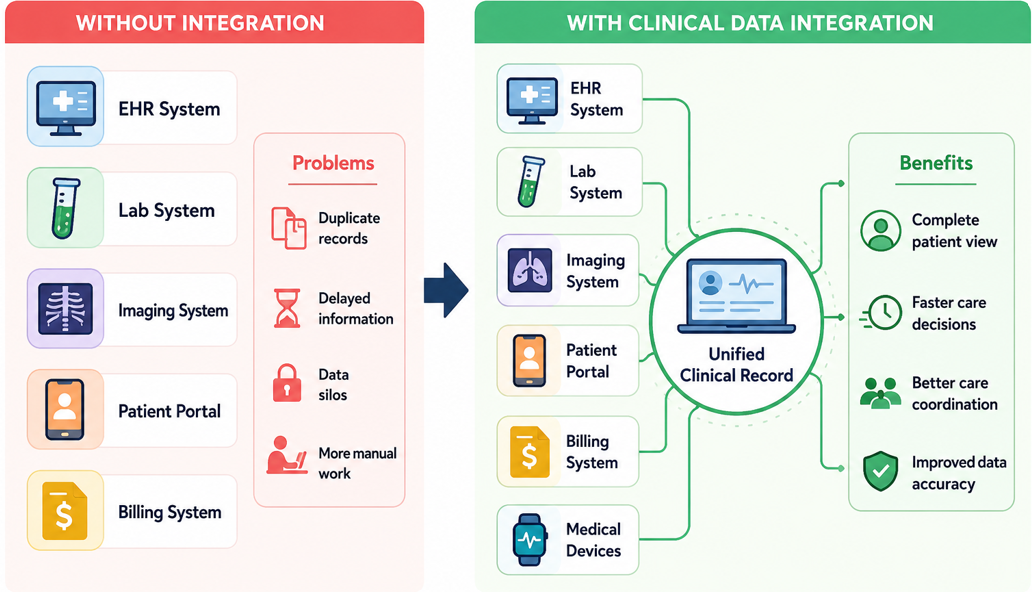
Clinical data integration connects patient records, lab results, imaging, and clinical notes from different systems into one place, allowing teams to find data simply. Instead of waiting for faxed notes or manual exports, integrated systems give clinicians access to a complete patient record at the point of care.
For example, a hospital doctor can see a patient’s past discharge note and medical records in one view. They don’t need to click through several programs to track down the info they need.
When these systems connect, healthcare teams get faster and clearer information.
How to Successfully Implement Clinical Data Integration in Healthcare
You’ll need to follow a 4-step process to successfully implement clinical data integration in healthcare. Make sure that your data sources and connected systems all have HIPAA-enabling features like role-based permissions and audit logs. Follow this sequence for optimal clinical data integration in healthcare:
Step 1: Identify the Data You Need to Collect
The first step is finding all the places where patient data lives. Most healthcare organizations store information in several systems, and each system collects different types of data. Here are some of the most common data sources and why they matter:
- Electronic health records (EHRs): These systems store patient histories and clinical notes. Connections, such as integration with an Epic EHR, provide the core information clinicians use to understand a patient's health and treatment history.
- Lab systems: Clinicians use patients’ lab results to monitor health conditions, adjust treatments, and identify new medical problems.
- Imaging platforms: These platforms store X-rays, CT scans, MRIs, and other diagnostic images along with radiology reports. The records help clinicians diagnose conditions and track changes over time.
- Patient portals: Messages, questionnaires, symptom updates, and other patient-submitted information often enter the healthcare system through portals. This information helps clinicians understand what happens between office visits.
- Medical devices and wearables: Glucose monitors, heart monitors, and other connected devices collect health data throughout the day in real time or near real time. This information can help clinicians spot problems earlier and monitor treatment progress.
- Billing and claims systems: Claims records track diagnoses, procedures, and healthcare services across different care settings. They help organizations understand costs and services received over time.
Clinical data integration brings information from these systems into one place. Providers can quickly access the data they need, helping them make better care decisions.
Step 2: Standardize and Transform Data
Before you combine data from the above sources, you need to make sure it’s clean and standardized. This is because data from different systems rarely match perfectly: One system may use a different patient ID format, another may record measurements in different units.
You’ll need to create a common format, fix inconsistencies, and remove duplicate records. By standardizing and changing your data, clinicians can see a single patient record instead of multiple incomplete versions. Here are the industry data standards:
- HL7 (Health Level Seven): Many hospitals use HL7 to exchange information such as patient demographics, lab results, admissions, discharges, and billing data between systems.
- FHIR (Fast Healthcare Interoperability Resources): Modern healthcare applications often rely on FHIR APIs to share patient data quickly and connect with other software systems.
- DICOM (Digital Imaging and Communications in Medicine): Medical imaging systems use DICOM to store, transmit, and manage X-rays, CT scans, MRIs, ultrasounds, and other diagnostic images.
- CDA (Clinical Document Architecture): Healthcare organizations use CDA to structure documents such as discharge summaries, progress notes, and patient reports so both clinicians and software can read them.
Step 3: Create a Unified Clinical Record
Once you’ve connected and standardized your data, your team can create a unified patient record. This record is where providers find the data they need. It allows them to avoid jumping between platforms or making phone calls to other departments.
Step 4: Validate, Monitor, and Maintain
Once the unified record is live, validate that data flows correctly across every connected system before opening it up to clinical workflows. Run test cases against real patient scenarios, confirm that audit logs capture every transfer, and set a cadence for monitoring data quality after go-live. Integration projects tend to fail in the months after a launch, when small mismatches multiply. Build the maintenance plan into the rollout, not after it.
Clinical Data Integration Examples
Clinical data integration looks different depending on where it's applied. These are some common examples that use clinical data integration in healthcare:
Hospital and EHR Integration
For hospitals, EHR integration centralizes patient records, clinical documentation, and care coordination. Providers from all departments can conveniently access these records in one place instead of a care team piecing together a patient's history from separate sources.
Laboratory and Imaging Integration
Lab and imaging integration connects diagnostic results directly to the clinical record. A physician waiting for a CT reading doesn't need to follow up with the lab or check a separate portal. Results arrive in the same record where the order was placed, flagged against reference ranges and prior values.
Clinical Research Integration
Research integration pulls clinical trial data and outcomes reporting into a unified pipeline instead of a spreadsheet maintained by a coordinator. The team submits regulatory filings using the same dataset used for clinical reporting, with a clear audit trail that shows who viewed, changed, or updated each record.
Benefits of Clinical Data Integration
Clinical data integration benefits healthcare organizations by helping improve care and improving data quality. Here’s how it can serve you:
- Improves care coordination: Integrated data gives every provider on a care team the same record. Hospitals and clinics see test results and documentation in one view, so care decisions get made off the same source instead of stitched-together notes.
- Reduces duplicate data entry: Data moves automatically between healthcare workflows and connected software. Staff can spend less time updating entries manually and more time on work that requires human judgment.
- Increases data accuracy: Integration eliminates the transcription layer where most errors originate, so the record clinicians act on reflects what actually happened. Every system reflects the same patient information, preserving data integrity.
- Strengthens healthcare analytics: By bringing information from clinical, operational, and financial systems into a unified dataset, clinical data integration can give healthcare organizations a complete view of performance and outcomes.
Clinical Data Integration Challenges
Clinical data integration projects often encounter technical, operational, and compliance obstacles that increase complexity, extend implementation timelines, and require careful planning before data can move reliably between systems.
Legacy Systems
Healthcare software development companies created older, legacy clinical platforms to store data, not share it. Many predate modern API standards entirely, so clinical data integration for these systems requires custom middleware or full replacement cycles that stretch timelines by months.
Although legacy systems often still work for their original purpose, attempting to connect other healthcare apps and software presents new constraints. A legacy EHR system may work well day to day, but connecting it to other systems often reveals problems that require extra work to fix.
Inconsistent Data Formats
Inconsistent data formats usually result when two systems record the same diagnosis code in different ways. Field names, date formats, and clinical terminology vary enough across platforms that direct data transfers create mapping errors before a single record moves.
EMR integration adds another layer of complexity when records must align with scheduling, billing, lab, and reporting systems. Avoid data formatting challenges by standardizing your data format before integration, not during it. This usually takes longer than project plans anticipate.
Data Quality Issues
Data quality problems arise from duplicate patient records and incomplete fields. These problems become visible when data starts to move between systems. Prevent this by defining, applying, and maintaining validation rules across every connected system.
HIPAA and Security Requirements
PHI moving between systems creates security risks that healthcare organizations must address with HIPAA-enabling safeguards. Access controls limit who can view specific data, while audit logs track every user action and data transfer.
Encryption protects data as it moves between systems by making it unreadable to unauthorized parties, even if someone intercepts it.
How To Choose a Clinical Data Integration Solution
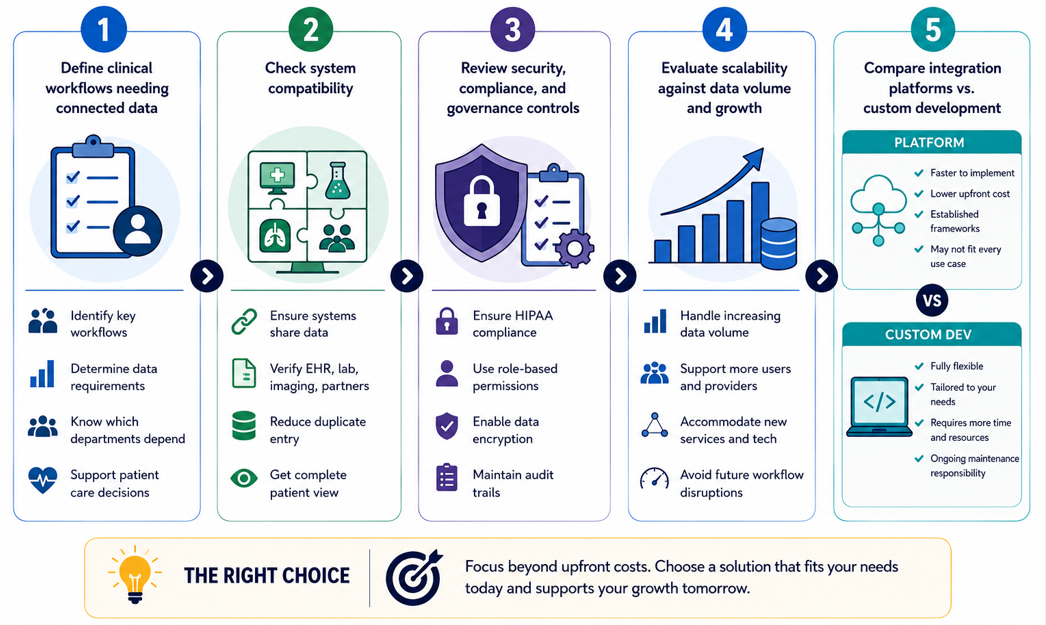
The right clinical data integration solution depends on a structured evaluation process that helps you avoid costly mismatches between your operational needs and long-term growth plans. Follow this process to pick the right one:
Step 1: Define the Clinical Workflows That Need Connected Data
Start by identifying clinical workflows that rely on information from multiple systems before integration work begins. Examine your workflows for patient care, reporting, scheduling, and billing. These are the processes that will depend on accurate data sharing.
After your examinations, determine clear requirements for how data should move throughout the system. Identify which departments depend on shared information to support daily decision-making and patient care.
Step 2: Check System Compatibility
Confirm that your existing systems can share data effectively. Healthcare systems need to exchange and use information without manual intervention. Compatibility with EHRs, laboratory systems, imaging platforms, and external partners determines how complete the clinical record becomes.
Strong connectivity reduces duplicate data entry and information silos, giving care teams a more reliable view of patient activity.
Step 3: Review Security, Compliance, and Data Governance Controls
Review how the integration protects, accesses, and monitors the data it will transfer. Make sure you can implement HIPAA-enabling features like audit trails, role-based permissions, and encryption to help you avoid breaches and penalties.
Step 4: Evaluate Scalability Against Data Volume and Growth
Determine whether your systems can support increasing data volumes and user demand over time. Your system’s data volumes will most likely expand as you add providers, patients, services, and connected technologies. Evaluating growth capacity early reduces the likelihood of workflow disruptions and infrastructure limitations that appear down the line.
Step 5: Compare Integration Platforms Against Custom Development
The last step is to decide whether your organization needs an integration platform or a custom-made solution. This decision determines how you’ll approach control and ongoing maintenance.
Custom development offers flexibility. You can configure each integration to specific workflows and data structures. But you’ll be responsible for updates, monitoring, and troubleshooting. This means you’ll most likely need a technical team.
Integration platforms reduce costs and time commitment by providing established frameworks for connectivity and management. However, they may not support every use case or data structure. This makes them limited compared to a fully custom solution.
Overall, the right choice for your organization depends less on upfront implementation costs and more on the resources required years after deployment.
Let Blaze Integrate Your Clinical Data
Many healthcare organizations discover that out-of-the-box clinical data integration solutions present challenges, especially when they need custom data transfer. Blaze helps teams unify clinical data and automate workflows with custom development. We’ll cover your long-term maintenance demands that come with custom-built integration solutions.
Here’s why more healthcare organizations trust Blaze:
- Get secure clinical integration built for you: Receive production-ready integration tools, including custom patient portals, connected EHR workflows, and clinical databases delivered and ready to deploy.
- Faster implementation than traditional builds: Launch in weeks instead of months with a 3-person team, including a project manager, healthcare developer, and integration engineer.
- Integrations built for real clinical workflows: Connects to a wide variety of EHR systems and integrates with Stedi for claims, eligibility, and ERA workflows, alongside custom HL7 and FHIR builds for the data flows that off-the-shelf platforms don't cover.
- Built on compliance-ready infrastructure: Blaze is a HIPAA-enabling, HITRUST e1-certified, SOC 2 Type II healthcare app development platform.
Schedule a free build consultation call today and learn how Blaze can help you build data integrations so your healthcare apps can talk to each other without time-consuming workarounds.
Frequently Asked Questions
What Is the Difference Between Clinical Data Integration and Interoperability?
Clinical data integration consolidates records from multiple systems into a unified patient record. For instance, lab results, imaging reports, and EHR data appear together. Interoperability defines the standards, such as HL7 and FHIR, that allow integrated systems to communicate. Both create consistent formats for securely exchanging healthcare information.
Does Clinical Data Integration Need HIPAA-Enabling Features?
Yes, any system moving PHI between platforms must include role-based access controls, audit logs, and encryption. Without these safeguards, organizations risk breaches and regulatory penalties that disrupt operations and erode patient trust. However, HIPAA compliance applies to your entire organization, not your clinical data integration or connected platforms.
How Long Does Clinical Data Integration Take?
Clinical data integration can take as little as a few weeks to several months. Timelines vary based on system complexity, data quality, and legacy infrastructure. However, standardizing data formats and choosing a compliance-ready platform before build begins cuts implementation time and avoids costly mid-project corrections.
Sources
1. U.S. Department of Health & Human Services. “Summary of the HIPAA Security Rule.” HHS.gov. https://www.hhs.gov/hipaa/for-professionals/security/laws-regulations/index.html
2. U.S. Department of Health & Human Services. “Security Rule Guidance Material.” HHS.gov. https://www.hhs.gov/hipaa/for-professionals/security/guidance/index.html
3. National Institutes of Health: StatPearls. “Health Insurance Portability and Accountability Act (HIPAA) Compliance.” NCBI. https://www.ncbi.nlm.nih.gov/books/NBK500019/
The Secure No-Code & AI Platform
Supercharge your team's operations and performance with better apps and tools.
Create custom apps fast
Secure & HIPAA compliant
Streamline complex workflows

The Secure No-Code Platform
Build apps with best-in-class security.
Related Articles
Discover related guides on healthcare no-code development, HIPAA compliance, security, integrations, and launching apps faster.
10 Best HIPAA-Compliant Telehealth Platforms and Features | 2026
HIPAA-compliant telehealth platforms provide secure medical visits. Top platforms are Doxy.me and Zoom for Healthcare. Compare tools and learn your best fit.
.png)
10 Best Replit Alternatives: Tested for Developer Tasks (2026)
After comparing 10 Replit alternatives, I found differences in compliance features and needed coding skills. Discover platforms and prices to find the best fit.
%20(1).png)
Healthcare Claims Automation: How It Works (2026)
Healthcare claims automation connects systems to reduce repetitive work. Explore the 9 workflow stages that show how eligibility, validation, and payments move.