
Table of contents
Pharmacy App Development Guide: Costs & Build Options | 2026

Written by
Blaze Team

Reviewed by
Nanxi Liu
Expert Verified
I’ve helped organizations with pharmacy app development since 2022, and I always recommend that they begin by planning their core components and integrations. Here, I’ll break down the 6 steps I use to create software that reduces manual data entry and leads to greater patient and provider adoption.
Why You Should Develop an App For Your Pharmacy
Pharmacy app development is the process of building an online platform that helps both patients and pharmacists.
Patients can request refills, receive reminders, get pickup updates, and communicate securely with the pharmacy team. They can avoid annoying phone calls and get what they need by simply logging in to the app.
For pharmacists, a pharmacy app puts refill requests, status checks, reminders, and patient messages into one digital system. When the app connects to pharmacy software or dispensing workflows, it can reduce repetitive manual tasks and help staff respond faster to patient needs.
Types of Pharmacy Apps
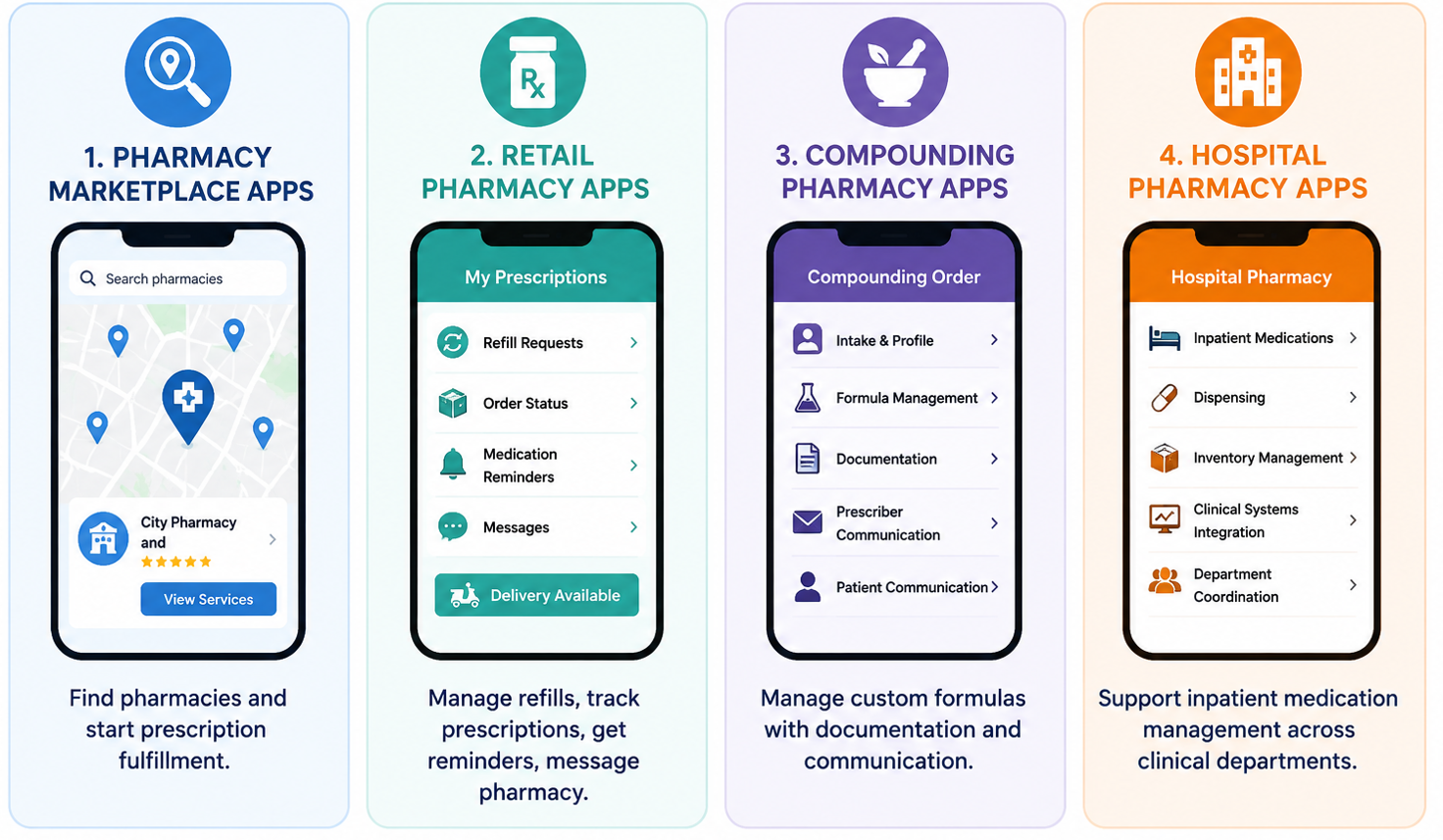
Different types of pharmacy apps help patients find pharmacies and manage prescriptions, while others support complex medication management in hospitals and specialty care settings. Here are the 4 main types of pharmacy apps:
- Pharmacy marketplace apps: Acting as pharmacy directories and ordering platforms, these help patients find pharmacies that meet their medical needs. Patients can compare available services and begin prescription fulfillment.
- Retail pharmacy apps: Focused on everyday prescription management, these platforms handle classic refill requests, prescription status tracking, medication reminders, and patient messaging. Patients can access the app and pick up prescriptions on their own, or have prescriptions delivered to their home if the app has a delivery service.
- Compounding pharmacy apps: Instead of focusing mainly on standard refills, these apps centralize records so pharmacists can manage patient-specific formulations. They feature digital tools to support accurate intake, clear documentation, formula management, and communication with prescribers and patients.
- Hospital pharmacy apps: Designed for inpatient medication management, these solutions support pharmacy teams across multiple clinical departments. They often integrate with clinical systems to coordinate dispensing and inventory management across many teams.
Each type of pharmacy app can support organizations of almost any size. For example, a startup pharmacy might build a retail app to manage local prescription deliveries. A large pharmacy chain could deploy a retail app across hundreds of locations.
Key Features of Pharmacy Apps
A pharmacy app's features should help manage prescriptions, reduce administrative work, and improve patient access. Here are some key features to include:
Prescription Management
Prescription management features are records of a patient's full medication history, which your staff can access and see in one place. When a patient messages about a refill, providers can find information about remaining medicine and refill details such as dosage and volume.
For new prescriptions, a structured in-app submission flow routes the request directly into the approval queue, triggers the right review step based on medication type, and notifies the patient when it's ready.
Medication Reminders
Pharmacy apps should track how far along patients are with their medications and send dose reminders tied to the fill date. They should send refill alerts before the supply runs out to keep the patient on schedule without requiring your staff to track manually across hundreds of active patients.
E-Prescribing Integrations
E-prescribing integrations connect a pharmacy app to other apps like electronic prescribing networks, EHR systems, and pharmacy management software. These connections allow all information that comes from the prescriptions, such as renewal requests and dosage changes, to move automatically between providers and pharmacies without manual data entry.
Inventory Management
Inventory management features alert staff when medications are beginning to run low. Medication availability updates automatically as inventory levels change. When stock runs low, the system can notify staff and generate reorder requests for approval.
Delivery Management
Delivery management gives patients visibility into when their medication will arrive. Order tracking and automated delivery notifications reduce inbound status calls, and route management on the operational side keeps fulfillment from stacking up when volume spikes.
Insurance Verification
Built-in insurance eligibility checks and coverage validation run whenever a patient submits a prescription request. This lets the patient learn about a coverage problem early.
Secure Payments
Payment processing inside the app collects co-pays at the point of order, which reduces transaction time. Billing records stay attached to the transaction, so disputes have a documented trail instead of a conversation no one wrote down. These payment features can also be integrated with a payment provider like Stripe or Plaid.
HIPAA-Enabling Security Controls
You must implement HIPAA-enabling features so your organization is HIPAA-compliant. For instance, role-based permissions limit what each staff member can see based on their job. Audit logs create a timestamped record of who accessed data and when. Encryption protects data in transit and at rest to help prevent healthcare breaches.
These HIPAA-enabling controls help protect pharmacy data. But HIPAA compliance also depends on how your organization signs BAAs, configures the app, and maintains those controls over time.
Pharmacy App Development Costs
Pharmacy app development costs start at ~$25,000 for an MVP developed on a self-build platform and can exceed $250,000 for a customized, enterprise-level build. Here’s a cost breakdown:
Basic Pharmacy Apps
A basic pharmacy app includes prescription tracking, refill requests, and patient notifications. Builds run from ~$25,000 to $80,000. Integrations are minimal, which keeps costs down. But if you need to integrate with other platforms, you'll likely need custom-built connectors.
Mid-Level Pharmacy Apps
Mid-level builds introduce patient portals, automated refill queuing, and direct integration with pharmacy management systems like PioneerRx and EHRs like Epic. Development runs $80,000 to ~$200,000. Integrations often account for a large part of that budget. Automated workflows or AI classification routes most refills directly into the pharmacy management system.
Enterprise Pharmacy Platforms
Large organizations with multi-location pharmacies need centralized data management and real-time inventory visibility across every branch. Total project costs can exceed $250,000 and even reach seven figures, depending on scope and integration depth. Scalability is something large organizations need to plan for early.
Factors That Affect Development Costs
Several factors beyond features influence the total cost of pharmacy app development. Keep the following considerations in mind when planning your project budget:
- Compliance requirements: HIPAA, DEA, and state regulations require dedicated development and validation.
- Infrastructure scalability: User volume, for both patients and providers, determines architecture, hosting, and long-term infrastructure costs.
- Third-party integrations: External APIs introduce dependencies, delays, and additional implementation expenses.
- Project timelines: Outside vendors and regulatory reviews can extend development and increase costs.
3 Options for Pharmacy App Development
Self-build platforms, vendor-assisted development, and custom coding are the 3 options for pharmacy app development. Costs still depend on your app’s complexity. Here’s a look at each option:
Self-Build Platforms
Your team creates a pharmacy app by subscribing to a platform that uses premade screens and a drag-and-drop editor. You can typically launch in a few weeks if your app has only 2–3 features and a small user base.
The tradeoff is that your team takes on more responsibility for building, maintenance, and day-to-day management. The vendor still manages the platform and underlying infrastructure. However, if you need a custom integration or encounter a compliance issue, you'll have to rely on the vendor's support process, or you may need to consider workarounds.
Vendor-Assisted Development
This development option involves hiring a company that handles most of the building and implementation while your team focuses on daily operations. Vendor-assisted development reduces the technical workload for your staff. It can speed up deployment because the vendor has already built similar systems and integrations.
However, the vendor still manages the platform and underlying code. If you need a custom integration or encounter a compliance issue, you'll have to rely on the vendor's support process and development timeline.
Custom-Coded Development
Custom coding involves hiring a software developer or a healthcare app development company to use programming languages to build your app. This option allows for unique workflows and complex integrations that self and vendor-assisted builds can’t create. You also own the underlying code and can make changes if need be.
However, custom-coding often costs the most, even if you’re creating a smaller pharmacy app. Build timelines are typically the longest because the process is longer, and you’ll need to constantly communicate with the development team.
How To Develop a Pharmacy App in 6 Steps
Since 2022, I’ve helped about 12 organizations develop pharmacy apps. We always follow this 6-step process that sets goals and maps out functionalities:
Step 1: Define Your Goals
Before you pick a development approach or start designing the app, decide how you want it to function and what problems it needs to solve for your staff and patients. Jot these goals down, so you can prioritize features and avoid wasting time on work that doesn't improve outcomes.
Step 2: Plan Integrations Early
Make a list of every system your pharmacy app needs to connect to before development starts. Most pharmacies need integrations with EHR and EMR systems, e-prescribing apps, and payment or insurance platforms because most pharmacies already use these day-to-day. kPlanning these integrations early helps you avoid delays and compatibility issues later.
Step 3: Map User Workflows
Talk to pharmacists, technicians, and patients to understand how they actually use your current system. I’ve also discovered that asking these users what they’d like to see in a pharmacy app helps you build a product with optimal user experience.
Mapping workflows that end users expect helps you build the right features the first time and reduces costly changes after launch.
Step 4: Choose a Development Method
Now that you have an idea of what you need in your pharmacy app, it’s time to choose the development approach that matches the technical requirements of your app. Follow this guide:
- Choose a Self-Build Platform if: Your team can configure and maintain the application internally, and you only need straightforward workflows and integrations.
- Choose vendor-assisted development if: You want an implementation team to build the application with you while your staff manages it after launch.
- Choose Custom-Coded Development if: You need highly specialized workflows, complex integrations, or functionality that standard application platforms cannot support.
Step 5: Build and Test Features and Integrations One-by-One
By building only one feature and one integration at a time, you'll identify issues before they spread across your system. Then test each feature with a few staff members and patients before moving to the next.
The one-feature-at-a-time approach helps you find and fix problems before they affect other parts of your app. Once tested, each completed feature is ready for deployment, making it easier to find exactly what changed if a new problem appears.
Step 6: Launch and Improve
Immediately after launch, be ready to make minor adjustments. Performance monitoring and structured user feedback reveal what production conditions expose that testing environments don't.
Common Pharmacy App Development Challenges
Pharmacy app development challenges stem from a misunderstanding of the needed compliance features, poorly planned integrations, and unclear user requirements. Be aware of these common pitfalls:
Compliance Requirements
Depending on your app’s functions and who uses it, it might need to meet HIPAA obligations, FDA requirements, and state prescription handling regulations. Each set of regulations has its own documentation, security, and recordkeeping requirements.
A vendor only needs a BAA (Business Associate Agreement) if it creates, receives, stores, maintains, or transmits PHI (Protected Health Information) on your behalf. If it doesn't, a BAA usually isn't required. Whether your app contains PHI isn't the deciding factor. Whether the vendor acts as a business associate is.
Your team can tackle this challenge by identifying which rules apply before deciding which compliance and audit features to build.
Integration Complexity
Connecting your app to EHRs, e-prescribing networks, and pharmacy management systems often takes longer than expected. Each system has its own approval process and requirements that your team can't control. If one integration is delayed, any feature that depends on it will also be delayed.
Identify every system your app needs to connect to before development starts. Request API documentation and approval requirements as early as possible. You might need to hire technical help if you’ve opted for the self-build option. Build and test each integration early so delays don't hold up development.
User Adoption
Pharmacists and patients don't adopt your app after launch because it takes more steps than the current, manual processes. If simple tasks become slower or more confusing, they'll avoid using the app whenever possible.
Avoid this problem by observing how pharmacists, staff, and patients complete their daily tasks before designing the app. Ask which features would save them the most time. Then, test each feature with real users, gather feedback, and make improvements before building the next one.
Scalability Planning
As your pharmacy app gains users and stores more data, performance problems can appear if you didn't plan for growth. Design your infrastructure to handle future demand from the start so you can scale without rebuilding major parts of the app. If you plan on having thousands of end users, you might want to only consider custom development, which handles scale the best.
Build Your Pharmacy App Faster With Blaze
Successful pharmacy app development requires careful planning for compliance, integrations, and scalability. If you need a self-build or vendor-assisted option, go with Blaze.tech. It provides the underlying infrastructure and integration capabilities so you can launch smoothly.
Here’s why more organizations trust Blaze:
- Expert-led builds delivered to your specs: Receive a production-ready pharmacy application built by a 3-person team, covering everything from patient portals to prescription management databases.
- Self-build path: Use Blaze's platform to configure and launch a custom pharmacy app without a full implementation engagement, drawing on pre-built healthcare components and integrations.
- Launch in weeks, not months: Blaze's implementation timeline runs significantly faster than traditional custom development, without cutting corners on compliance or integrations.
- Integrations built for real pharmacy workflows: Connects with 95+ EHR systems and integrates with Stedi for insurance eligibility, claims, and ERA processing, alongside automated patient intake and secure e-prescribing to support everyday dispensing workflows.
- Compliance infrastructure already in place: Blaze is a HIPAA-enabling, HITRUST e1-certified, SOC 2 Type II platform, so you're not building compliance from scratch.
Schedule a free build consultation call today and launch your pharmacy app quickly and without the integration issues that bog down many healthcare providers.
Frequently Asked Questions
Does a Pharmacy App Need To Support HIPAA Compliance?
Yes, a pharmacy app needs to support HIPAA compliance if it creates, receives, stores, or transmits PHI. Role-based permissions, audit logs, and encryption are core HIPAA-enabling safeguards. HIPAA compliance also depends on how your organization signs BAAs, configures the application, and maintains those safeguards. Without them, your organization faces greater risk of data breaches and regulatory penalties.
Is Free Pharmacy App Development Realistic?
No, free pharmacy app development is not realistic. Your pharmacy app will have features that save time and transfer data, which require development resources and infrastructure, increasing costs. However, developing a simple pharmacy app with 2–3 features and 1–2 integrations can reduce costs, with builds starting around $25,000, depending on your approach.
What Is Online Pharmacy App Development?
Online pharmacy app development is the process of building a digital platform that lets patients request refills, receive reminders, and message pharmacy staff. Patients and staff log in to the app from a secure browser. These apps often connect to EHRs and dispensing systems on the backend. Well-built apps reduce manual prescription-tracking work and speed up patient care.
Sources
1. U.S. Department of Health & Human Services. “Summary of the HIPAA Security Rule.” HHS.gov. https://www.hhs.gov/hipaa/for-professionals/security/laws-regulations/index.html
2. U.S. Department of Health & Human Services. “Security Rule Guidance Material.” HHS.gov. https://www.hhs.gov/hipaa/for-professionals/security/guidance/index.html
3. National Institutes of Health: StatPearls. “Health Insurance Portability and Accountability Act (HIPAA) Compliance.” NCBI. https://www.ncbi.nlm.nih.gov/books/NBK500019/
The Secure No-Code & AI Platform
Supercharge your team's operations and performance with better apps and tools.
Create custom apps fast
Secure & HIPAA compliant
Streamline complex workflows

The Secure No-Code Platform
Build apps with best-in-class security.
Related Articles
Discover related guides on healthcare no-code development, HIPAA compliance, security, integrations, and launching apps faster.
10 Database Applications: Types, Examples & Use Cases
What do database applications do and how do they help your business? Read on for an overview and 10 real-world examples that could help.
.png)
17 Top Customer Service Platform: 2026 (Tested & Compared)
Shopping for a customer support platform portal and need some inspiration? I reviewed the top 17, shared features, pricing details, and my verdict.
%20(1).png)
8 Healthcare Dashboard Examples (2026)
Explore healthcare dashboard examples for hospital operations, revenue, and compliance. Discover what each dashboard tracks and how to build one.