
Table of contents
Healthcare Software Development 2026: 3 Build Paths & Costs

Written by
Blaze Team

Reviewed by
Nanxi Liu
Expert Verified
Healthcare software development covers everything from EHRs to custom patient portals. After helping providers build their own systems, I’ve found many struggle to choose the right approach and features. This guide breaks down the main software types, key features, and 3 development paths so you can make the right decision for your organization.
What Is Healthcare Software Development?
Healthcare software development involves building digital tools that help support patient care and provider workflows. These systems often store and exchange protected health information (PHI), so they must include HIPAA-enabling features like role-based logins and audit logs.
Types of Healthcare Software
Healthcare software development includes creating applications for clinical, administrative, and patient-facing tasks. Here are the main categories of healthcare software providers often build:
- Custom healthcare applications: By matching the specific processes of specialty clinics, health systems, or specialty practices, these applications support custom tasks. They reduce workarounds and manual data entry. For example, a mental health clinic could build an app that includes video consultation and mood tracking.
- Clinical systems: EHRs (electronic health records) help providers deliver care. These tools store patient information, including chart notes, SOAP notes, medical histories, and test results. They help clinicians evaluate symptoms and develop treatment plans.
- Administrative systems: Software that supports billing, scheduling, and claims management helps keep day-to-day activities running smoothly. These tools save time and help improve the accuracy of information that enters the system.
- Patient-facing applications: Portals, communication platforms, and mobile health tools let patients interact with providers or upload important health data to the system. This gives providers a more complete view of a patient's health and supports more informed care decisions.
Organizations often develop and integrate these systems so they can share information across departments when needed. This reduces duplicate data entry and minimizes workarounds.
Why Organizations Develop Their Own Healthcare Software
Organizations develop their own healthcare software when premade platforms aren’t flexible enough for customizable tasks or just can’t grow with an organization. Here are 4 reasons why healthcare organizations develop customized software:
Reason #1: Reduces Administrative Work
Electronic intake forms, online scheduling apps, and custom billing workflows reduce paperwork and the need to toggle between disconnected systems.
Patients enter the required information through a portal or tablet, and the system automatically routes that data to a centralized dashboard where staff can review and manage it.
Reason #2: Improves Data Accuracy
A purpose-built system validates data, preventing errors from spreading throughout the system. Data transfers from system to system, accurately arriving at its destination without manual entry.
Reason #3: Accommodates Growth
Custom systems standardize processes across your entire organization. This helps when scaling to multiple locations or managing higher patient volumes. It gives leadership the visibility needed to track performance and allocate resources where they’re needed most.
Reason #4: Strengthens Compliance and Security
HIPAA compliance requires healthcare organizations to implement controls such as role-based access, audit logs, and encryption. Custom development gives teams greater flexibility to align permissions and data-handling practices with their existing policies and regulatory requirements.
Features of Healthcare Software
Healthcare software includes features like EHRs and billing tools that help you manage clinical and administrative workflows. Consider adding the following functionalities when you’re developing healthcare software:
EHR Systems
EHRs store patient records such as medical histories and provider notes in one system. They give clinicians easy access to patient records. Providers can find patient information faster, giving them a more complete view of a patient's health history.
Clinical Decision Support (CDS) Systems
Clinical decision support systems give providers evidence-based guidance during practice. Functioning alongside other safety processes such as clinician review and pharmacy oversight, these tools can flag potential drug interactions and highlight relevant care guidelines.
Medical Billing and Revenue Cycle Management (RCM) Software
Medical billing systems help front-desk staff convert clinical documentation into standardized billing codes and track payment status. These tools help prevent errors such as incorrect coding or missing information that can lead to claim denials. Many systems include automated checks for patient eligibility, coding accuracy, and claim status to help identify errors before submission.
Appointment Scheduling Software
Scheduling systems manage provider calendars and patient appointments. These systems use defined rules for visit types and provider availability. Patients can schedule appointments directly from an app, while providers and administrative staff can see their schedules in one place.
Telehealth Platforms
Telehealth tools let providers and patients meet virtually through a secure app, allowing providers to evaluate patients remotely when clinically appropriate. Many systems also document care by recording meetings so providers can track progress during follow-ups.
Medication Management Systems
Medication management systems help healthcare teams prescribe and track medications. Providers can compare past medication records to help catch missing or conflicting prescriptions.
Many include mobile pharmacy apps that allow providers to send prescriptions during in-person or virtual visits. Patients can then pick up their medications at a pharmacy or receive them through home delivery services.
Patient Portals
Patient portals give patients online access to their health information. Patients log in and can view test results, manage appointments, request refills, and message providers. The benefits depend on whether patients use the portal and how easy it is to navigate.
AI Features
AI features can create visit summaries, draft clinical notes, organize patient information, and handle repetitive tasks such as appointment reminders and follow-up messages. They support nearly every part of a healthcare software system, from EHRs to clinical decision support systems.
Although these tools can reduce repetitive work and improve data entry accuracy, they still require human oversight and validation.
Important Healthcare Software Integrations
Healthcare software integrations connect systems such as EHRs and patient portals so they can share information automatically. Without these connections, staff often need to enter the same data into multiple systems or move information manually between applications.
Here are some key integrations:
EHR Integrations
These connections integrate healthcare software with EHRs such as Epic, Oracle Health, athenahealth, and eClinicalWorks. Patient records and new updates can flow from a recent appointment directly to the EHR without staff switching systems and entering the same data multiple times.
Laboratory and Imaging Systems
Laboratory and imaging integrations send test orders and results between healthcare systems. Providers can order a lab test or imaging study in one place and receive the results in the patient's record. These connections send test results directly into the patient's record, so staff do not have to search for results in other systems or call labs for updates.
Billing and Insurance Platforms
Billing and insurance integrations connect clinical records with claims and medical billing systems. These connections can verify insurance coverage, support medical coding, and help submit claims. When these systems aren’t connected, staff often spend more time typing information and correcting errors.
Patient-Facing App Integrations
Patient-facing apps such as telehealth platforms and appointment scheduling tools rely on integrations with EHRs and administrative systems. These connections keep information current across platforms. When a patient updates their information, changes can flow automatically between systems instead of requiring staff to update records manually.
Medical Devices and Remote Monitoring
Medical device integrations connect physical health devices such as blood pressure monitors and glucose monitors to healthcare systems. Providers can review patient data in near real time without manually reading devices. In some cases, systems alert care teams when readings fall outside normal ranges.
Healthcare Software Development Process
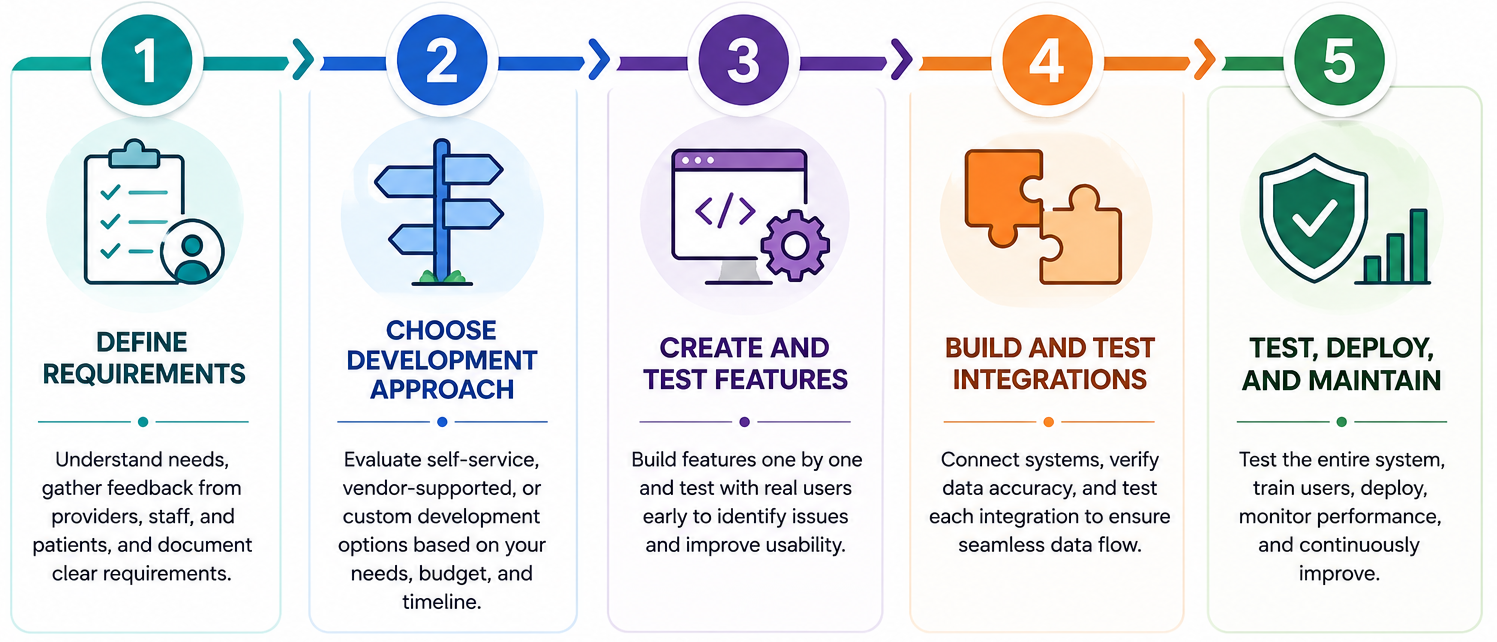
Healthcare software development typically starts with planning and design, moves through development and testing, and continues with updates and support after launch. Here’s a look at a 5-step development process:
Step 1: Define Your Requirements
Start by identifying what your software needs to do. Meet with doctors, nurses, and staff to understand how they perform their daily tasks and where current processes create problems. Talk with patients to understand what improvements would make managing their healthcare simpler and more convenient.
Write down provider, staff, and patient feedback so you have a clear list of requirements.
Step 2: Choose a Development Approach
Here’s a closer look at the 3 development approaches:
1. Self-Service Platforms
Your team configures the software using a no-code or low-code platform. This provides the fastest deployment and the lowest upfront cost, but limits customization. For example, a physical therapy clinic could use a no-code app builder to create a custom patient intake app and appointment scheduling system.
Costs range from $1,000–$15,000+ per year, and are typically month-to-month or annual subscriptions.
2. Vendor-Supported Platforms
A vendor builds the technical parts and walks you through usage, so your team can handle maintenance and updates. You'll get a faster deployment, but you need a clearly defined scope and a plan for handling changes. For example, a clinic could hire a vendor to build a custom referral management system.
Expect to pay $10,000–$50,000+ per year, typically as an annual contract.
3. Full Custom Development
Developers build the software from scratch around your workflows. This offers maximum flexibility and customization, but requires the most time and budget. For example, a large hospital system might build a custom platform that combines many core clinical and administrative workflows.
Typical pricing ranges from $40,000–$500,000+ for most projects. Large enterprise healthcare systems with extensive integrations and complex workflows can exceed $2 million.
Note: Before choosing a development approach, review the features you want to build. Consider your team's technical capabilities, available budget, and how quickly you need the system deployed.
Step 3: Create and Test Features
Core development focuses on building the tools that your staff and patients will use. You should develop each feature one by one rather than all at once. Once you've built a feature, test it with patients, providers, and staff before releasing it more broadly.
For example, if you’re building a scheduling software system, first create and test a patient intake form. Once it’s bug-free and clean, move on to the billing workflows.
This approach helps teams identify bugs and usability issues early, when fixes are easier and less expensive to make.
Step 4: Build and Test Integrations
By building your integrations, you’ll connect all software so data can flow between them. However, integrations often require technical expertise. Organizations that use custom development or work with a vendor typically have access to the skills needed to build, test, and maintain these connections. Some self-service platforms don’t offer a full suite of integrations.
After setting up an integration, test it before moving on to the next one.
For example, create a test patient in your intake system. After transfer, confirm that their demographic information, insurance details, and appointment records appear correctly in your EHR.
Check that information moves correctly between systems and that the data arriving in the destination matches the original source. Missing, incomplete, or incorrect data can create problems for all healthcare software.
Step 5: Test, Deploy, And Maintain
Before launch, test the entire system. A feature may work correctly on its own, but problems can appear when multiple features and integrations operate together.
Test common workflows from start to finish, especially when one system passes information to another. For example, check that patient registration details flow correctly into scheduling, billing, and clinical records. This helps teams catch system-wide problems before launch.
Once you finish testing, train users on the parts of the system they will use most often. Providers, administrators, and support staff typically need different training because they perform different tasks.
Patient-facing features should be easy to navigate and simple enough for most people to use without training.
After deployment, collect feedback and monitor the system closely so teams can address issues that only become visible during daily use.
Which Healthcare Software Development Option Should You Choose?
The approach you choose determines how much control, cost, and implementation work your organization can take on. Follow this guide to choose the right development option for your needs:
Choose a Self-Service Platform If You:
Have standard workflows with only a few integrations and have minimal technical resources. Your own team will configure the software, and you can accept limited flexibility and integration capabilities.
Choose a Vendor-Supported Platform If You:
Need guidance without funding a fully custom project. The provider offers onboarding services and handles technical implementation while your own staff maintains the system after launch.
Choose Custom Development If You:
Have specialized workflows, complex integrations, or unique operational requirements. Higher investment provides complete control over functionality and long-term scalability.
Avoid Healthcare Software Development If You:
Only have standard scheduling, billing, documentation, and reporting needs. Building a custom solution adds cost and complexity without delivering meaningful operational advantages. An out-of-the-box, premade solution often fits these situations.
Let Blaze Cover Healthcare Software Development
If you want to avoid high healthcare software development costs and complexity, try Blaze.tech. Unlike other developers and build-it-yourself platforms, Blaze provides hands-on onboarding, a user-friendly platform, and the option for vendor-assisted building.
Here’s why more companies choose Blaze for their healthcare software:
- Healthcare software built for you: Receive production-ready applications like custom patient portals and clinical databases built by an expert-led 3-person team, delivered to your specifications.
- Build-it yourself platform included: Blaze also offers its own visual development platform, giving your team the option to self-build, so you can create your own custom healthcare software without any technical knowledge.
- Faster implementation than traditional builds: Launch your healthcare software in weeks instead of months.
- AI integrations built for real clinical workflows: Supports use cases like automated document extraction and patient intake with an OpenAI integration.
- Built on compliance-ready infrastructure: Blaze is a HIPAA-enabling, HITRUST e1-certified, SOC 2 Type II healthcare app development platform.
Schedule a free build consultation call today to avoid your healthcare software development plans from stalling.
Frequently Asked Questions
How Long Does Healthcare Software Development Take?
Your healthcare software development build time depends on your chosen approach. Self-service platforms can launch in weeks, and vendor-supported builds typically take as little as a few weeks to 6 months. Full custom builds often require 6 to 18 months, depending on complexity. Defining your requirements early cuts delays and reduces costly changes.
Does Healthcare Software Need To Have HIPAA-Enabling Features?
Yes, your healthcare software needs to have HIPAA-enabling features if it handles PHI. This means your system must include controls like role-based access, audit logs, and encryption. However, HIPAA compliance applies to your organization as a whole, not your healthcare software.
Can Healthcare Software Integrate With Existing EHR Systems?
Yes, most healthcare software can integrate with EHR systems such as Epic, Oracle Health, athenahealth, and eClinicalWorks using APIs or interoperability standards. Integrations reduce manual data entry and keep data synchronized across systems. However, vendor-supported and fully custom development typically provide the best integration capabilities.
Sources
1. U.S. Department of Health & Human Services. “Summary of the HIPAA Security Rule.” HHS.gov. https://www.hhs.gov/hipaa/for-professionals/security/laws-regulations/index.html
2. U.S. Department of Health & Human Services. “Security Rule Guidance Material.” HHS.gov. https://www.hhs.gov/hipaa/for-professionals/security/guidance/index.html
3. National Institutes of Health: StatPearls. “Health Insurance Portability and Accountability Act (HIPAA) Compliance.” NCBI. https://www.ncbi.nlm.nih.gov/books/NBK500019/
The Secure No-Code & AI Platform
Supercharge your team's operations and performance with better apps and tools.
Create custom apps fast
Secure & HIPAA compliant
Streamline complex workflows

The Secure No-Code Platform
Build apps with best-in-class security.
Related Articles
Discover related guides on healthcare no-code development, HIPAA compliance, security, integrations, and launching apps faster.
10 Database Applications: Types, Examples & Use Cases
What do database applications do and how do they help your business? Read on for an overview and 10 real-world examples that could help.
.png)
17 Top Customer Service Platform: 2026 (Tested & Compared)
Shopping for a customer support platform portal and need some inspiration? I reviewed the top 17, shared features, pricing details, and my verdict.
%20(1).png)
8 Healthcare Dashboard Examples (2026)
Explore healthcare dashboard examples for hospital operations, revenue, and compliance. Discover what each dashboard tracks and how to build one.