
Table of contents
Telemedicine App Development Cost? Feature Breakdown | 2026

Written by
Blaze Team

Reviewed by
Nanxi Liu
Expert Verified
Telemedicine app development costs vary widely depending on your app's complexity and development approach. According to current numbers, updating an existing telemedicine app starts around $25,000, while fully custom enterprise solutions with advanced integrations and workflows can exceed $500,000.
Here's my breakdown of the features, integrations, and 3 development approaches that affect the price you pay for a telemedicine app.
Telemedicine App Development Cost by Project Type
These ranges reflect what it typically costs to build an app across different telemedicine project types. The estimates are based on recent client projects, industry experience, and typical telemedicine implementation requirements:
Most telemedicine apps will handle PHI (protected health information), so they’ll need features that support HIPAA, such as audit logs and role-based access. These functionalities increase costs compared to non-medical apps. But they keep your patients’ information safe from healthcare breaches and privacy concerns.
You can develop 4 types of telemedicine projects:
- Platform updates: Improve an existing telemedicine app by adding new features or integrations.
- Telemedicine MVP: Launch a lean telemedicine app with video conferencing, messaging, and appointment scheduling. These suit small and solo practices.
- Mid-sized app: Mid-sized clinics need telemedicine apps that have all the features of an MVP, along with integrations to EHR, patient portals, and workflows.
- Enterprise Telemedicine Platform: Large-scale platform with advanced workflows, extensive integrations, and analytics. These platforms suit clinics with multiple locations.
Telemedicine App Development Cost by Feature Complexity
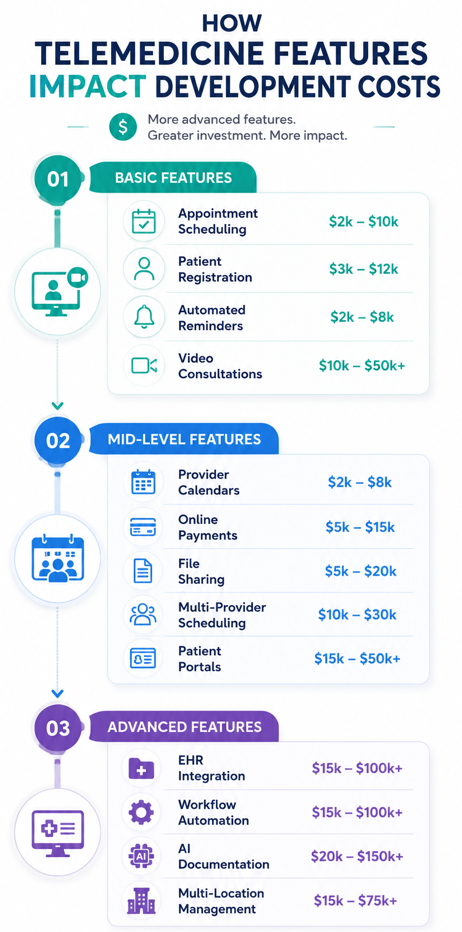
The features you include directly affect development costs. After several years of helping clients build telemedicine apps and other healthcare platforms, I grouped these features into 3 tiers based on complexity and cost:
Feature Set 1: Basic Telemedicine Features
Video consultation, messaging, and appointment scheduling make up the backbone of telemedicine because they support direct patient/provider communication. Here’s a look at each:
- Video consultations ($10,000–$50,000+): Enable remote patient visits through secure virtual appointments instead of in-person consultations. Real-time video infrastructure significantly increases development complexity and ongoing costs.
- Appointment scheduling ($2,000–$10,000): Allows patients to book appointments online without requiring staff to manually manage scheduling requests. Costs stay relatively low because most scheduling workflows are straightforward.
- Patient registration ($3,000–$12,000): Collects patient information before appointments, reducing administrative work during intake. Costs rise when organizations require custom forms and validation rules.
- Automated reminders ($2,000–$8,000): Send appointment notifications that reduce no-shows and improve attendance rates. SMS delivery and third-party messaging services increase implementation costs.
Feature Set 2: Mid-Level Telemedicine Features
Patient portals, online payments, document sharing, and multi-provider scheduling help providers handle more patients. Here’s a look at each one:
- Provider calendars ($2,000–$8,000): Display clinician availability and prevent double bookings across telemedicine appointment schedules.
- File and document sharing ($5,000–$20,000): Allows providers and patients to exchange forms, images, and medical documents electronically. Storage, permissions, and security controls drive implementation costs.
- Online payments ($5,000–$15,000): Collects patient payments digitally, reducing billing delays and administrative effort. Costs depend on payment processor integrations and billing workflows.
- Patient portals ($15,000–$50,000+): Provide a centralized location for appointments, documents, messages, and care information.
- Multi-provider scheduling ($10,000–$30,000): Coordinates calendars across multiple clinicians, locations, and appointment types. Complexity grows as scheduling rules and provider availability increase.
Feature Set 3: Advanced Telemedicine Features
Features like EHR and e-prescribing integration support healthcare organizations that need deeper system connectivity and automation. If you need more advanced functionality, consider investing in these advanced capabilities:
- EHR integration ($15,000–$100,000+): Synchronizes patient information between telemedicine software and existing clinical record systems.
- E-prescribing integration ($10,000–$50,000+): Allows providers to send prescriptions directly to pharmacies during virtual consultations.
- Laboratory integrations ($10,000–$75,000+): Transfers orders and test results between healthcare systems without manual data entry. Costs depend on the number of laboratory systems involved.
- Analytics and reporting dashboards ($10,000–$50,000+): Provides operational visibility into utilization, patient activity, and organizational performance metrics.
- AI-powered documentation ($20,000–$150,000+): Generates clinical notes and summaries automatically, reducing administrative burden on providers.
- Workflow automation ($15,000–$100,000+): Automates repetitive processes such as intake reviews, routing, approvals, and follow-up activities.
- Multi-location management ($15,000–$75,000+): Supports providers, scheduling, reporting, and operations across multiple healthcare facilities.
Telemedicine App Development Cost by Development Approach: At a Glance
These ranges reflect typical telemedicine app build costs by development approach:
Pricing ranges reflect common costs for each development approach. Your actual investment depends on added features, integrations, and overall project scope.
Here’s a breakdown of each option:
Self-Build Platforms
When you choose a self-build platform, your team builds most of the telemedicine app using a drag-and-drop interface and premade components, which are part of the platform. You’ll set up the database, build out the user interface, and set user roles. Many self-build platforms also come with native integrations, making it simple to connect to some popular healthcare software.
However, your organization must also manage maintenance, monitor performance, and keep workflows and compliance settings up to date. And certain integrations might require technical resources.
This approach works best for teams that already understand their processes and want to move quickly without a large vendor project. It is a good fit for small to mid-sized healthcare organizations that need faster deployment. Costs run from $3,000–$50,000+ per year, depending on features and scale.
Vendor-Assisted Development
Vendor-assisted development pairs configurable software with direct support. During onboarding, the vendor guides your team through build decisions and handles technical infrastructure. You stay involved at the decision level without carrying the full development burden.
The drawback is that when your system goes live, your team owns updates, troubleshooting, and ongoing maintenance. Plus, vendors often quote based on scope, size, and integration complexity, which makes early budget forecasting difficult.
This approach suits healthcare organizations that have defined workflow requirements but no internal resources to develop an app. Teams willing to accept a vendor’s build decisions and then learn how to operate their system often fit vendor-assisted development.
Costs typically fall between $50,000 and $150,000+. The vendor handles infrastructure setup, compliance configuration, and initial training. Your team handles adoption, process mapping, and post-launch changes. The tradeoff is speed and reduced technical overhead in exchange for less control over the system's long-term direction.
Custom Development
Custom development involves using code to build a telemedicine platform from the ground up, either with an internal engineering team or an outside healthcare app development firm.
Instead of configuring what a vendor provides, your team defines every feature, data structure, and integration from scratch. Experienced engineering teams can make almost any telemedicine app you can envision a reality.
The main drawbacks are cost and long-term responsibility. Custom systems take the longest to launch, require ongoing engineering support, and cost more to maintain long after deployment. Organizations typically hire a contracted development team for long-term support.
This model fits large health systems, specialty networks, or organizations with workflows that no existing platform supports. It typically costs between $150,000–$500,000+ for large, enterprise builds.
Additional Telemedicine App Development Costs
Most telemedicine budgets focus on initial development, but ongoing operational costs play a critical role in whether a platform remains reliable, compliant, and scalable over time. Here’s a look at those factors:
Infrastructure and Hosting
Cloud hosting for telemedicine platforms is typically usage-based rather than a fixed monthly expense. Factors such as video streaming volume, data storage, and system traffic can increase costs.
Infrastructure requirements typically expand with patient volume. Disaster recovery and redundancy systems, which healthcare organizations often require to meet compliance standards and uptime expectations, add additional costs that teams may underestimate during early planning.
Compliance and Security Audits
For your organization to comply with HIPAA rules, you’ll need continuous oversight. Ongoing activities include security monitoring, risk assessments, and maintaining proper documentation, as well as staff training.
Many healthcare organizations engage third-party auditors to validate compliance, especially when working with enterprise clients or payers. These recurring processes are a standard part of operating a healthcare platform and should be budgeted accordingly.
Third-Party Software Fees
Telemedicine platforms commonly rely on external services such as video APIs, e-prescribing systems, payment processors, and messaging tools. These services often charge per transaction or through tiered pricing models.
As usage grows, these third-party software costs increase too. To estimate expenses accurately, identify any outside tools or services you depend on. Understand how their pricing works before creating your budget.
Ongoing Maintenance and Support
A telemedicine platform requires continuous updates after launch. This includes applying security patches, improving performance and debugging, and adapting to user requirements. Organizations that don’t spend enough time and money on maintenance can see their system become slower and less secure over time.
How To Reduce Telemedicine App Development Costs
Reduce your telemedicine app development costs by learning which features you need to build the most, and creating them first. Follow these pointers:
- Prioritize high-value features: Focus spending on scheduling, video visits, messaging, and payments before adding features that serve a smaller portion of users. Delay nonessential functionality until usage data supports the investment.
- Use existing healthcare integrations: Connect the EHR, payment, and e-prescribing systems you already use instead of building costly custom integrations from scratch. Existing integrations can reduce development time and long-term maintenance costs.
- Choose the right development approach: The build path you pick is one of the biggest cost levers, and see the next section for how to match it to your needs.
How to Choose the Right Development Approach
Choose the right development approach by estimating your user count and determining how many features and integrations you’ll require. Use this guide to determine which option aligns with your needs best:
Choose a Self-Build Platform If You:
Need a telemedicine app with standard features such as appointment scheduling, video consultations, patient intake forms, and basic EHR integrations. This is typically the lowest cost option because your internal team configures and manages the platform.
Choose Vendor-Assisted Development If You:
Want to reduce development costs without managing the technical implementation. The vendor handles setup, integrations, compliance, and onboarding, while your team manages day-to-day operations after launch.
Choose Custom Development If You:
Must have specialized telemedicine workflows, advanced engagement features, and complex integrations. Although custom development requires the highest investment, it provides complete control over functionality and scalability.
Avoid Custom Telemedicine App Development If You:
Only need common telemedicine capabilities such as video visits, patient scheduling, and secure messaging. Building a custom solution can significantly increase telemedicine app development costs when a simple, off-the-shelf platform delivers the features you need at a fraction of the cost.
Reduce Telemedicine App Build Costs With Blaze
Blaze.tech is a healthcare app development platform that combines a self-build approach with vendor-assisted support. Your team can build the app, while our experts help with implementation, integrations, compliance, and deployment. This hybrid approach is why more healthcare organizations choose Blaze:
- Custom telemedicine and other healthcare apps: Get production-ready telemedicine applications, patient portals, scheduling systems, and clinical databases built by Blaze’s 3-person support teams, tailored to your requirements.
- Faster deployment than traditional development: Launch your telemedicine solution in weeks instead of waiting months for a custom software build.
- AI integrations designed for telemedicine workflows: Automate patient intake, document processing, virtual care workflows, and secure EHR/EMR data exchange while integrating OpenAI-powered features where needed.
- Built on compliance-ready infrastructure: Blaze is a HIPAA-enabling, HITRUST e1-certified, SOC 2 Type 2 healthcare app development platform designed to support secure patient data management.
Schedule a free build consultation call today and see how Blaze can help you avoid high telemedicine app development costs while launching a compliant solution faster and more affordably.
Frequently Asked Questions
Which Development Approach Is the Most Affordable?
The self-build approach is the most affordable, with projects that have under 5 features and native integrations often costing around $10,000. Your team will need to handle maintenance and configuration. However, costs increase as your user base grows and you need to build out more features and handle a greater amount of data.
Does a Telemedicine App Need to Be HIPAA Compliant?
Yes, under HIPAA rules, your organization, not a telemedicine app, needs to be HIPAA compliant if it handles PHI. This means that your app needs to have encryption, role-based permissions, and audit logs. These features help protect your app from breaches that may compromise your patients’ privacy.
How Long Does Telemedicine App Development Take?
Telemedicine app development can take as little as a few weeks for a simple platform to over a year for an advanced, enterprise health app. Start with essential telemedicine features like video visits, scheduling, and messaging to lower costs and launch features one by one. Add complex integrations later as usage grows.
Sources
1. U.S. Department of Health & Human Services. “Summary of the HIPAA Security Rule.” HHS.gov. https://www.hhs.gov/hipaa/for-professionals/security/laws-regulations/index.html
2. U.S. Department of Health & Human Services. “Security Rule Guidance Material.” HHS.gov. https://www.hhs.gov/hipaa/for-professionals/security/guidance/index.html
3. National Institutes of Health: StatPearls. “Health Insurance Portability and Accountability Act (HIPAA) Compliance.” NCBI. https://www.ncbi.nlm.nih.gov/books/NBK500019/
The Secure No-Code & AI Platform
Supercharge your team's operations and performance with better apps and tools.
Create custom apps fast
Secure & HIPAA compliant
Streamline complex workflows

The Secure No-Code Platform
Build apps with best-in-class security.
Related Articles
Discover related guides on healthcare no-code development, HIPAA compliance, security, integrations, and launching apps faster.
10 Database Applications: Types, Examples & Use Cases
What do database applications do and how do they help your business? Read on for an overview and 10 real-world examples that could help.
.png)
17 Top Customer Service Platform: 2026 (Tested & Compared)
Shopping for a customer support platform portal and need some inspiration? I reviewed the top 17, shared features, pricing details, and my verdict.
%20(1).png)
8 Healthcare Dashboard Examples (2026)
Explore healthcare dashboard examples for hospital operations, revenue, and compliance. Discover what each dashboard tracks and how to build one.