
Table of contents
Clinical Workflow Automation for Improving Patient Care | 2026

Written by
Blaze Team

Reviewed by
Nanxi Liu
Expert Verified
If your providers are losing time with documentation, referral follow-ups, or discharge coordination, clinical workflow automations can see them through. But choosing what to automate and how matters more than most guides admit.
Drawing from experience helping providers over the years, here’s my guide that covers what processes you should automate and how to implement these workflows.
What Is Clinical Workflow Automation?
Clinical workflow automation uses predefined rules to move clinical tasks, information, and decisions through patient care workflows while reducing manual coordination. It’s mainly for clinical tasks, such as charting, documentation, and care coordination.
Do Clinical Workflow Automations Need to Be HIPAA-Compliant?
Yes, clinical workflow automations need to have HIPAA-enabling features such as encryption and audit logs because these systems handle sensitive PHI (protected health information).
Always choose a vendor or developer that provides a BAA (Business Associate Agreement). This document is what defines each party's responsibilities for protecting PHI under HIPAA. Although these HIPAA-enabling features support HIPAA compliance, your organization's BAA, configuration, and operational processes are what determine compliance, not the automation platform.
8 Clinical Workflows Most Providers Should Automate
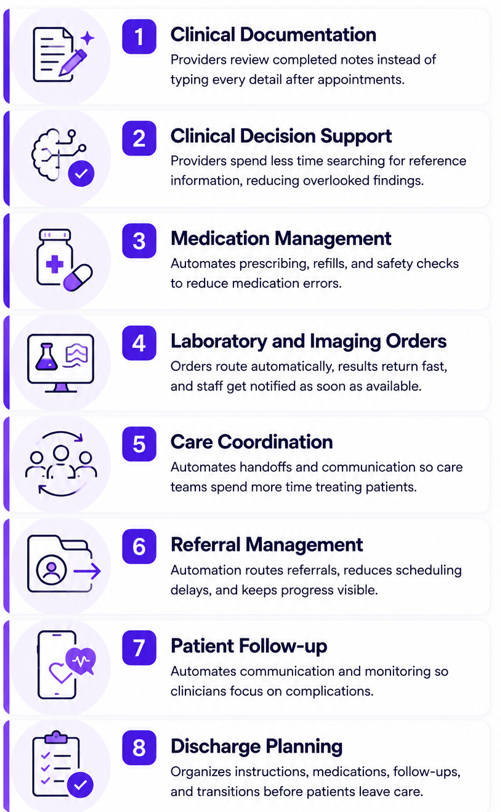
Clinical workflow automation delivers the greatest value when applied to repetitive clinical processes. These workflows reduce delays, improve consistency, and give clinicians more time for direct patient care:
1. Clinical Documentation
Clinical documentation tools include AI tools for healthcare, such as AI scribes, which record patient encounters, diagnoses, and treatment decisions in the medical record. They then generate structured summaries of the conversation for the provider to review.
Instead of documenting every detail after each appointment, providers verify completed notes, helping documentation reach billing and care teams sooner.
2. Clinical Decision Support
Clinical decision support tools help physicians evaluate diagnoses, treatments, and other clinical decisions using patient data and evidence-based guidelines. These systems often connect to large databases of medical literature and previous cases to support decision-making.
Providers spend less time searching for reference information, reducing overlooked findings and improving diagnostic consistency.
3. Medication Management
Medication management tracks prescribing, administration, refills, and safety checks throughout treatment. Organizations automate these tasks to reduce medication errors and improve prescribing accuracy. Pharmacy requests and refill approvals move through established rules instead of manual coordination.
4. Laboratory and Imaging Orders
Automated laboratory and imaging workflows reduce delays by routing diagnostic orders directly to the appropriate department. Completed results return automatically, so staff stop tracking pending requests throughout the day. They receive notifications as soon as results are available.
5. Care Coordination
Care coordination manages communication and responsibilities among clinicians, including physicians, nurses, and specialists, across departments and care settings. Organizations automate handoffs, such as transferring patient updates from the night shift to the morning shift, so care teams spend more time treating patients instead of tracking patient status.
6. Referral Management
Providers can coordinate patient transfers between primary care, specialists, and healthcare organizations with referral management tools. Automation helps reduce scheduling delays and incomplete handoffs, as requests move directly to receiving offices while progress remains visible throughout the process.
Staff stop making repeated follow-up calls and bouncing emails back and forth. For example, a general practitioner can approve a referral to a cardiologist, electronically sign it, and send the patient's information to the cardiologist's office with just a few clicks.
7. Patient Follow-up
Patient follow-up automations manage communication between clinicians and patients after treatment. These systems can be a part of a telehealth platform, allowing providers to check in with patients through video visits or secure messaging. They can also monitor recovery using connected devices such as glucose monitors, blood pressure cuffs, or pulse oximeters.
Clinicians can focus on complications that arise after treatment, helping them deliver optimal care to their patients.
8. Discharge Planning
These systems organize instructions, medications, follow-up appointments, and care transitions before patients leave treatment.
How to Successfully Implement Clinical Workflow Automation
Clinical workflow automation works best when it follows the way patient care already happens. Start with one frustrating delay, prove the workflow works, then expand after clinicians trust the process.
Step 1: Identify Patient Care Bottlenecks
Patient care bottlenecks are points where treatment slows because information, approvals, or responsibilities stop moving. Identify these problems first because automation can’t fix a broken process. Resolve the underlying cause before introducing automation so the workflow moves faster instead of repeating the same delays.
Step 2: Map Out Clinical Workflows
After you’ve found where the issues are, mapping out your clinical workflows can help you identify other areas to automate. Document each process step-by-step, including every handoff, approval, and decision point.
This exposes duplicate work, unnecessary delays, and inconsistent processes that are difficult to spot during daily operations. Once you’ve defined each of your workflows, you can automate individual tasks without disrupting patient care.
Step 3: Choose the Right Automation Platform
The right automation platform supports your clinical rules, system connections, user permissions, and reporting. The best automation platforms do the following:
- Connect to your existing systems: The platform should integrate with your EHR, billing software, laboratory systems, and other clinical applications. Strong integrations reduce duplicate data entry and keep patient information moving automatically between departments.
- Allow you to build and change workflows: Choose software that lets administrators create and update workflows without relying on developers for every change. As your clinical processes evolve, you can adjust automations instead of replacing the platform.
- Protect patient information: Look for role-based permissions, audit logs, and HIPAA-enabling security features. These controls help limit access to authorized staff only.
Selecting software that fits daily clinical operations creates fewer workarounds and gives teams a stable foundation for long-term improvement ahead.
Step 4: Integrate Your EHR
EHR integration connects automated workflows to the patient record clinicians already use. It helps data transfer cleanly from your workflow automations and your EHR.
Step 5: Test With One Clinical Team
A pilot team is a small group that tests the workflow before a full rollout. Starting with one team often reveals issues missed during planning, allowing you to make adjustments before deploying the system across the entire organization.
Monitor use and pay close attention to how their daily work improves when users find issues early. Fix problems before rolling out the system to more providers.
Step 6: Train Clinicians and Roll Out to More Teams
Once the pilot team is satisfied with your system, it’s time to roll it out across your organization. Start by training your staff on how the new workflow changes their daily responsibilities.
Spending time training your team reduces confusion, increases adoption, and helps clinicians consistently use the new workflows instead of reverting to old manual processes.
Step 7: Measure Patient Outcomes
Outcome measurement tracks whether automation improves patient care. When you measure outcomes, you’ll see where your results are hitting. For example, compare missed follow-up rates before and after automated outreach.
Gather feedback from practitioners periodically. If they say the system has issues or could be optimized, immediately fix these issues so they don’t start looking for manual workarounds.
Step 8: Refine Workflows Over Time
Workflow refinement means updating rules, routing, and exceptions after the system goes live. Your workflows need to keep improving because clinical needs change over time. For instance, daily work gets better when teams remove unnecessary alerts, clarify responsibilities, and fix delays.
Customize Clinical Workflow Automation With Blaze.tech
Blaze.tech helps healthcare organizations build clinical workflow automations that fit existing care processes instead of forcing workflow changes. Whether you want a custom-built solution or prefer to build it yourself, Blaze provides the tools to automate clinical operations.
Here’s why healthcare organizations choose Blaze:
- Custom healthcare applications: Receive production-ready applications, including patient portals, referral management tools, and clinical workflow systems, built by an expert-led three-person team to your specifications.
- Build workflows without coding: Prefer to build internally? Use Blaze's no-code app builder to create and modify clinical workflows without technical expertise.
- Launch faster than custom development: Deploy new clinical workflow automations in weeks instead of waiting months for traditional software projects.
- AI built for clinical operations: Automate patient intake, clinical documentation, document extraction, and other workflows with AI alongside secure EHR and EMR integrations.
- Built on compliance-ready infrastructure: Blaze is a HIPAA-enabling, HITRUST e1-certified, SOC 2 Type II healthcare app development platform.
Schedule a free build consultation call today and see how Blaze can replace disconnected manual processes with clinical workflows that reduce administrative work and keep patient care moving.
Frequently Asked Questions
What Clinical Workflows Should Be Automated First?
Clinical documentation, referral management, and laboratory/imaging orders are the best clinical workflows that should be automated first. These workflows are good starting points because they're repetitive and high-volume. Automating these first cuts manual coordination fastest.
How Is Clinical Workflow Automation Different From Healthcare Process Automation?
Clinical workflow automation focuses specifically on patient-care tasks like charting and care coordination. Healthcare process automation includes broader administrative functions like billing and scheduling. This distinction helps providers target tools that directly reduce clinician workload rather than only back-office tasks.
How Do You Make Clinical Workflow Automation HIPAA Compliant?
Although HIPAA compliance applies to your organization rather than the automation itself, your clinical workflow automation should include HIPAA-enabling features that support compliance requirements. First, only buy from a vendor that provides a BAA (Business Associate Agreement). Then, add features like encryption, role-based access control, and audit logs to help keep your automation platform secure.
Sources
1. U.S. Department of Health & Human Services. “Summary of the HIPAA Security Rule.” HHS.gov. https://www.hhs.gov/hipaa/for-professionals/security/laws-regulations/index.html
2. U.S. Department of Health & Human Services. “Security Rule Guidance Material.” HHS.gov. https://www.hhs.gov/hipaa/for-professionals/security/guidance/index.html
3. National Institutes of Health: StatPearls. “Health Insurance Portability and Accountability Act (HIPAA) Compliance.” NCBI. https://www.ncbi.nlm.nih.gov/books/NBK500019/
The Secure No-Code & AI Platform
Supercharge your team's operations and performance with better apps and tools.
Create custom apps fast
Secure & HIPAA compliant
Streamline complex workflows

The Secure No-Code Platform
Build apps with best-in-class security.
Related Articles
Discover related guides on healthcare no-code development, HIPAA compliance, security, integrations, and launching apps faster.
%20(1).png)
7 Top White Label Telehealth Platforms + How to Pick (2026)
I reviewed seven white-label telehealth platforms to see how they compare. Explore pricing, branding, integrations, and the best fits available.
%20(1).png)
Top 9 Cursor Alternatives: Tested & Ranked 2026
I compared 9 Cursor alternatives' pricing plans and codebase editing features. See which platforms work for agent building so you can pick for your workflow.
.png)
Scytale Pricing: Plans, Costs, and What You Pay (2026)
Scytale pricing isn’t publicly listed, making budgeting difficult. But I researched the 5 plans and their features to uncover where additional costs can appear.