
Table of contents
How to Build an EHR System: 6 Steps + Costs (2026)

Written by
Blaze Team

Reviewed by
Nanxi Liu
Expert Verified
When organizations need advice about how to build an EHR system, I recommend that they first map out their needed features and integrations. Follow the 6 steps I use to help clinics build software that supports better patient care.
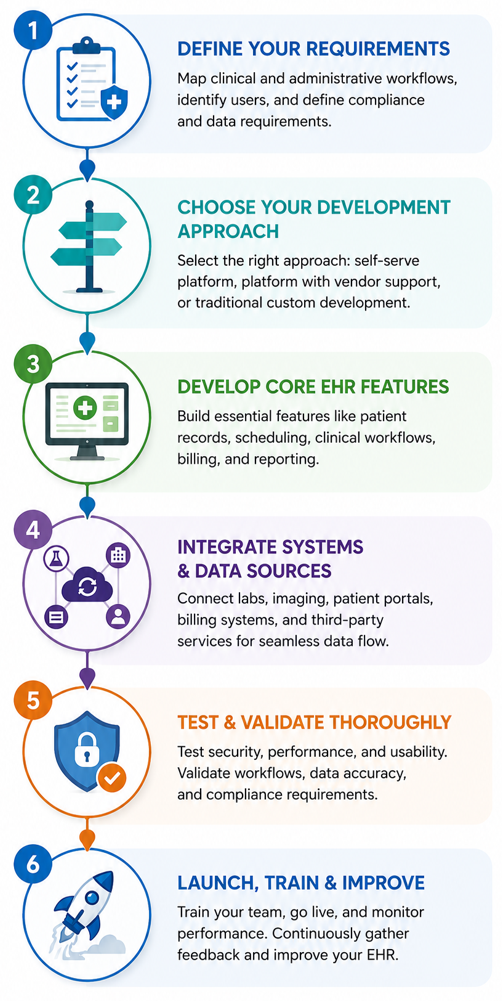
Step 1: Define Your Requirements
Before you start building a custom EHR, you’ll need to map out the work it will do. Define your clinical workflows and day-to-day processes, and note who executes these tasks. Here are some common requirements to define:
Clinical Workflow
Clinical workflows are the steps doctors, nurses, and other healthcare providers follow to deliver patient care. Documenting patient visits, managing medications, and placing orders for equipment fall into this category.
Begin mapping these workflows by asking doctors and nurses how they manage interruptions and switch between tasks. Your requirements should reflect how clinicians actually work, not how you think they work.
Administrative Workflows
Patient registration, scheduling, insurance verification, and billing are some common administrative workflows. Front-desk and administrative staff handle these workflows regularly.
These workflows often involve patient engagement tools that help patients book appointments, complete forms, and receive reminders. Your EHR should support these tasks by automatically exchanging data with connected tools. This helps reduce manual data entry and errors.
Compliance Requirements
Since your EHR will most likely store protected health information (PHI), it will need to have HIPAA-enabling features. Encryption, role-based access, and audit logs help keep your patients’ data safe from healthcare breaches and bad actors.
Including these features and continuously educating your staff about requirements helps your organization, not your EHR alone, maintain HIPAA compliance.
Step 2: Choose Your EHR Development Approach
You can build a custom EHR using a self-serve platform, a platform with implementation services, or a traditional custom development team. The right approach depends on how much complexity and support you need.
Secure hosting, monitoring, and incident response create ongoing costs. Clinical testing, as well as HIPAA-related configuration and ongoing maintenance, can further increase your total costs.
Self-Serve EHR Platform
When you choose a self-serve platform, your team sets up the database, user access, and integrations using the platform's built-in tools. This approach gives your team direct control over system changes, so you’re responsible for keeping it running effectively over time.
Platform With Vendor Support
Platforms with onboarding support and guidance combine configurable software with help from the vendor. They work well for healthcare organizations that need a tailored system but don't want to manage every part of the build themselves.
The vendor shows you how the platform works and handles much of the technical work. Your team is responsible for key decisions to keep the project aligned with your goals.
Once you deploy your EHR system, your team handles updates and maintenance. Costs vary from one project to another. Vendors often provide custom pricing based on the size and complexity.
Custom Development
With this approach, an internal team or outside firm builds your EHR using custom code. It gives you the most control over your EHR’s design and how it captures and transfers data. It works best when off-the-shelf platforms can’t support the way your organization operates.
The trade-off is time and cost. Building a custom EHR takes longer to launch, and your organization remains responsible for supporting the system long after it goes live. Many organizations retain an internal technical team to maintain their system, or they hire out a healthcare software development company.
Step 3: Develop Your Core EHR Features
An EHR needs to keep track of patient records and care coordination. You’ll need to include these features:
Patient Records and Documentation
The patient record stores patient data such as medical history, test results, and clinical notes. Make sure you correctly organize these records so staff can easily find and share information, or create accurate reports.
Scheduling and Care Coordination
Scheduling requires organizations to coordinate provider availability with appointment types. It also involves managing follow-up care needs. These systems should connect directly to patient care workflows so staff can manage appointments and care coordination from one place.
Lab Orders and Test Results
Healthcare providers use EHRs to manage lab orders, imaging requests, prescriptions, and diagnostic results. Each order and result should connect to the appropriate patient record so clinicians can review information and track treatment while maintaining a complete view of patient care.
Clinical Workflow Tools
Clinical workflow tools support the day-to-day activities of providers and administrative staff. Organizations can use these workflows to manage documentation, task assignments, follow-up activities, approvals, and other processes that help move patients through the care journey.
Billing and Revenue Cycle Management
Billing starts when a patient schedules an appointment. Your EHR must process documentation, coding, claim submission, and payment collection. Connecting billing directly to patient encounter data can reduce errors and speed up reimbursement.
Reporting and Analytics
You can use all the data that your EHR stores to produce reports and track clinical performance and patient care. Accurate reports give both clinical and administrative teams the information they need to make informed care decisions.
Step 4: Build Your Integrations
Building an EHR system requires connecting it to the clinical and administrative systems already in use. For instance, platforms like Blaze.tech offer API and integration support so healthcare organizations can link systems together without building connections from scratch.
Here are the key integration layers to plan for:
Clinical Data Organization
How your EHR organizes patient records and clinical information affects how well the EHR works over time. Store information that’s easy for your team to find, update, and use in reports later. Make sure your data follows the same organizational flows across your entire EHR as well as the apps your EHR integrates with.
Keep in mind that you may need to change how you organize data as your clinic grows. A structure that works for a small organization may struggle as you add more patient records.
Healthcare Interoperability
An EHR needs to automatically share data with other healthcare systems and applications. This compatibility helps your staff avoid spreadsheets, phone calls, and dreaded manual data entry.
The 2 most common healthcare data standards are HL7 v2 (Health Level Seven Version 2) and FHIR (Fast Healthcare Interoperability Resources).
HL7 v2 is a legacy messaging integration that helps many hospitals and labs exchange information.
FHIR is a modern integration that uses APIs to enable healthcare systems to exchange patient data. For instance, FHIR sends data from a patient portal directly to your EHR without any manual entry.
Step 5: Test Security and Usability
Before launching, you need to test your EHR against real clinical scenarios. I recommend that you use sample data sets when testing.
Begin by testing clinical and administrative workflows. Doctors, nurses, front-desk staff, and billing teams should all test the system before launch. They use the software every day and can spot problems that developers may miss. Try to identify and eliminate unnecessary steps that can slow staff down and make the system harder to adopt.
Conduct performance testing by checking whether the system remains fast and reliable as more people use it. A system that works well for a small group of users may slow down when an entire organization is using it at the same time.
Before launch, test the system's security controls and verify that access restrictions work correctly. Use sample data and security reviews to identify problems before real patient information enters the system.
Testing also helps identify problems such as delayed updates and data errors before the system goes live. Finding these issues early is much easier than fixing them after staff start using the EHR.
Step 6: Train Staff, Deploy, and Monitor
A successful EHR launch depends as much on people and data readiness as it does on the software itself. Here’s what to plan for before and after go-live:
Staff Training
Doctors, nurses, front-desk staff, and billing teams all use an EHR differently. Training should focus on the tasks each group performs every day rather than giving everyone the same general overview.
For example, physicians need to learn documentation and order entry workflows. Front-desk staff need to learn scheduling and patient registration. Role-specific training helps staff become comfortable with the system more quickly.
Go-Live Planning
A go-live plan outlines how your organization will launch the new EHR and respond to problems if they occur. It should define who provides support, how issues are reported, and how you’ll measure success after launch.
Many healthcare organizations roll out a new EHR in phases instead of switching everyone at once. A phased approach allows teams to identify and fix issues before expanding the system to additional departments or locations.
Monitor and Maintain
After launch, you need to monitor your EHR. Define what normal system performance looks like before launch so you can quickly identify and investigate problems when they occur. Then, schedule maintenance cycles so you catch problems early on.
When Should You Build a Custom EHR System?
Not every organization needs to build an EHR system. These situations indicate that you should probably build your own EHR:
- Your workflows don’t fit the system: Clinicians rely on workarounds because your current EHR can’t support their daily workflows.
- Staff constantly re-enter data: EHR, billing, scheduling, and patient tools are so poorly integrated that staff must manually enter the same information, and leaders can’t get a reliable view of operations without spreadsheets.
- Critical integrations are out of reach: Essential lab, imaging, telehealth, or specialty systems are unavailable or too expensive to connect.
- Reporting limitations are holding you back: Your EHR can’t produce the reports, dashboards, audit trails, or compliance data that your organization needs without significant manual spreadsheet work.
Building a custom EHR makes the most sense when the technology of your current systems constrains your workflows.
How to Build Your EHR System: Which Method Should You Choose?
How you build your EHR determines what it costs, how long it takes, and who can maintain it. Here's how to match your situation to the right method:
Choose a Self-Serve Platform If:
You want greater control over system configuration and lower long-term costs, and your team has the resources to manage the platform internally.
Choose a Platform With Implementation Services If:
You need custom workflows, integrations, or guidance during deployment, but the vendor handles the technical side while your team decides how the system should support the organization.
Choose Traditional Custom Development If:
Your organization requires highly specialized workflows, complete control over system architecture, or functionality that existing platforms can’t support.
Avoid Building an EHR System If:
You have a small staff, a limited number of patients, and an out-of-the-box EHR can cover all your documentation and integration needs.
Let Blaze Build Your EHR System
Custom EHR development requires the right platform, the right team, and a build process designed for clinical environments. If you're looking for how to build an EHR system, Blaze.tech gives healthcare organizations a faster path from requirements to a production-ready system without the overhead of a traditional software build.
Here’s why more businesses go with Blaze:
- Get a custom EHR built for you: Receive production-ready EHR software including patient records, clinical workflows, billing modules, and integrations delivered as a complete, working system.
- Faster implementation than traditional builds: Launch in weeks instead of months with an expert-led 3-person team, including a project manager, healthcare developer, and integration engineer.
- Modern features and healthcare integrations: Supports EHR-specific use cases like automated patient intake and clinical data extraction, alongside secure lab, imaging, and pharmacy integrations built for real clinical workflows.
- Built on compliance-ready infrastructure: Blaze is a HIPAA-enabling, HITRUST e1-certified, SOC 2 Type II healthcare app development platform.
Schedule a free build consultation call today and stop losing time to a system that wasn't built for how your organization actually works.
Frequently Asked Questions
What Features Should Every EHR System Include?
Patient record management, scheduling and care coordination, billing and revenue cycle management, and reporting and analytics are features every EHR system should include. These core features connect clinical and administrative workflows in one place. They reduce manual data entry and give your team the accurate information for making better care decisions.
Does My EHR Need to Have HIPAA-Enabling Features?
Yes, your EHR needs to have HIPAA-enabling features if it stores protected health information (PHI). Encryption, role-based access, and audit logs are essential safeguards that reduce healthcare breach risk. Keep in mind that HIPAA compliance depends on your organization's ongoing practices, not the software alone.
What Integrations Does an EHR System Need?
An EHR system needs integrations with lab, imaging, pharmacy, telehealth, patient portals, and billing tools. You can achieve these by using data standards like HL7 v2 and FHIR. These connections let systems automatically exchange data to avoid costly manual re-entry, which reduces errors and gives clinical and administrative teams a reliable, unified view of operations.
How Long Does It Take to Build an EHR System?
Building an EHR system takes anywhere from a few weeks to 18 months, depending on the approach you choose. Self-serve platforms can launch in as little as a few weeks and vendor support can take weeks or months. Traditional custom development typically takes 6 to 18 months. The right approach typically balances speed with long-term maintenance needs.
Sources
1. U.S. Department of Health & Human Services. “Summary of the HIPAA Security Rule.” HHS.gov. https://www.hhs.gov/hipaa/for-professionals/security/laws-regulations/index.html
2. U.S. Department of Health & Human Services. “Security Rule Guidance Material.” HHS.gov. https://www.hhs.gov/hipaa/for-professionals/security/guidance/index.html
3. National Institutes of Health: StatPearls. “Health Insurance Portability and Accountability Act (HIPAA) Compliance.” NCBI. https://www.ncbi.nlm.nih.gov/books/NBK500019/
The Secure No-Code & AI Platform
Supercharge your team's operations and performance with better apps and tools.
Create custom apps fast
Secure & HIPAA compliant
Streamline complex workflows

The Secure No-Code Platform
Build apps with best-in-class security.
Related Articles
Discover related guides on healthcare no-code development, HIPAA compliance, security, integrations, and launching apps faster.
10 Best HIPAA-Compliant Telehealth Platforms and Features | 2026
HIPAA-compliant telehealth platforms provide secure medical visits. Top platforms are Doxy.me and Zoom for Healthcare. Compare tools and learn your best fit.
.png)
10 Best Replit Alternatives: Tested for Developer Tasks (2026)
After comparing 10 Replit alternatives, I found differences in compliance features and needed coding skills. Discover platforms and prices to find the best fit.
%20(1).png)
Healthcare Claims Automation: How It Works (2026)
Healthcare claims automation connects systems to reduce repetitive work. Explore the 9 workflow stages that show how eligibility, validation, and payments move.